How to use : iSOBER APP Operation
* Download iSOBER application from the App store or Google play store.
* Turn on Bluetooth mode of your mobile to be pairing with iSOBER 10 unit.
%BAC %BAC %BAC %BAC
How to use : Standalone Operation
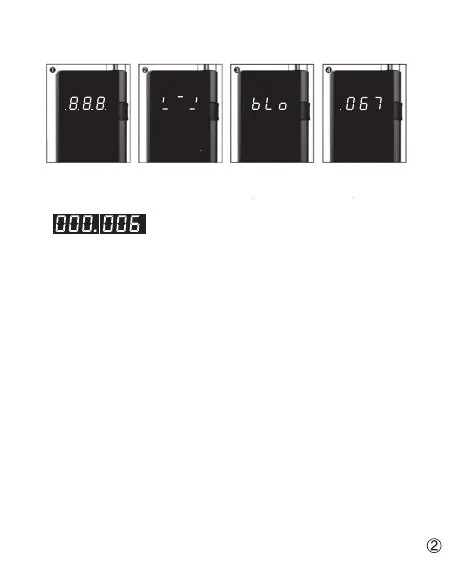
1. Attach the mouthpiece and press the power button.
*If you keep pressing the power button, a number of testing after calibration
will be shown as toggling displaying
*e.g. : Total 6 tests performed after calibration (Dot in the first displaying means the thousands)
2. Warming up takes a few seconds until displaying ‘bLo’ (it means blow) sign.
3. Blow through the mouthpiece for 4 seconds steadily without stops.
*the unit gives beeping sound during the breath sampling
and stop blowing when hearing click-clack sound from the unit.
4. The result displays for 10 seconds and shut off automatically.
*Passive test operation:
Press the power button once at ‘bLo(blow)’ status. Then result in displays as
P(PASS) or F(FAIL) according to preset limit value 0.020%BAC


 To Next Page