The Denon DJ DS1 is a compact, class-compliant DVS (Digital Vinyl System) interface designed for Serato DJ software. It allows DJs to control Serato DJ with traditional turntables or CDJs using Serato NoiseMap™ control vinyl or CDs.
Function Description:
The Denon DJ DS1 acts as an audio interface, converting analog signals from turntables or CDJs into digital signals that Serato DJ can interpret, and vice-versa. This enables DJs to manipulate digital music files in Serato DJ as if they were playing traditional vinyl records or CDs. It features two stereo inputs for connecting turntables or CDJs and two stereo outputs for connecting to a DJ mixer. A dedicated ground terminal is provided for turntables to minimize hum and noise. The device is powered and communicates with a computer via a single USB connection.
Important Technical Specifications:
- Inputs: Two stereo RCA inputs, switchable between Phono and CD (line-level) via dedicated selectors. This allows for direct connection of turntables (Phono) or CDJs/other line-level sources (CD).
- Outputs: Two stereo RCA outputs, designed to connect to the channel inputs of a DJ mixer.
- Connectivity: USB port for connection to a computer (Mac or PC).
- Power: USB bus-powered, eliminating the need for an external power supply.
- Indicators: A Power ON indicator (LED) confirms the device is receiving power and is operational.
- Compatibility: Class compliant on Mac OS X, requiring no specific drivers. For Windows (PC), dedicated drivers are necessary and should be installed from the Denon DJ website. It requires Serato DJ software, with the latest available version recommended for optimal performance.
Usage Features:
-
Installation and Setup:
- Driver Installation: For Windows users, it's crucial to install the latest drivers from the Denon DJ website. Mac users benefit from class-compliant operation, meaning no specific drivers are needed.
- Direct USB Connection: Always connect the DS1 directly to your computer's USB port, avoiding USB hubs, to ensure stable performance and sufficient power.
- Serato DJ Software: Ensure the latest version of Serato DJ is installed on your computer.
- Hardware Connection:
- Connect turntables or CDJs to the DS1's INPUTS.
- Use the PHONO/CD SELECTOR switches to match the input source (Phono for turntables, CD for CDJs/line-level).
- Connect the GND (ground) terminal to your turntables if they have a ground wire, to reduce noise.
- Connect the DS1's OUTPUTS to the channel inputs of your DJ mixer.
- Connect the DS1 to your computer via the USB port.
-
Calibration:
- After connecting your turntables, it's essential to calibrate the noise sensitivity within the Serato DJ SETUP screen.
- Proper calibration is vital for accurate tracking and optimal performance. Incorrect calibration can lead to poor performance or tracking issues.
- Refer to the Serato DJ Calibration article for detailed instructions.
-
MIDI Control:
- The DS1 itself is a DVS interface, but Serato DJ supports MIDI control for various software functions.
- You can map Serato DJ functions (e.g., Loops, Cue Points) to external MIDI controllers (keyboards, triggers, sliders, knobs).
- To enable MIDI mapping, a secondary MIDI controller must be connected.
- Buttons marked as 'MIDI mappable' in Serato DJ can be assigned to functions on your MIDI controller.
- Consult the Serato DJ software manual for detailed information on MIDI mapping.
-
Tool Tips:
- Serato DJ includes a "Tool Tips" feature to help users learn the software.
- Click the question mark icon (located between the MIDI and setup buttons in the top right corner of the screen) to enable Tool Tips.
- Hovering your mouse over different sections of the Serato DJ interface will display context-sensitive information.
- Holding the mouse over the question mark icon with Tool Tips enabled will show a list of keyboard shortcuts.
Maintenance Features:
- Software Updates: Regularly check the Denon DJ website for the latest drivers (for Windows) and firmware updates for the DS1. Similarly, keep your Serato DJ software updated to the latest version for compatibility and performance improvements.
- User Guides: Refer to the Denon DJ DS1 User Guide for comprehensive information on controls, menu features, and troubleshooting. The Serato DJ Manual provides detailed information on software operation, including MIDI mapping and calibration.
- Support: For further assistance, contact Serato support via email (support@serato.com) or visit their support website (http://serato.com/dj/support).
The Denon DJ DS1 is a straightforward and effective solution for DJs looking to integrate the power of Serato DJ with the tactile control of traditional DJ hardware. Its plug-and-play nature (especially on Mac) and robust design make it a reliable tool for both studio and live performance environments.

 Need help?
 General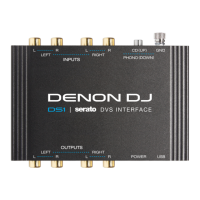

 To Next Page