11
142 x 208 mm
Light ring and illumination of the mixing bowl
The light ring on the control knob and the LED for illuminating the mixing bowl appear ashing when the appliance is waiting
for input. They remain permanently lit during the mixing operation.
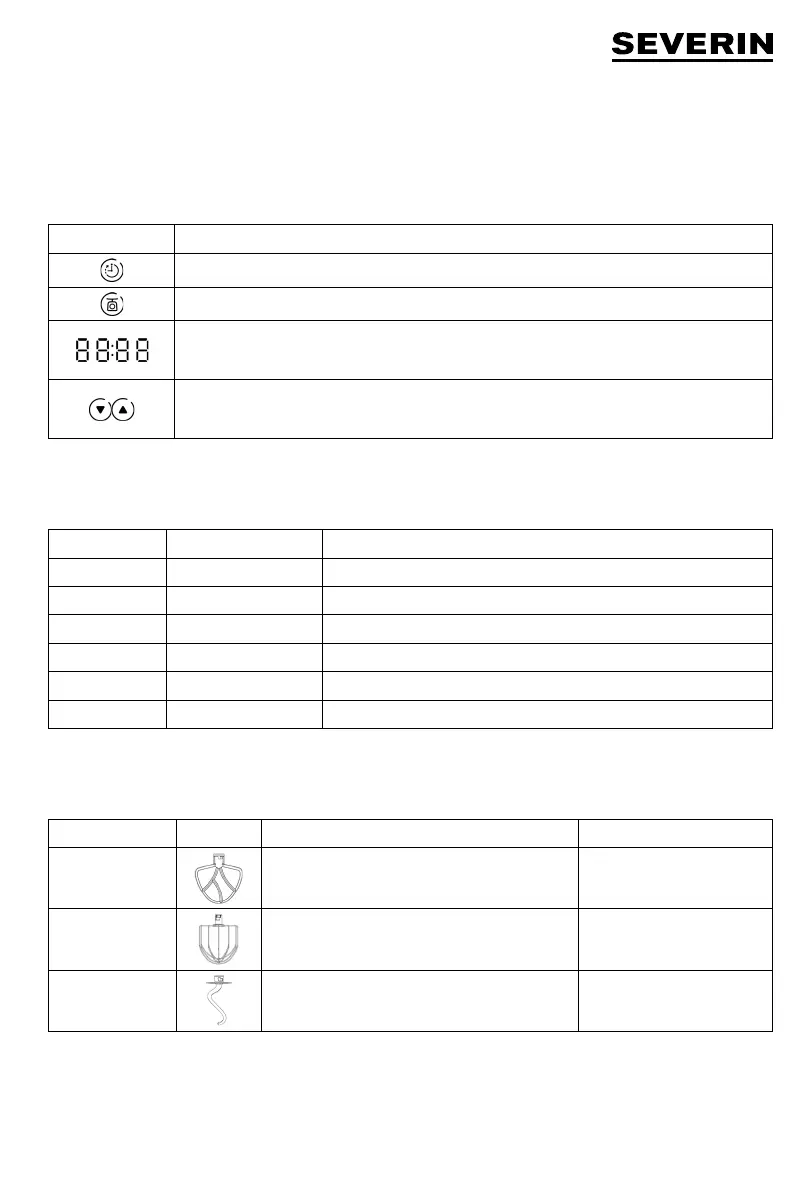
Display
The display shows the selected functions, weight and running times. You can also select the running time and unit of weight.
Symbol Function
Mixing and taring display
Weighing display
Remaining time or mixing time display
or
Weight in the weighing process
Selection of the mixing time
or
Selection of the units of weight (kg, g, lb, and oz) in the weighing process
Control Knob
The control knob can be used to select speed settings between 0 and 8, or to select the Pulse function.
Speed setting Designation Use
0 Off Before every change of attachment, after use
1 Lowest speed For slow mixing, initial mixing together of ingredients, kneading
2-3 Low speed For whisking, folding in and mixing in of ingredients, kneading
4-6 Medium speed For all mixing tasks
7-8 High speed For beating egg white and whipping cream
P Pulse For short bursts of mixing at the highest speed setting
Attachments
Select attachments in accordance with the table below. For slow mixing of ingredients, always start on speed setting 1.
Attachment Symbol Use Recommended speed
Flat beater
Light soft mixes, e.g. batters, cakes and puddings 1-6
Whisk
Cream, egg white and mousse 7-8
Dough hook
Heavier doughs, e.g. bread dough, pizza dough,
yeast dough
1-3
Operation
∙ The appliance must be switched off and unplugged
before attachments are inserted, changed, removed
or cleaned.
∙ Check that the mixing bowl is locked in place before
starting the mixing operation!
∙ After switching off, wait for the motor to stop
running! Do not touch any part of the appliance



 To Next Page