5
IV. Switching the lighting modes
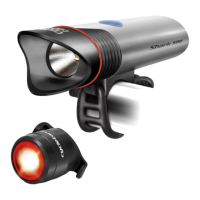
Operation Modes: The initial short press of the switch will turn the light on
High mode. Each additional short press of the button switches the light from one
mode to the next in the following order: (1) High; (2) Medium; (3) Low; (4) Flash
Turning off SHARK 500: Press and hold the button for one to three seconds.
Checking Battery Level: When the light is turned off, press the button for 3
seconds and release. The light will flash from 1 to 10 times indicating the remaining
battery level (10 flashes indicate - 100% charge, 9 flashes - 90%, 8 flashes – 80% …).
Low Battery Level: The switch light will glow red when the battery level is low
and the light will automatically turn off when the battery level is too low. This
system protects the battery from damage, but since it draws a small amount of
current, and can drain the battery beyond the minimum voltage for the battery.
The light must be turned off when the button glows red or within 5 minutes
of it glowing red. Do not wait until the light goes completely out as this will greatly
reduce the number of charge cycles that the battery can be used and can render
the battery unusable.
Charge your bike light each 2-3 months when stored or not in use to prevent
battery degradation.


 To Next Page
 Loading...