A
Crown comfort padding
1. Insert the plastic edging at the back of the crown com-
fort padding between the polystyrene lining and back of
the shell.
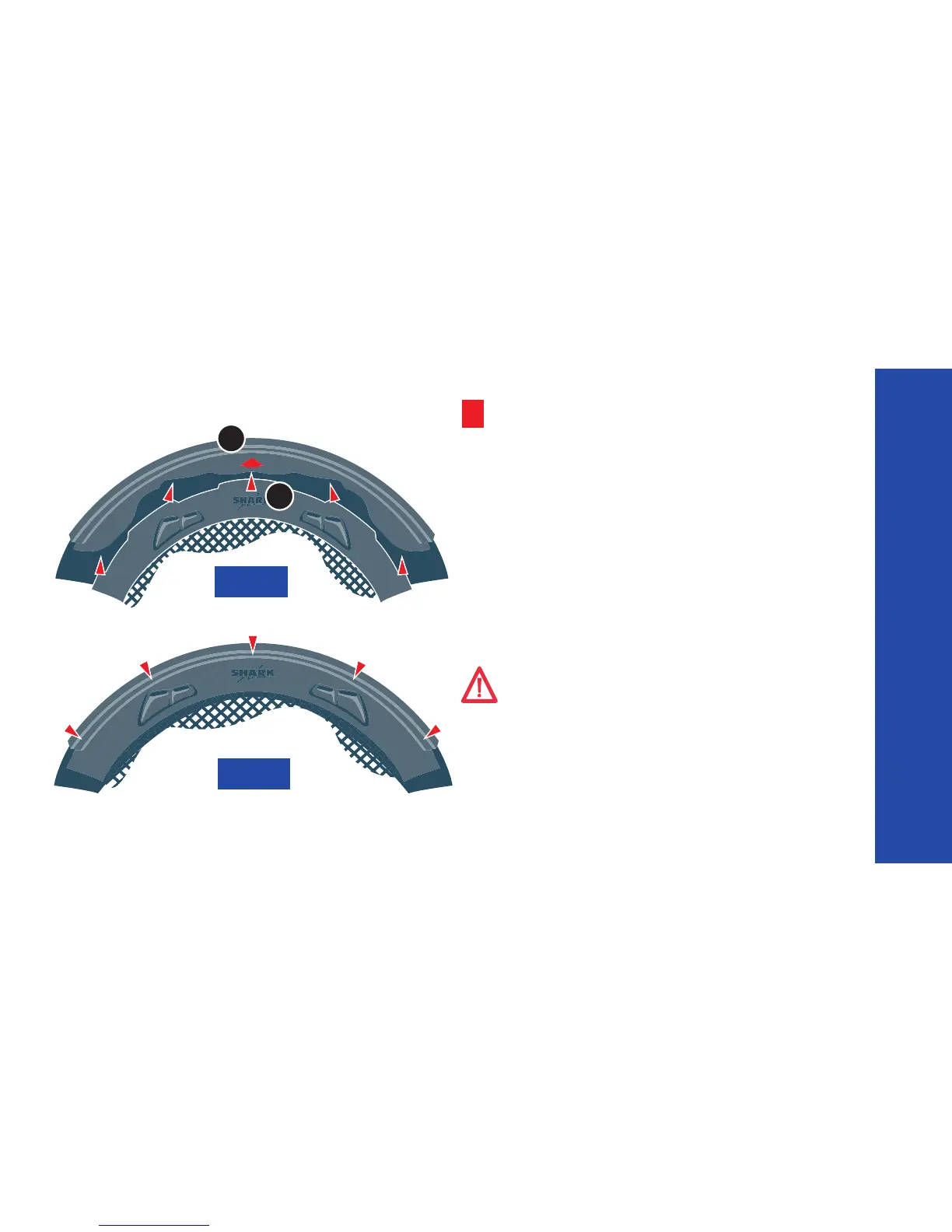
2. Insert the plastic tabs into their respective slots at the
front of the helmet, starting with the central tab (1) indica-
ted by the arrow (2) (see Figure A).
Be sure that the tabs are completely inserted into the
correct slots (see Figure B).
NOTE – When the Crown Comfort Padding is properly re-
installed, the warnings label should be visible.
Fig A
1
2
Fig B
REplacE THE cOMfORT paddING
WARNING! The polystyrene lining and comfort
padding are critical to properly fit your helmet
on your head. An improper fit could cause your helmet
to become dislodged in an accident, leaving your head
unprotected and resulting in severe head injury or
death. If you are not sure that you properly replaced the
comfort padding, DO NOT USE YOUR HELMET. Contact
your retailer for assistance or advise.


 To Next Page