29
Dimension: 140 X 215 mm
H BLUE SCREEN
Automatically turns the screen blue if a broadcast signal is not
received.
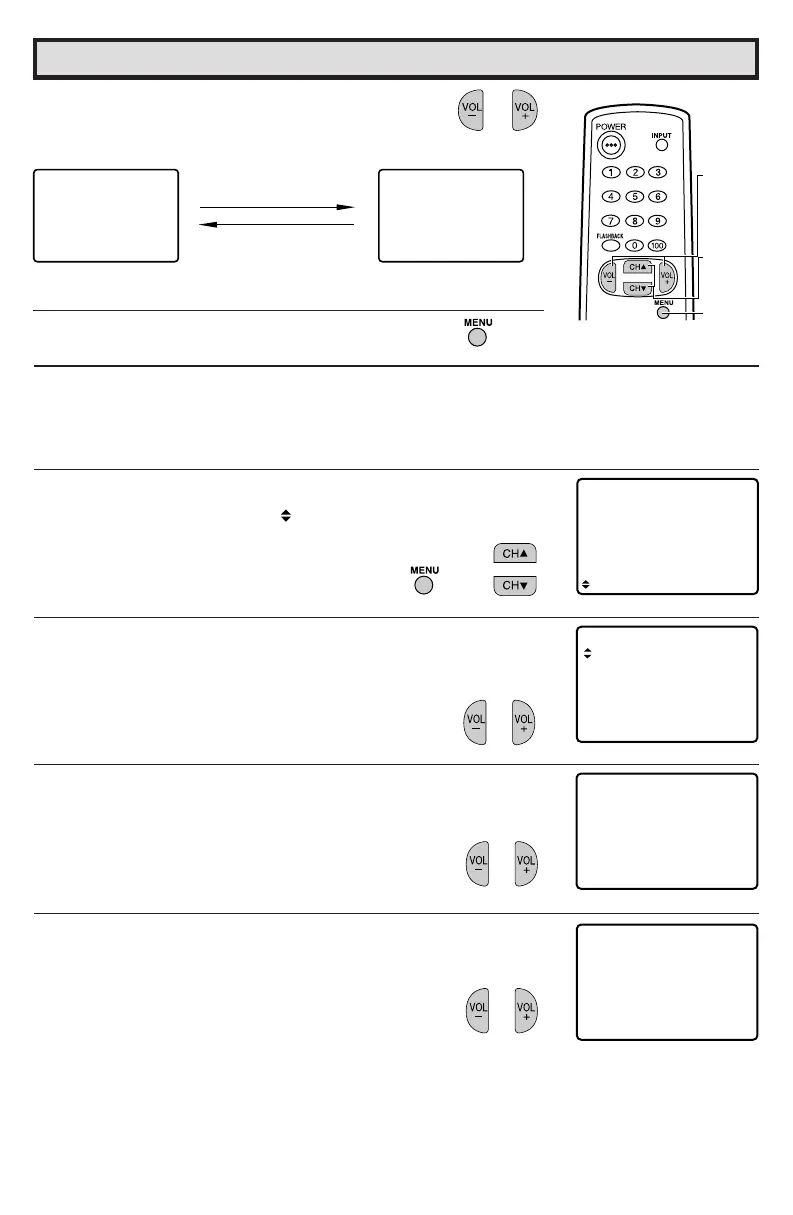
1 Press MENU to access the MAIN MENU screen.
2 Press CH a/ s to move the “ ” mark to “SET UP”.
3 Press VOL k/l to access the SET UP screen.
4 Press VOL k/l to access the BLUE SCREEN select screen.
5 Press VOL k/l to select “ON”.
6 Press VOL k to add a channel to the TV
memory or press VOL l to erase a channel
from the TV memory.
7 Press MENU to exit.
VOL k
To add channel 12 to
the TV memory
VOL l
To erase channel 12 from
the TV memory
(CH MEMORY
memorized channel)
(CH MEMORY
unmemorized channel)
(MAIN MENU screen)
(SET UP screen)
(BLUE SCREEN select screen)
→
Set Up (Continued)
VOLUME
(
k
)/(
l
)
CHANNEL
UP (
a
)/
DOWN (
s
)
MENU
32C240(29-30) 03.11.28, 0:56 PM30
D+:
AIR
C
H MEMORY
ADTO
21
E –:
AIR
CH MEMORY
ESTO AR
VIDEO ADJUST
ELECTAUD I O S
SET UP
CAPT I ONCLOSED
CONTROLPARENT
ENERGY SAVE
SL EPETIERM
LANG GEUA
BL E NSCREEU
CH SETT I NG



 To Next Page