18
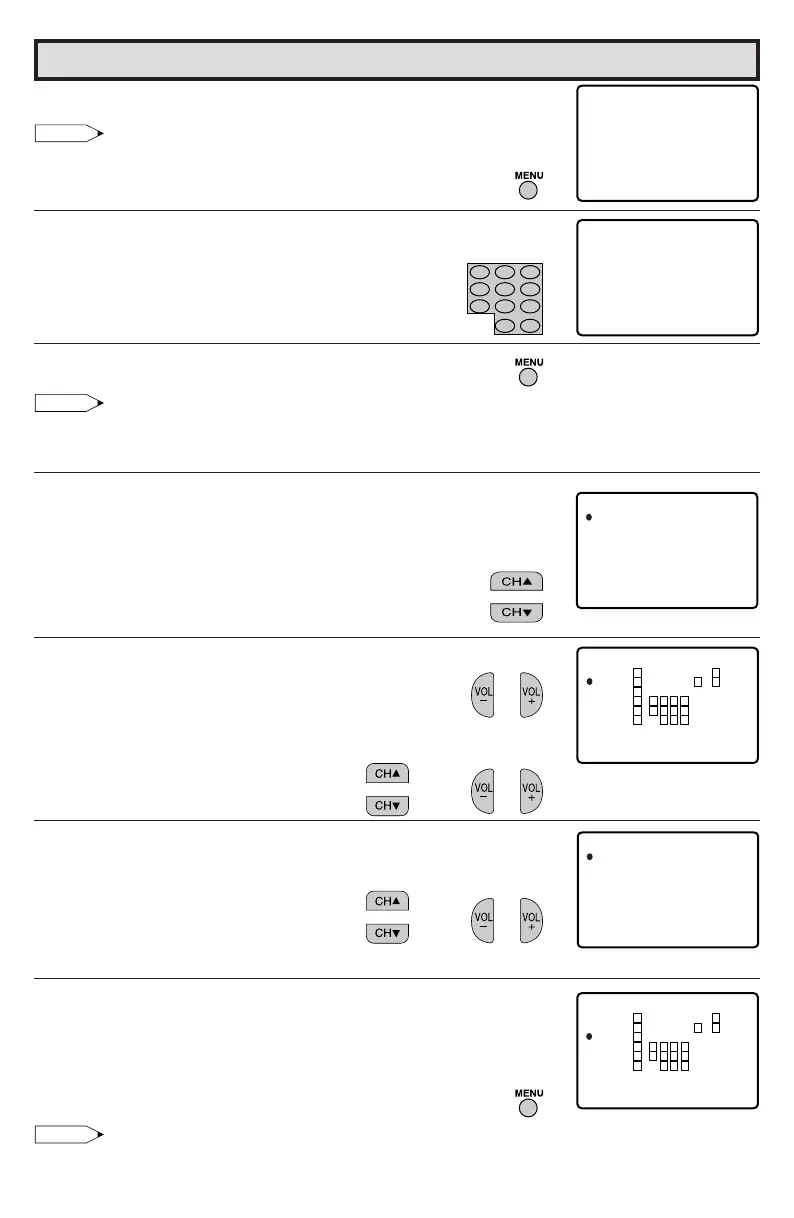
7 Press MENU, then “INPUT SECRET No.” will be displayed.
Note:
• If SECRET No. is already set, skip to step 9.
8 Enter a 4-digit SECRET No. using the REMOTE KEYPAD.
9
When done, press MENU
to exit.
Note:
• If you set “G” to BLOCK , all ratings are automatically blocked.
• If you set “X” to BLOCK, “G”, “PG”, “PG-13”, “R” and “NC-17” are not blocked.
[2] TV GUIDELINES
1 Repeat steps 1 to 4 of [1] MPAA RATING.
2 Press CH
a/s to move the “E” mark to “TV GUIDELINES”.
3 Press VOL
k/l to access the TV GUIDELINES screen.
4 To change AGE and CONTENT SETTING, press CH
a/s to move
the “E” mark to the desired rating and then press VOL
k/l
to
select.
5 Press CH
a/s to move the “E” mark to the desired content item
and then press VOL
k/l to select either “BLOCK” or “– – – – –”
(unblock).
6 Press MENU
to return to the TV GUIDELINES screen.
7 Repeat steps 4 to 6 until all ratings and their contents are set.
8
When done, press MENU
to return to V-CHIP selct screen.
9 Press MENU to exit.
Note:
• If SECRET No. is not set, enter a SECRET No. as show in steps 7 and 8 of [1] MPAA RATING.
→
Parent Control (V-CHIP Operation) (Continued)
(TV GUIDELINES screen)
(CONTENT RATING screen)
(V-CHIP select screen)
→
I NPU T
––––
SECRET No .
I NPU T
1234
SECRET No .
MP AA
TV GU I DEL I NES
AD : OFFDOWNLO
STATUS : OFF
TV– Y
TV– Y7
TV–G
TV– PG
TV– 14
TV–MA
MENU : RE TURN
GAE
–
–
–
D
–
–
–
L
–
–
–
S
–
–
–
V
–
–
–
–
–
:
:
BLOCK
VIEW
FV
–
V
A
TV–Y7
D
GE
L
S
V
V
F
:
:
:
:
:
B LOCK
B LOCK
:
–––––
–––––
–––––
–––––
MENU : RE TURN
TV– Y
TV– Y7
TV–G
TV– PG
TV– 14
TV–MA
MENU : RE TURN
GAE
–
–
–
D
–
–
–
L
–
–
–
S
–
–
–
V
––
–
–
–
–
V
VVVV
V
VVV
VVV
V
V
V
V
VV
:
:
BLOCK
VIEW
FV
321
654
987
100
0
ENTER



 To Next Page