EasyManua.ls Logo

Sharp CE-122 - Page 10

Sharp CE-122
32 pages
Print Icon
To Next Page IconTo Next Page
To Previous Page IconTo Previous Page
Loading...
(5)
Low
battery
indicator
Normally,
this
indicator
is
out
when
battery
power
is
sufficient.
However,
it
will
start
blinking
when
the
battery
power
drops
too
low
to
operate
the
printer.
When
the
indicator
starts
to
blink,
data
recording
and
fetching
to/from
the
cassette
recorder
and
the
printer
is
disabled,
and
commands
from
the
computer
are
skipped
over,
that
is,
ignored.
When
the
power
switch
of
the
CE-122
is
turned
on
after
making
a
sufficient
recharge
of
the
battery
with
the
power
switch
at
“OFF”
position,
the
indicator
will
stop
to
blink,
allowing
to
accept
print
command,
data
recording
and
fetching
commands
to
the
tape.
NOTE:
The
low
battery
indicator
may
fail
to
blink
when
the
battery
potential
is
too
low
below
the
specific
level.
(ORR)
t
(ORR)
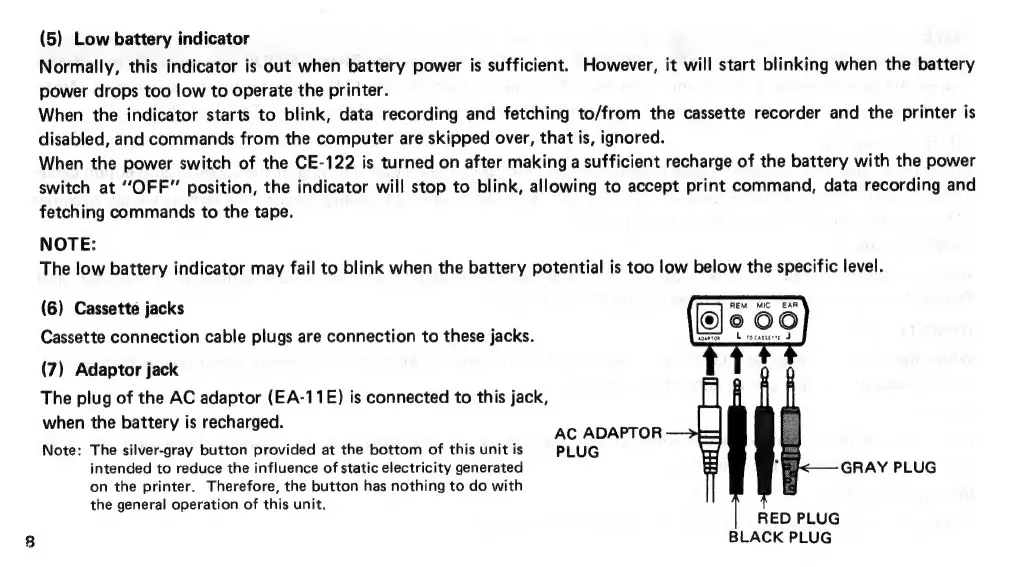
(6)
Cassette
jacks
Cassette
connection
cable
plugs
are
connection
to
these
jacks.
(7)
Adaptor
jack
The
plug
of
the
AC
adaptor
(EA-11E)
is
connected
to
this
jack,
hen
the
battery
is
recharged.
o
rae
:
AC
ADAPTOR
Note:
The
silver-gray
button
provided
at
the
bottom
of
this
unit
is
PLUG
intended
to
reduce
the
influence
of
static
electricity
generated
GRAY
PLUG
on
the
printer.
Therefore,
the
button
has
nothing
to
do
with
the
general
operation
of
this
unit.
RED
PLUG
BLACK
PLUG

Related product manuals