EasyManua.ls Logo

Sharp CE-122 - Page 13

Sharp CE-122
32 pages
Print Icon
To Next Page IconTo Next Page
To Previous Page IconTo Previous Page
Loading...
CARTRIDGE
RIBBON
REPLACEMENT
A
cartridge
is
used
for
the
ink
ribbon
of
this
printer.
Replace
the
cartridge
ribbon
specifically
designed
for
the
CE-122
(Type:
EA-800R)
in
the
following
manner,
when
print
impression
became
too
weak.
Sometimes,
print
impression
may
become
weak
due
to
dried
ink
ribbon
when
it
was
left
unused
for
a
longer
time.
c
such
an
event,
advance
the
ink
ribbon
to
a
certain
degree
to
a
properly
inked
portion
after
feeding
the
paper.
)
(1)
Turn
CE-122
off.
(2)
Open
the
paper
tape
cover,
cut
away
the
paper
tape,
and
then
pull
the
ramaining
part
of
the
paper
forward
and
completely
out
of
the
printer.
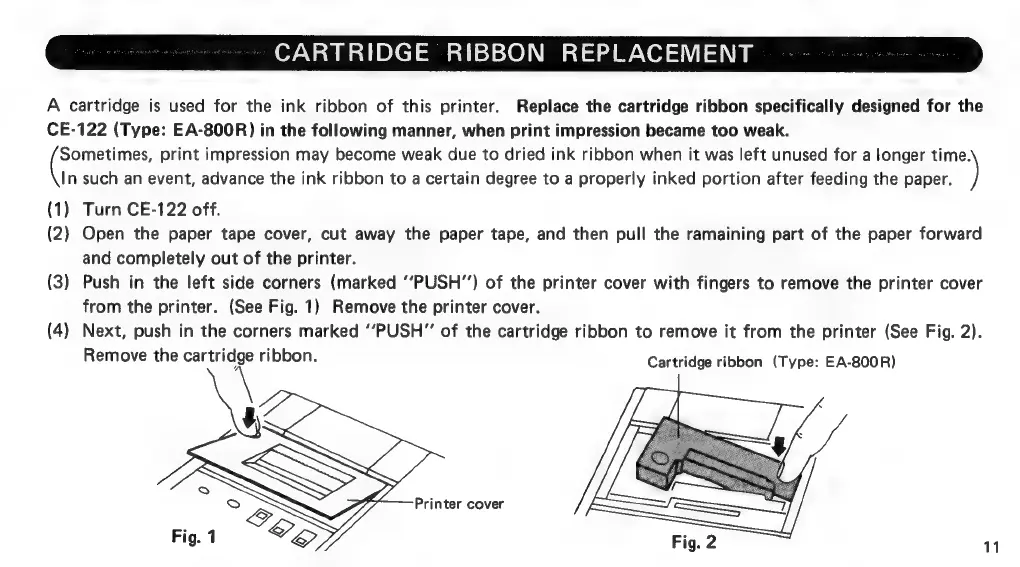
(3)
Push
in
the
left
side
corners
(marked
‘‘PUSH”)
of
the
printer
cover
with
fingers
to
remove
the
printer
cover
from
the
printer.
(See
Fig.
1)
Remove
the
printer
cover.
(4)
Next,
push
in
the
corners
marked
‘‘PUSH”
of
the
cartridge
ribbon
to
remove
it
from
the
printer
(See
Fig.
2).
Remove
the
cartridge
ribbon.
Cartridge
ribbon
(Type:
EA-800R)
Printer
cover
11

Related product manuals