EasyManua.ls Logo

Sharp CE-122 - Page 17

Sharp CE-122
32 pages
Print Icon
To Next Page IconTo Next Page
To Previous Page IconTo Previous Page
Loading...
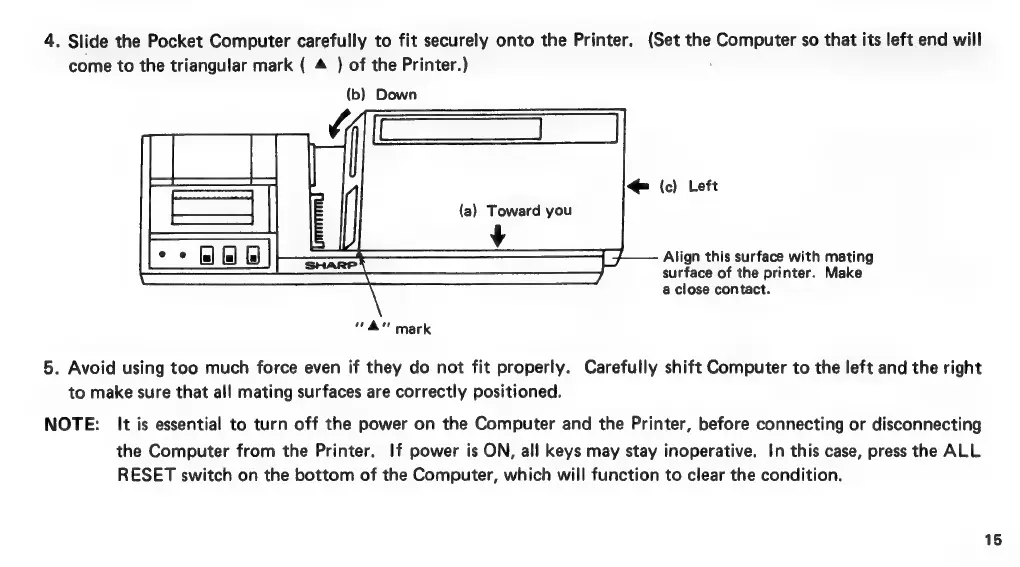
4.
Slide
the
Pocket
Computer
carefully
to
fit
securely
onto
the
Printer.
(Set
the
Computer
so
that
its
left
end
will
come
to
the
triangular
mark
(
4
)
of
the
Printer.)
(b)
Down
©
(c)
Left
(a)
Toward
you
v
Align
this
surface
with
mating
surface
of
the
printer.
Make
a
close
contact.
a"
mark
5.
Avoid
using
too
much
force
even
if
they
do
not
fit
properly.
Carefully
shift
Computer
to
the
left
and
the
right
to
make
sure
that
all
mating
surfaces
are
correctly
positioned.
NOTE:
It
is
essential
to
turn
off
the
power
on
the
Computer
and
the
Printer,
before
connecting
or
disconnecting
the
Computer
from
the
Printer.
If
power
is
ON,
all
keys
may
stay
inoperative.
In
this
case,
press
the
ALL
RESET
switch
on
the
bottom
of
the
Computer,
which
will
function
to
clear
the
condition.
15

Related product manuals