EasyManua.ls Logo

Sharp CE-122 - Page 22

Sharp CE-122
32 pages
Print Icon
To Next Page IconTo Next Page
To Previous Page IconTo Previous Page
Loading...
20
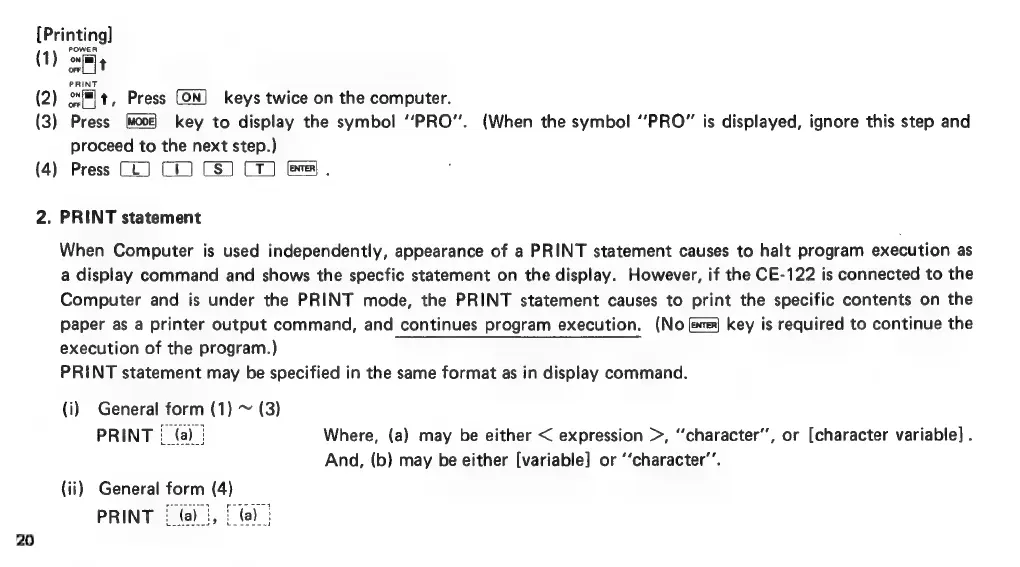
[Printing]
(1)
omfg
(2)
ox#lt,
Press
keys
twice
on
the
computer.
(3)
Press
key
to
display
the
symbol
‘‘PRO”’.
(When
the
symbol
“PRO”
is
displayed,
ignore
this
step
and
proceed
to
the
next
step.)
(4)
Press
(LJ)
C1)
CS)
C1)
fs),
2.
PRINT
statement
When
Computer
is
used
independently,
appearance
of
a
PRINT
statement
causes
to
halt
program
execution
as
a
display
command
and
shows
the
specfic
statement
on
the
display.
However,
if
the
CE-122
is
connected
to
the
Computer
and
is
under
the
PRINT
mode,
the
PRINT
statement
causes
to
print
the
specific
contents
on
the
paper
as
a
printer
output
command,
and
continues
program
execution.
(No
fe)
key
is
required
to
continue
the
execution
of
the
program.)
PRINT
statement
may
be
specified
in
the
same
format
as
in
display
command.
(i)
General
form
(1)
~
(3)
PRINT
:_
(a)
|
Where,
(a)
may
be
either
<
expression
>,
‘‘character’’,
or
[character
variable]
.
And,
(b)
may
be
either
[variable]
or
‘‘character’’.
(ii)
General
form
(4)
sdesnnso?
wsesosd

Related product manuals