EasyManua.ls Logo

Sharp CE-122 - Page 30

Sharp CE-122
32 pages
Print Icon
To Next Page IconTo Next Page
To Previous Page IconTo Previous Page
Loading...
28
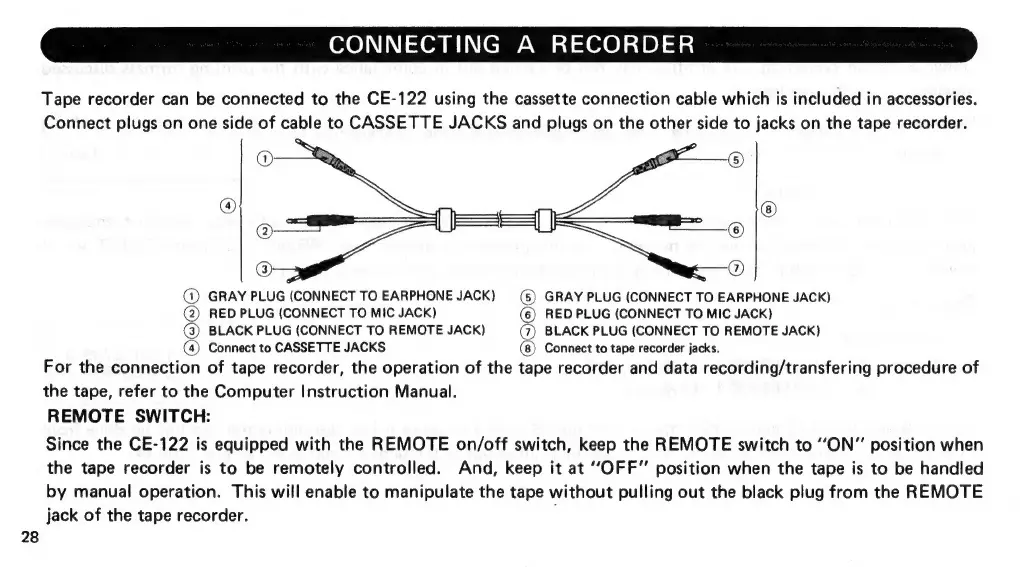
CONNECTING
A
RECORDER
Tape
recorder
can
be
connected
to
the
CE-122
using
the
cassette
connection
cable
which
is
included
in
accessories.
Connect
plugs
on
one
side
of
cable
to
CASSETTE
JACKS
and
plugs
on
the
other
side
to
jacks
on
the
tape
recorder.
©
®
®
@
om
=
@)
GRAY
PLUG
(CONNECT
TO
EARPHONE
JACK)
(©)
GRAY
PLUG
(CONNECT
TO
EARPHONE
JACK)
(2)
RED
PLUG
(CONNECT
TO
MIC
JACK)
(@)
RED
PLUG
(CONNECT
TO
MIC
JACK)
(3)
BLACK
PLUG
(CONNECT
TO
REMOTE
JACK)
(@)
BLACK
PLUG
(CONNECT
TO
REMOTE
JACK)
@)
Connect
to
CASSETTE
JACKS
(8)
Connect
to
tape
recorder
jacks.
For
the
connection
of
tape
recorder,
the
operation
of
the
tape
recorder
and
data
recording/transfering
procedure
of
the
tape,
refer
to
the
Computer
Instruction
Manual.
REMOTE
SWITCH:
Since
the
CE-122
is
equipped
with
the
REMOTE
on/off
switch,
keep
the
REMOTE
switch
to
“ON”
position
when
the
tape
recorder
is
to
be
remotely
controlled.
And,
keep
it
at
‘OFF’
position
when
the
tape
is
to
be
handled
by
manual
operation.
This
will
enable
to
manipulate
the
tape
without
pulling
out
the
black
plug
from
the
REMOTE
jack
of
the
tape
recorder.

Related product manuals