EasyManua.ls Logo

Sharp EL-5103 - Page 24

Sharp EL-5103
43 pages
Print Icon
To Next Page IconTo Next Page
To Previous Page IconTo Previous Page
Loading...
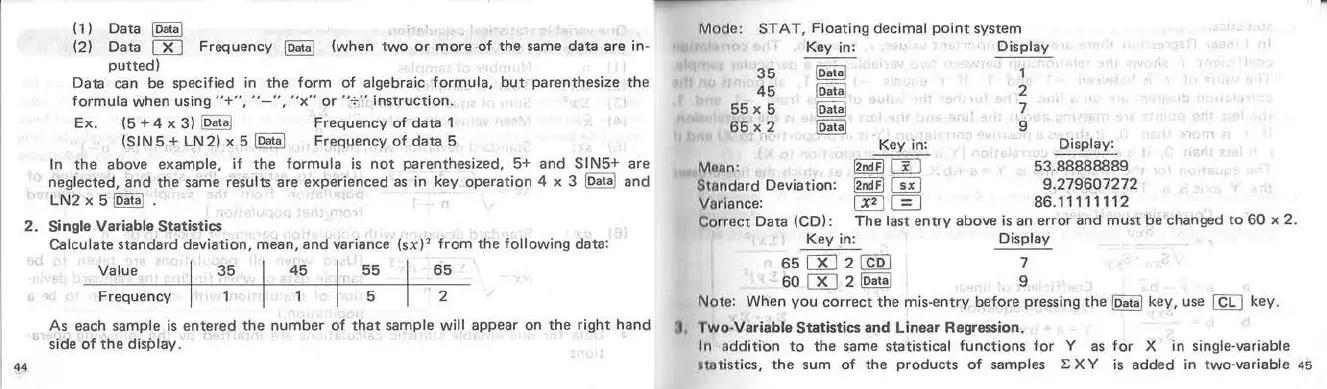
(1) Data
~
(2) Data
00
Frequency
~
(
.....
hen
two
or
more
of
the
same
data
are in·
putted)
Data
can
be specified in tha form of algebraic formula.
but
parenthesize
the
formula
.....
hen using
"+",
"~",
"x"
or
"-:-" instructiOfl.
Ex.
(S
+4
x
3)
~
Frequency
of
data
1
(SINS + LN2) x 5
~
Frequency
of
data
S
In
the
~bove
example, il
the
formula
is
not
parenthesized, 5+
and
SINS+ are
neglected,
and
the
same results
are
experienced
as in key
operation
4 x 3
~
and
LN2xS~.
2.
Single Variable
Stetistics
..
Calculate
standard
devialion.
mean,
and
variance
Value
35
45
55
Freque
n
cy
5
(ul'
from
the
lollo
.....
ing data:
65
2
As each sample
is
entered
the
number
of
that
sample
.....
ill
appear
on
the
right
hand
side of
the
display.
Mode:
STAT,
Floating decimal
point
$Vstem
35
45
S5
x 5
65
x 2
Key in: Display
~
1
~
2
~
7
~
9
Key in;
Mlan:
~
m
Standard
Deviation:
~
CiiJ
9.279607272
Varionce:
~0
86.
1
11
111 12
Correct Data (CO):
The
last
entry
above
is an
errOl"
and
must
be
changed
to
60
)<
2.
Key in: Display
65
00
2
~
7
60
00
2
~
9
Note: When
you
correct
the
mis-entry before pressing
the
~
key, use @ key.
J, Two·Variable
Sta
tistics
and
Linear Regression.
In
addition
to
the
same statistical functions
for
Y as
for
X in single·variable
IUlti$lics,
the
sum of
the
products
of
samples
I:
X Y is
added
in two·variable
45

Related product manuals