EasyManua.ls Logo

Sharp FDD-412A - Page 112

Sharp FDD-412A
119 pages
Print Icon
To Next Page IconTo Next Page
To Previous Page IconTo Previous Page
Loading...
FDD412A/B
5
Changing
VFO
clock
phase
Set
to
the
desired
phase
method
according
to
the
list
below,
using
jumper
wire.
Pee
Open
between
5
and
6.
Short
between
5
and
6.
NOTE:
For
the
detail
of
A
and
B
methods,
refer
to
Instruction
Manual
of
the
device.
Changing
door
lock
mode
Set
to
the
desired
door
lock
mode
according
to
the
lit
below,
using
jumper
plug.
JP-2
position
perational
Short
between
can
be
locked
only
by
the
ENGAGE
1
and
3.
Signal.
Short
between
can
be
1
and
2.
Or
HEAD
ENGAGE
signals.
Test
points
The
following
signal
names
are
used
for
test
points
(TP).
Read
signal
Read
signal
DATA
SS
(luS)-1P
DATA
SS
(0.5uS)-1P
VCO
CLOCK-P
STEP-P
TRACK
QO0-P
INDEX~-1P
—lii-
locked
by
either
DOOR
JP/
(a)
FDD*
0
IPI
.
(b)
FDD"}
JP}
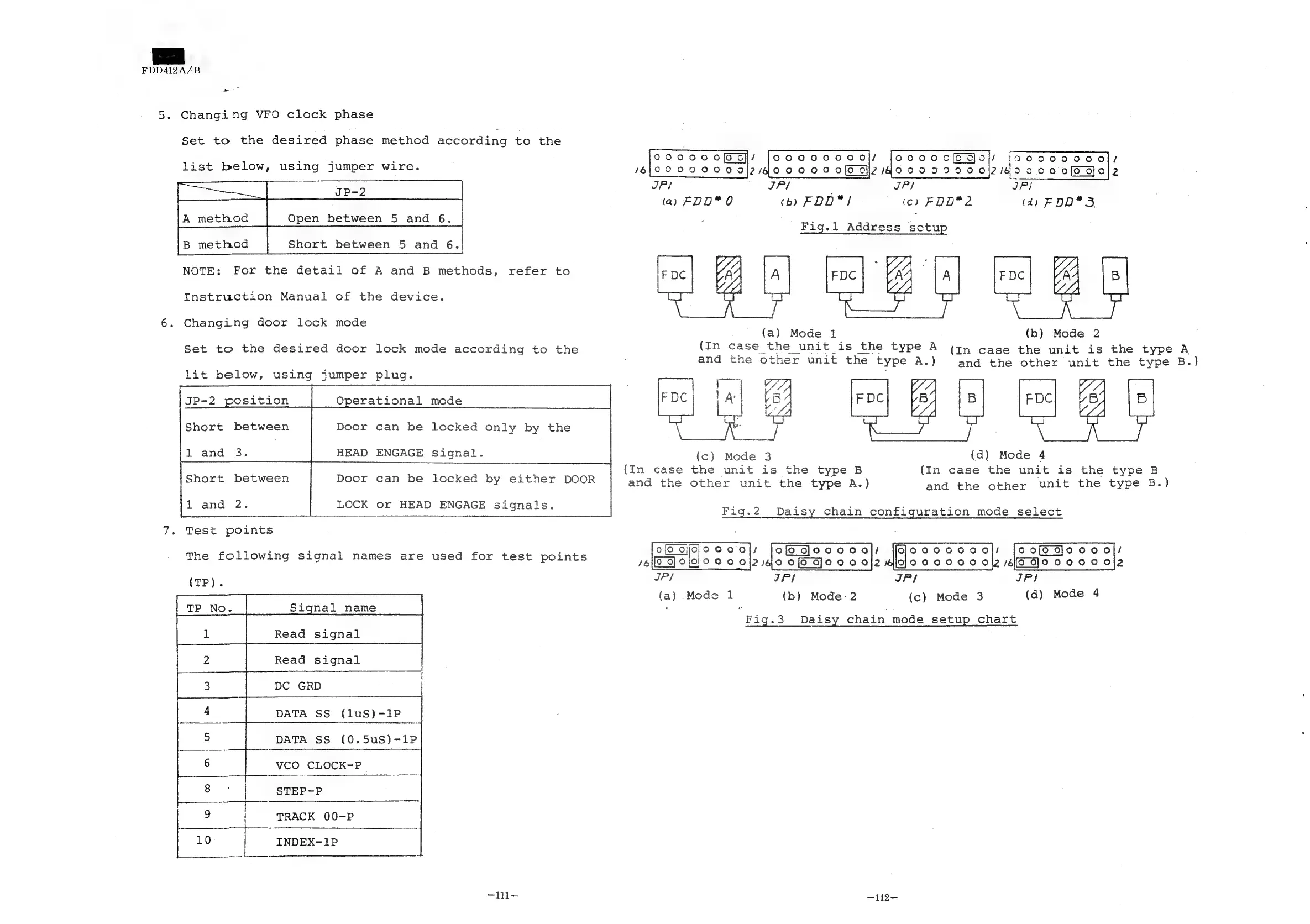
Fig.l
Address
setu
(tc)
FOD*2
O90
OO
OM
C4
jooaag
ae
cKO
Ol/
JocoocE
doy)
inosaoo000l7
18
0909000
0|2/400000
06
2140099290
0\2/409c0
06
ool2
JP/
(4)
FDD*
3
(aj)
Mode
1l
(In
case
the
unit
is
the
type
B
and
the
other
unit
the
type
A.)
ACE
epee
/
tofediooooodrs
/6{0_
GJ
O19
9
O
Of2
4,0
Of
DJo00
0j24
JP/
(a)
Mode
1
(In
case
the
unit
is
the
type
A
and
the
other
unit
the
type
A.)
‘ae
balk
(4
H
A
pon
i
Mode
3
{c}
Fig.2
(b)
Mode
2
(In
case
the
unit
is
the
type
A
and
the
other
unit
the
type
B.)
(d)
Mode
4
(In
case
the
unit
is
the
type
B
and
the
other
unit
the
type
B.)
Daisy
chain
configuration
mode
select
ony)
ot
/6[9_
8}0
0000
012
IPI
JP}
JP!
(b)
Mode:
2
(c)
Mode
3
(d)
Mode
4
—112-—
Fig.3
Daisy
chain
mode
setup
chart