EasyManua.ls Logo

Sharp FDD-412A - Page 51

Sharp FDD-412A
119 pages
Print Icon
To Next Page IconTo Next Page
To Previous Page IconTo Previous Page
Loading...
FDD412A/B
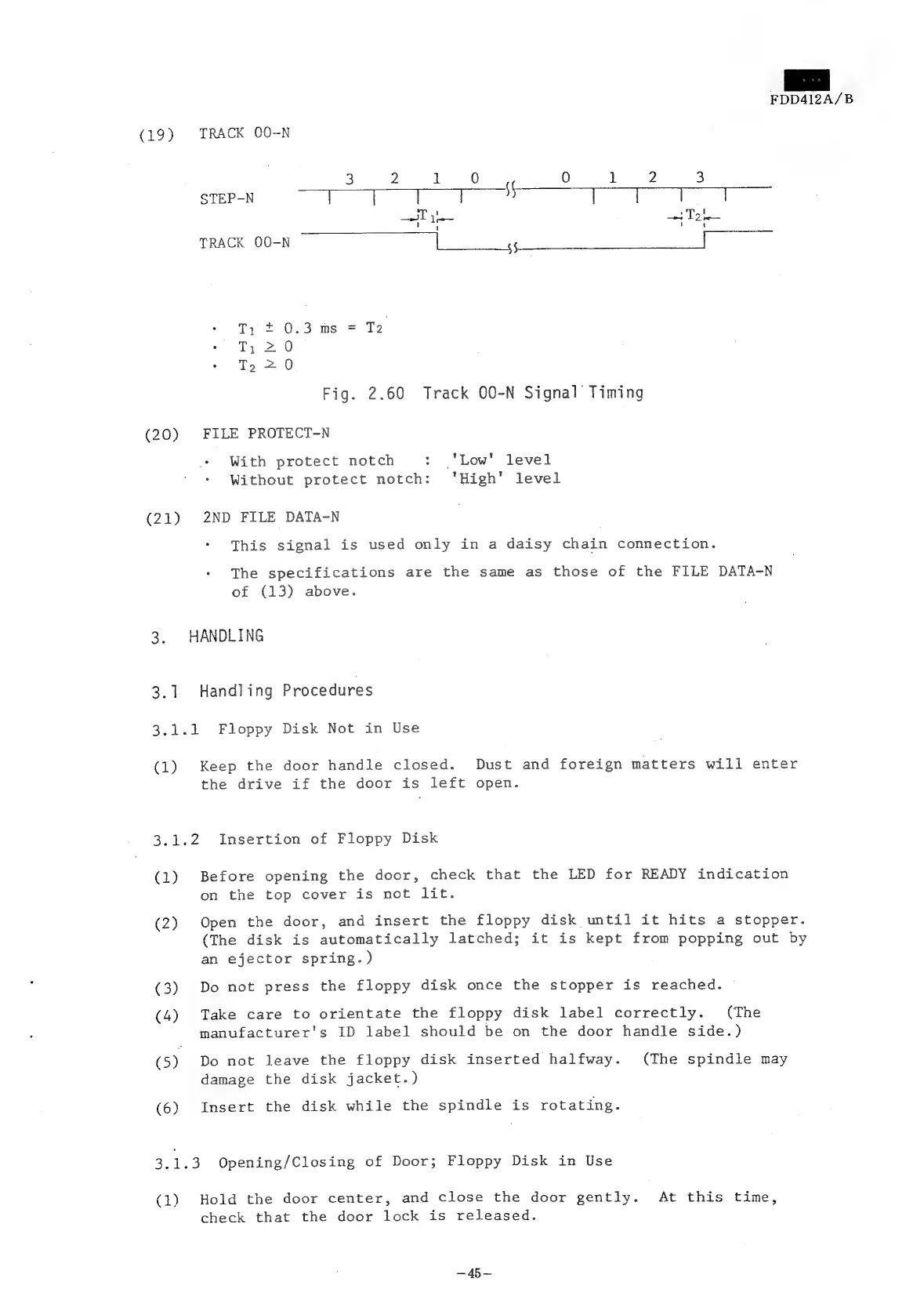
(19)
TRACK
OO-N
3 2
1
0 0
1
2
3
STEP-N
TT
I
|
i
|
]
]
—T
1
Ta
TRACK
OO-N
|
55
T,
=
0.3
ms
=
T2
T;
20
To
20
Fig.
2.60
Track
O0-N
Signal
Timing
(20)
FILE
PROTECT-N
With
protect
notch
:
‘Low’
level
Without
protect
notch:
'High'
level
(21)
2ND
FILE
DATA-N
This
signal
is
used
only
in
a
daisy
chain
connection.
The
specifications
are
the
same
as
those
of
the
FILE
DATA-N
of
(13)
above.
3.
HANDLING
3.1
Handling
Procedures
3.1.1
Floppy
Disk
Not
in
Use
(1)
Keep
the
door
handle
closed.
Dust
and
foreign
matters
will
enter
the
drive
if
the
door
is
left
open.
3.1.2
Insertion
of
Floppy
Disk
(1)
Before
opening
the
door,
check
that
the
LED
for
READY
indication
on
the
top
cover
is
not
lit.
(2)
Open
the
door,
and
insert
the
floppy
disk
until
it
hits
a
stopper.
(The
disk
is
automatically
latched;
it
is
kept
from
popping
out
by
an
ejector
spring.)
(3)
Do
not
press
the
floppy
disk
once
the
stopper
is
reached.
(4)
Take
care
to
orientate
the
floppy
disk
label
correctly.
(The
manufacturer's
ID
label
should
be
on
the
door
handle
side.)
(5)
Do
not
leave
the
floppy
disk
inserted
halfway.
(The
spindle
may
damage
the
disk
jacket.)
(6)
Insert
the
disk
while
the
spindle
is
rotating.
3.1.3
Opening/Closing
of
Door;
Floppy
Disk
in
Use
(1)
Hold
the
door
center,
and
close
the
door
gently.
At
this
time,
check
that
the
door
lock
is
released.