Page - 4 -
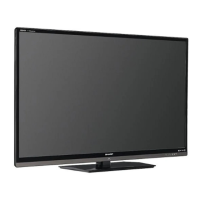
The following image will appear:
Remain on the button „Change settings" and confirm the choice with the „OK
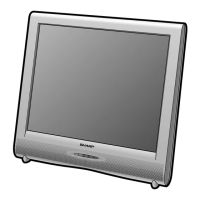
“-button on the remote control. You will see the following:
Choose the setting applicable to your satellite device and confirm your choice
with the „OK “-button on the remote control. You can find an overview of
settings in the chapter „Frequently asked questions" in the appendix. The
example shows installation for a satellite device with an individual connection
(only Astra).


 To Next Page