18
NOTES:
1. Press the SET MEMORY pad twice within 2 seconds.
2. If the cooking time is over the maximum time, the display
will show error code EE9. To clear the error code, press
the STOP/CLEAR pad and re-program. See Maximum
Cooking Time on page 21.
3. It is not necessary to press the POWER LEVEL pad for
100% in Single Stage.
<Repeat Digit Input>
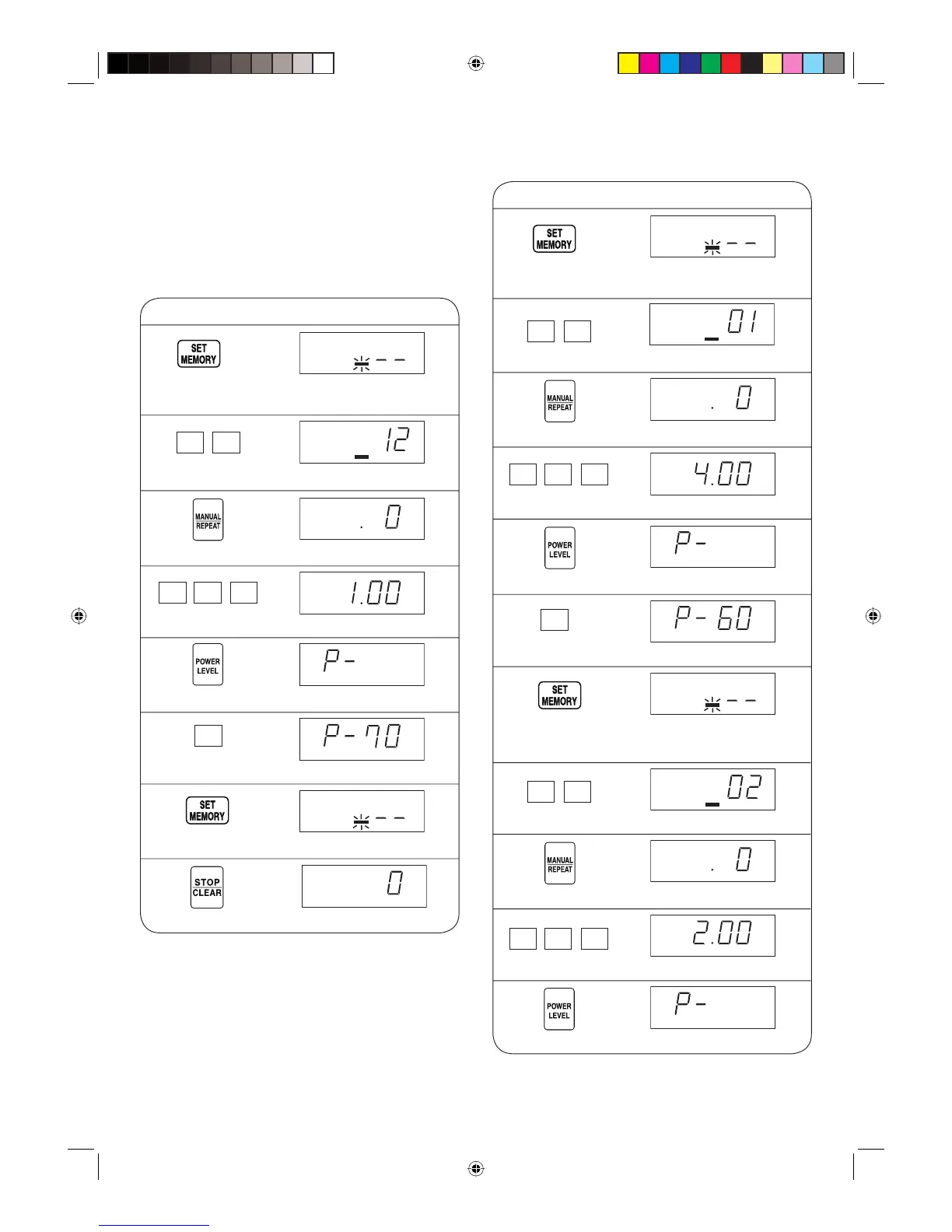
* Suppose you want to set 1 minute at 70% with memory
12.
1 Press the SET MEMORY pad
twice within 2 sec.
2 Enter memory number.
NO.
NO.
3 Press the MANUAL/REPEAT pad.
4 Enter cooking time.
5 Press the POWER LEVEL pad.
6 Enter power level.
7 Press the SET MEMORY pad.
8 Press the STOP/CLEAR pad to exit.
NO.
NOTES:
1. Press the SET MEMORY pad twice within 2 seconds.
2. If the programmed cooking time is over the maximum
time, the display will show error code EE9. To clear
the error code, press the STOP/CLEAR pad and
re-program. See Maximum Cooking Time on page 21.
3. It is not necessary to press the POWER LEVEL pad for
100% in Single Stage.
Procedure Display
<Dual Digit Input>
* Suppose you want to set 4 minutes at 60% with
memory 1 and 2 minutes at 30% with memory 2.
1 Press the SET MEMORY pad
twice within 2 seconds.
3 Press the MANUAL/REPEAT pad.
4 Enter cooking time for memory 1.
5 Press the POWER LEVEL pad.
6 Enter power level for memory 1.
8 Enter memory number.
NO.
NO.
NO.
NO.
9 Press the MANUAL/REPEAT pad.
10 Enter cooking time for memory 2.
11 Press the POWER LEVEL pad.
Procedure Display
2 Enter memory number.
7 Press the SET MEMORY pad to
save memory 1.
X 2
X 2
1 0 0
22
01
7
4 0 0
6
02
2 00
R-1900M [EN].indd Sec1:18R-1900M [EN].indd Sec1:18 9/29/08 1:36:35 PM9/29/08 1:36:35 PM


 To Next Page