EasyManua.ls Logo

Sharp ZQ-3000 - Page 8

Sharp ZQ-3000
18 pages
Print Icon
To Next Page IconTo Next Page
To Previous Page IconTo Previous Page
Loading...
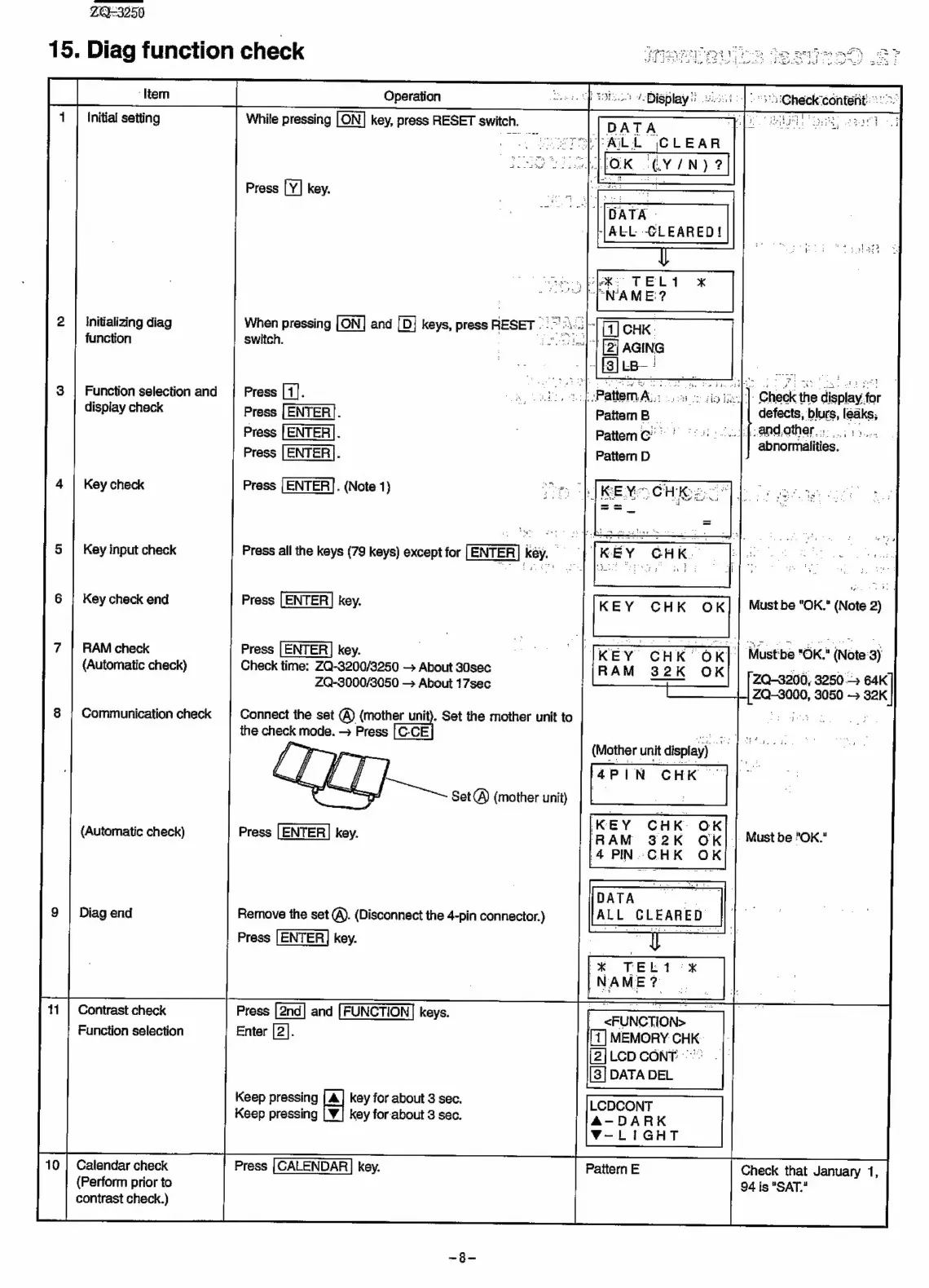
ZQ-3250
15.
Diag
function
check
nt)
2?
Operation
onteriti
25"
Initial
setting
1
ae
eal
|
DATA
ye
POLPAILL
|CLEAR
Press
key.
Initializing
diag
When
pressing
and
[D}
keys,
press
RESET
TAG
function
3
a
switch.
Function
selection
and
Press
[4].
aa
_
).
Check
the
display
for
display
check
Press
[ENTER].
defects;
blurs,
leaks;
Press
[ENTER|.
Ab
apdother
ow.
abnormalities.
Press
|
ENTER].
Press
[ENTER].
(Note
1)
oe
Ade
Key
check
Key
input
check
Press
all
the
keys
(79
keys)
except
for
[ENTER]
kéy.
|
KEY
CHK
OK
Key
check
end
Press
[ENTER]
key.
Must
be
"OK."
(Note
2)
RAM
check
Press
[ENTER]
key.
TKEY
CHK
OK]
|
Mustbe
"OK."
(Note
3)
(Automatic
check)
Check
time:
ZQ-3200/3250
About
30sec
RAM
32K
OK
Bk
to
ce
2Q-3000/3050
—>
About
17sec
arm
2Q-3200,
3250
-
2k
|
ZQ-3000,
3050
>
32K
Communication
check
is,
se
8
Connect
the
set
(@)
(mother
unit).
Set
the
mother
unit
to
the
check
mode.
>
Press
{>
(Mother
unit
display)
4PIN
CHK
Set
A)
(mother
unit)
Press
[ENTER
|
key.
(Automatic
check)
|
Must
be
"OK."
Remove
the
set
@).
(Disconnect
the
4-pin
connector.)
Press
|ENTER]
key.
Diag
end
Contrast
check
Function
selection
Press
and
keys.
Enter
[2].
Keep
pressing
key
for
about
3
sec.
Keep
pressing
key
for
about
3
sec.
V-LIGHT
Calendar
check
Pattern
E
(Perform
prior
to
contrast
check.)
Check
that
January
1,
94
is
"SAT."
Press
{CALENDAR
|
key.

Related product manuals