EasyManua.ls Logo

Sharper Image Portable Ice Maker - User Manual

Sharper Image Portable Ice Maker
4 pages
Print Icon
To Next Page IconTo Next Page
Loading...
Item No. 206078
PORTABLE ICE MAKER
Owners Manual
Thank you for purchasing the Sharper Image Portable Ice Maker.
Please read this guide carefully and keep it for future reference.
- 1 -
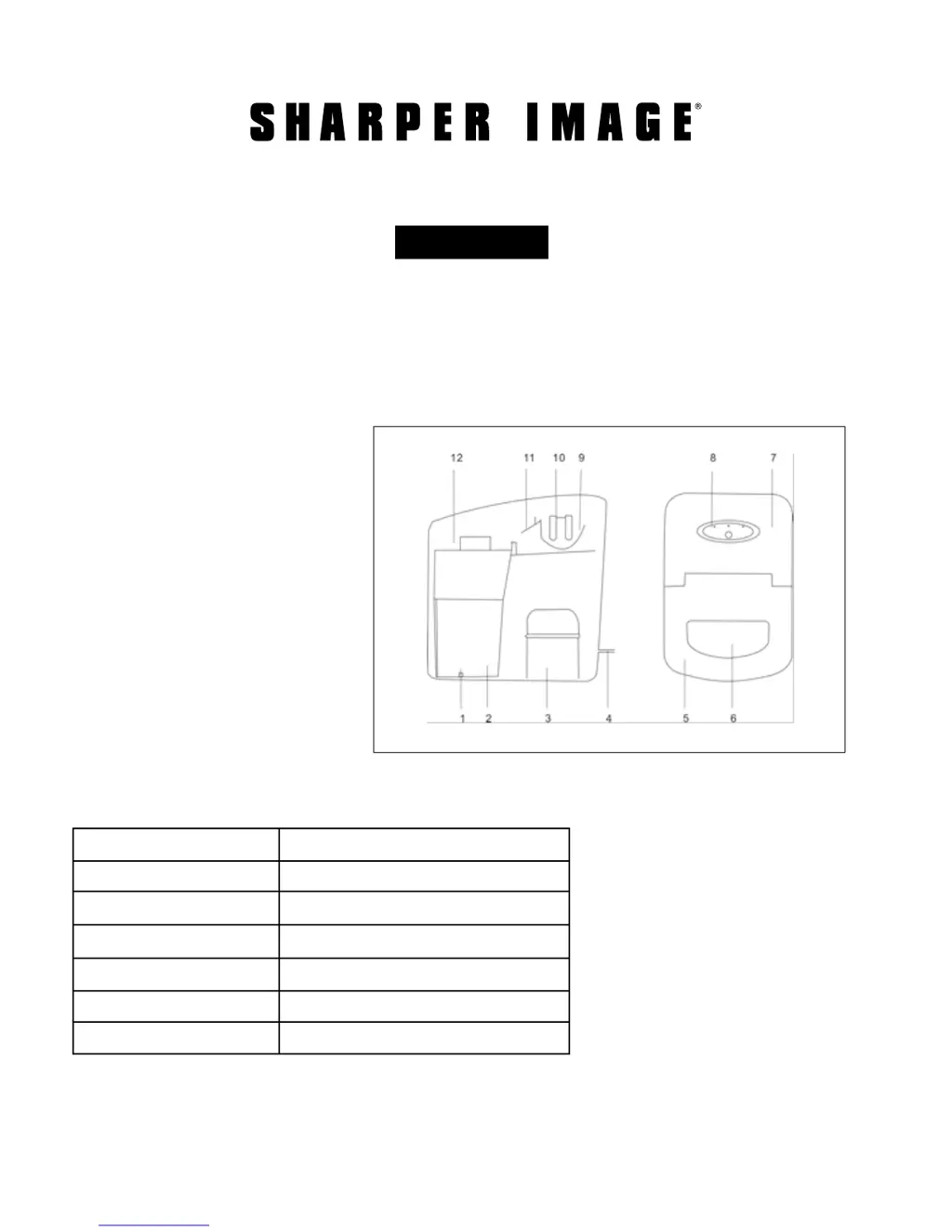
FEATURES
SPECIFICATIONS
1. Rubber stopper
2. Water tank
3. Compressor
4. Plug and power cord
5. Front lid
6. View window
7. Back front cover
8. Control Panel
9. Water tray
10. Evaporator
11. Ice shovel
12. Ice basket
Daily ice output: Approx. 22 lbs. in 24 hours
Ice storage capacity: 1.3 lbs.
Compressor: High efficiency CFC free R134a
Water reservoir capacity: 1.8 Qts.
Dimensions: 14” L x 9.5” W x 13” H
Voltage: AC 220-240V/50Hz
Power cord: 60” length with 3-prong safety plug

Questions and Answers

  • D
    David JensenJul 27, 2025
    Why are the ice cubes too large or sticking together in my Sharper Image Portable Ice Maker?
    • M
      Melissa WintersJul 27, 2025
      If the ice cubes in your Sharper Image Ice Maker are too large or sticking together, it's likely because ice from previous cycles is left in the water tray. To resolve this, turn the unit OFF and allow any remaining ice in the system to melt.
  • B
    Bryan DelacruzAug 11, 2025
    What to do if the 'ICE FULL' and 'ADD WATER' lights are on at the same time on my Sharper Image Portable Ice Maker?
    • T
      Todd PowersAug 11, 2025
      If the “ICE FULL” and “ADD WATER” lights are on simultaneously, it means that the water tray is blocked by an ice cube. To fix this, clear the ice cube from under the ice shovel. Then, remove the plug from the AC outlet, plug it back in, and press the “ON/OFF” button. The machine will restart within two minutes.

Summary

Getting Started and Controls

Initial Setup Warnings

Crucial warnings before first use, including avoiding tipping and ensuring proper ventilation.

Control Panel Functions

Explanation of indicator lights (ICE FULL, ICE, ADD WATER) and the ON/OFF button.

Ice Making Operation

Step-by-step guide to filling the reservoir, starting the unit, and expected ice production.

Operation, Care, and Troubleshooting

Important Operational Notes

Guidelines for compressor restarts after interruptions and safety precautions for warm surfaces.

Care and Maintenance Procedures

Instructions for cleaning, drying, and maintaining the ice maker's interior and exterior.

Troubleshooting Common Issues

Solutions for problems like 'ADD WATER' light, ice sticking, and simultaneous indicator lights.

Warranty and Customer Service

Sharper Image Portable Ice Maker Specifications

General IconGeneral
Ice ShapeBullet-shaped
Ice Size OptionsSmall, Medium, Large
Water Reservoir Capacity2.3 quarts
Power Consumption120W
Dimensions14.1 x 9.6 x 13.7 inches
Weight17.4 pounds
Ice Production Capacity26 lbs per day
Ice Storage Capacity1.5 lbs