
 Need help?
Do you have a question about the Shearwater PETREL-3 and is the answer not in the manual?
Details which models this manual applies to, including variants.
Explains the DiveCAN digital communication standard for rebreathers.
Highlights the benefits of the DiveCAN standard over analog wiring.
Instructions on how to power on the Petrel 3 dive computer.
Describes the function and usage of the Petrel 3's two titanium piezo-electric buttons.
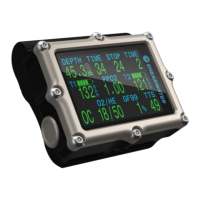
Details the information displayed in the top row of the main screen.
Explains the PPO2 information displayed in the center row.
Describes the current mode, gas, and decompression info on the bottom row.
Shows last dive data and air integration status.
Shows compass readings and PPO2 millivolt outputs.
Displays depth stats and CNS toxicity percentage.
Shows diluent PPO2, setpoint, and fraction of O2.
Displays gradient factors, TTS, and dive end time.
Shows battery status, external voltage, and system info.
Visualizes tissue compartment inert gas tensions using a bar graph.
Discusses common weaknesses and best practices for alarms.
Describes primary and persistent notifications.
Explains how vibration alerts function and are controlled.
Lists primary notifications, their meaning, and actions.
Lists the key features of the Petrel 3's digital compass.
How to access and navigate the compass display.
Instructions on how to mark a heading with the compass.
Discusses factors affecting compass accuracy and calibration.
Introduces the Air Integration system and its function.
Covers the installation and initial setup of AI transmitters.
Explains the various displays related to air integration data.
Discusses best practices for using multiple transmitters.
Provides troubleshooting steps for "No Comms" errors.
Outlines key pre-requisites for configuring the computer for dives.
Walks through a simple rebreather dive scenario.
Guides through a complex rebreather dive with multi-gas bailout.
Explains assumptions and factors affecting decompression data accuracy.
Visual overview of the computer's menu hierarchy.
Explains the function of various menu items and sub-menus.
Allows adjustment of dive-specific settings like setpoints and gases.
Enables review and management of stored dive logs.
Configures operating modes, salinity, and PPO2 settings.
Sets the decompression model, conservatism, and last stop.
Configures Air Integration settings, including transmitters and units.
Allows editing of open circuit bailout gas lists.
Allows editing of closed circuit diluent gas lists.
Sets the fraction of oxygen for calibration gas and sensor display mode.
Configures automatic switching of PPO2 setpoints based on depth.
Allows custom dive alerts for depth, time, and NDL.
Configures display units, brightness, and altitude compensation.
Sets compass view range and true north declination.
Allows setting date, clock, log rate, and resetting to defaults.
Accesses advanced configuration options for detailed settings.
Guides on updating firmware and downloading logs using the desktop software.
Explains how to update firmware and download logs using the mobile app.
Instructs on selecting the correct battery type after replacement.
Explains clock behavior and decompression tissue loading during battery changes.
 General
| Screen Resolution | 320 x 240 pixels |
|---|---|
| Screen Type | Transflective |
| Battery Type | Rechargeable Lithium-ion |
| Wireless | Bluetooth |
| Display | Color LCD |
| Gas Mixes | Up to 5 |
| Dive Log Capacity | 1000 hours |
| Algorithm | Bühlmann ZHL-16C |
| Operating Temperature | -10°C to 40°C |

 To Next Page
