SD-S92 User Manual
SHENZHEN SHIDU DIGITAL TECHNOLOGY CO.,LTD
Tel:+86-755-21635866 Fax:+86-755-29105099 Email:info@10shidu.com Website:www.10shidu.com
1. Turn on/off:
A. Long press “
” to turn on, and the blue indicator light will on all the time;
B. In “power on” status, long press “
” to turn off, and the blue indicator
light will go out.
2. UHF frequency pairing:
A. Turn on the UHF wireless voice amplifier, then long press “UHF” key and
the red indicator light flashes, which means the device has enter into the
UHF wireless pairing status;
B. Turn on the Hand-held MIC, then short press the “
” three times quickly
and enter into UHF wireless pairing status, then the red indicator light of
voice amplifier will stop flashing and on all the time, which means pairing
successfully. And you can begin to speak;
C. Paired successfully , then short press “UHF” key of voice amplifier, you
can pause UHF wireless amplification mode. Short press again, you can turn
on the UHF wireless amplification mode.
3. Charge the Hand-held MIC :
The Hand-held MIC is low battery with red indicator flashing please charge it
timely.
Please switch-off the speaker before charging. The red indicator light will
flash during charging and will on all the time after fully charged. Please
recharge it with 5V 500mA ~1.5A adapter and the charging time is normally 2
~3 hours.
Pairing & usage of U2 waist hanging UHF wireless microphone:
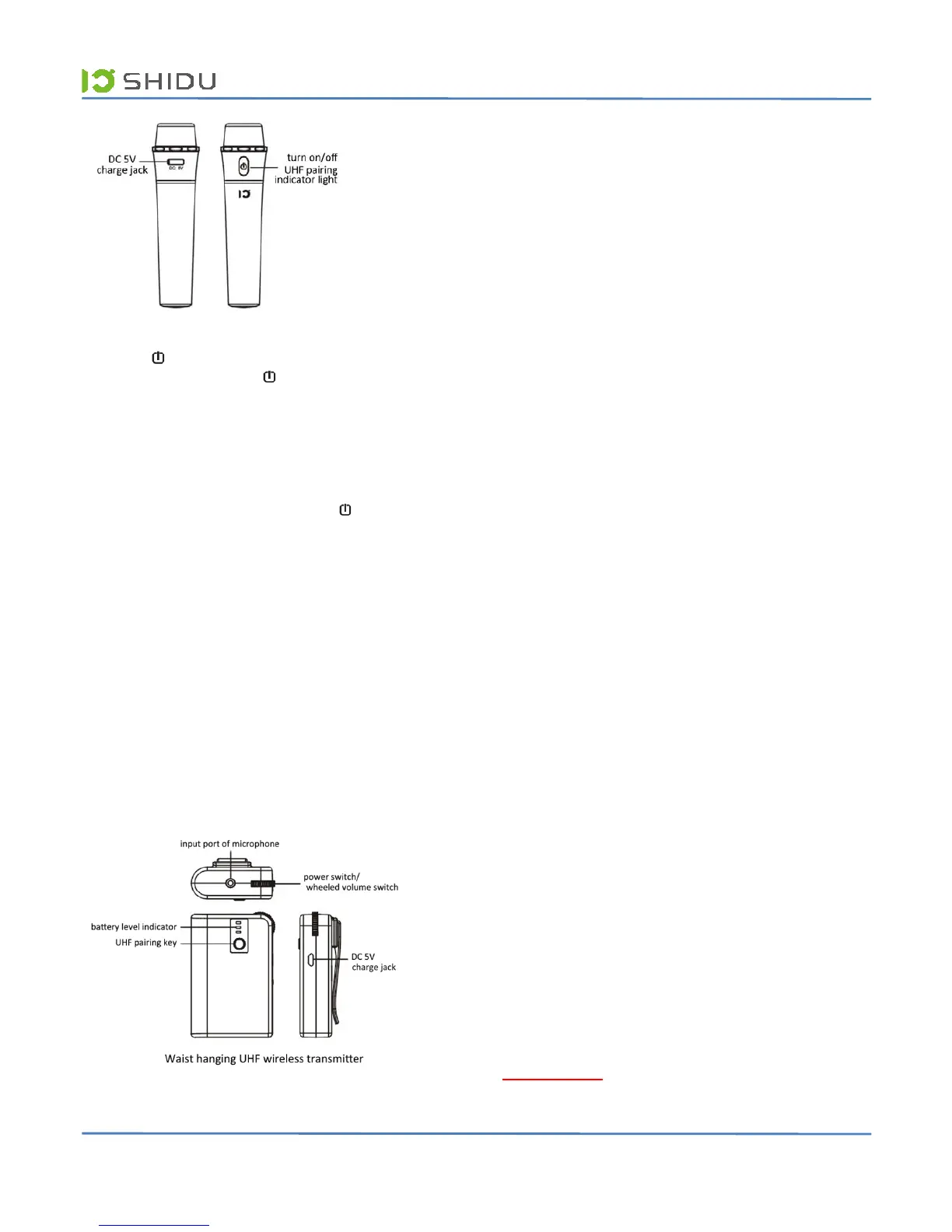
1. Turn on/off:
A. Insert the wired microphone into the “MIC” input port of waist hanging
UHF wireless transmitter;
B. Switch the wheeled power switch to “ON”, and the battery level indicator
will light on, which means you have turned on the waist hanging UHF
wireless transmitter;
C. Switch the wheeled power switch to “OFF”, and the battery level indicator
will go out, which means you have turned off the waist hanging UHF wireless
transmitter.
2. UHF frequency pairing:
A. Turn on the UHF wireless voice amplifier, then long press “UHF” key and
the red indicator light will flash, which means the device has enter into the
UHF wireless pairing status;
B. Long press the “Pair” key of waist hanging UHF wireless transmitter, and
enter into UHF wireless paring status, then the red power indicator will on
all the time, which means paired successfully and you can try to speak;
C. In the status of UHF wireless amplification, short press “UHF” key of
voice amplifier, you can pause UHF wireless amplification mode.
D. In the status of UHF wireless amplification, long press the “Pair” key of
waist hanging UHF wireless transmitter and you can exit the UHF wireless
amplification mode.
3. Adjust volume of waist hanging UHF wireless transmitter:
In the status of UHF wireless a mplification, you can adjust the volume of
amplification through the wheeled volume switch of waist hanging UHF
wireless transmitter.
(Note: You can also adjust the volume of amplification by operating the “+” &
“-” of multimedia UHF wireless voice amplifier.)
4. Charge the waist hanging UHF wireless transmitter:
A. Battery capacity i ndication: “Full” blue lights means 100%; “Half” yellow
lights means 50%; “Low” red lights means low battery and please charge it
timely;
B. How to charge the transmitter: Turn off the waist hanging UHF wireless
transmitter, and connect the DC 5V charger with the transmitter, then
connect with the 100~240V socket; the battery capacity indication “Half” and
“Low” will flash one by one when charging; and the three lights “Full”, “Half”
and “Low” will on all the time after charged.
Note: We suggest fully recharge the waist hanging UHF wireless microphone
before you using it at the first time.
SHIDU Guarantee:
100% SHIDU Guaranteed Product Satisfaction.
We promise 1 year warranty.
If you have any questions, please feel free to contact us, we will try
our best to provide you the best service.
www.10shidu.com
Email:info@10shidu.com


 To Next Page
 Loading...