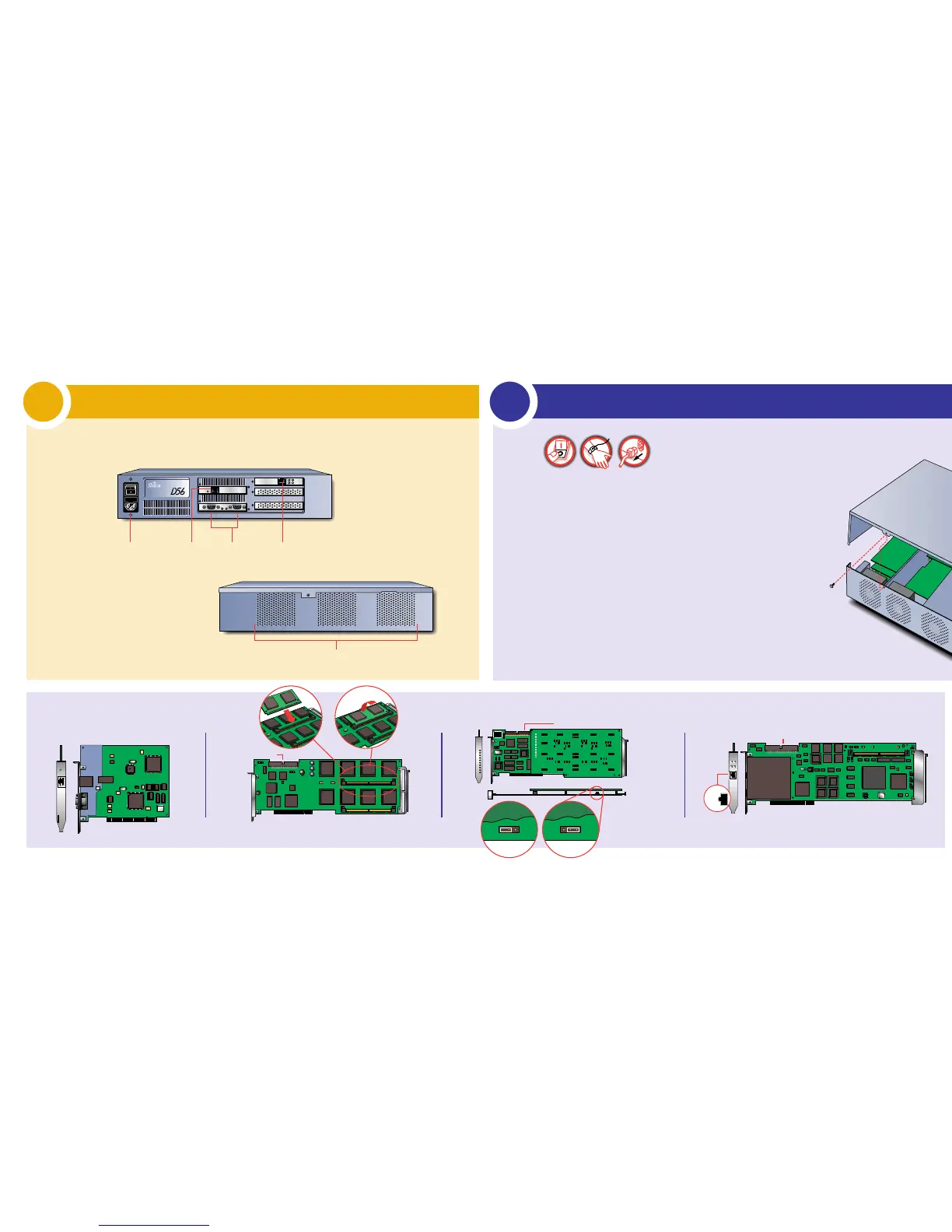
Getting Familiar With Your LanRover D56
1
Installing Shiva WAN, Digital Modem Cards, and Ether
2
Look over your LanRover D56. Each item of the unit is identified in the illustration below.
Caution: Before installing any card, make sure the AC power
cable is disconnected, you are wearing the static wrist band,
and all telecom-munication cables are disconnected.
Module Identification
Back
Front
10/100 Ethernet
1
Open the top,note the slots and where the cards are installed.
2
Insert the WAN card,Digital Modem Card (DMC),or Ethernet card
into an available slot.
3
Ensure the card is secure in the connector.
4
Screw the card bezel to the unit with the card bezel screw(s).
For WAN and DMC cards only:
a. Secure the card into the back slot with the hinged bracket.
b. Connect the MVIP cable to the MVIP cable connectors on all
WAN or DMC cards installed.
5
Close the chassis.
6
Secure cover with screws.
7
Install/reinstall all appropriate cables.
Cover Removal
High Density
Digital Modem Card Shiva Single/Dual T1/E1 PRI (WAN)



 To Next Page