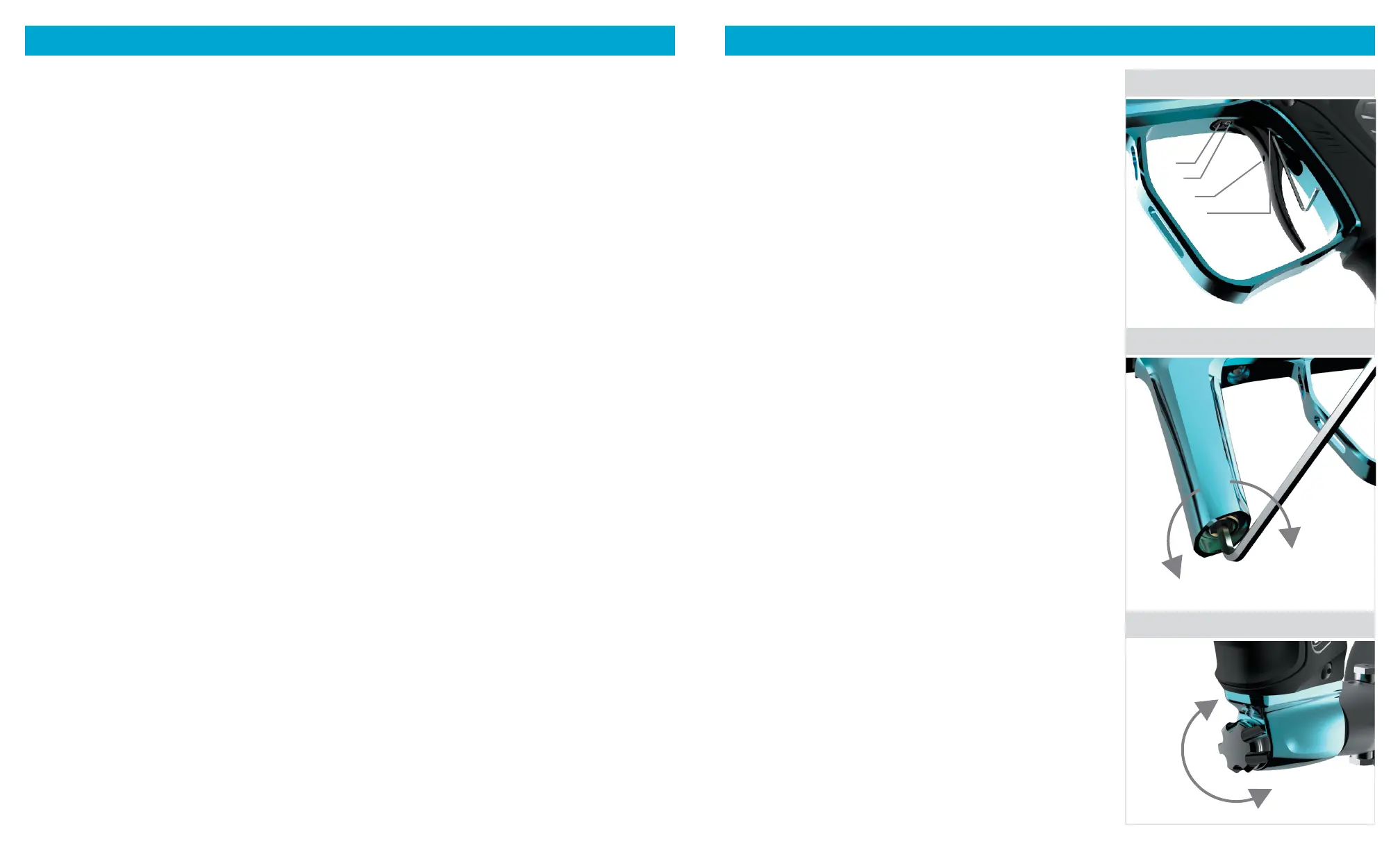
TRIGGER ADJUSTMENT The Shocker® XLS has four adjustments of
trigger customization. All set screws are adjusted with a 1/16” allen key.
Magnetic Tension- This set screw is located at the top of the trigger; it is
the set screw closest to the trigger guard. Adjusting this set screw will alter the
weight of the trigger pull. [FIG. 03 A]
Pre-Travel - This set screw is located at the top of the trigger behind the
magnetic tension set screw. Adjusting this set screw will alter the forward
travel of the trigger pull. [FIG. 03 B]
Firing Point – This adjustment is accessed through the hole in the trigger
face. Adjusting this set screw will alter the point where the trigger activates
the ring switch on the control board. [FIG. 03 C]
Post-Travel- This adjustment is accessed by placing the allen wrench at
a slight angle from the left hand side of the marker. Adjusting this set screw
will alter the rearward travel length of the trigger pull. [FIG. 03 D]
BARREL Assemble and install the included barrel – make sure The Freak®
insert is in the barrel back. Put the supplied barrel blocker over the end of the
barrel and secure it around the Shocker® XLS body.
BARREL BLOCKER A barrel blocking device must be used any time the Shocker®
XLS (or any other paintball marker) is connected to an air source and is in an area
where people are not protected by paintball goggles or paintball eld netting.
It is important to make sure that the barrel blocker is securely in place when it is
used. To put the barrel blocker on the Shocker® XLS, slide the bag part of the blocker
over the end of the barrel and loop the cords over the back of the marker. Adjust the
cord lock so that the barrel blocker is held snugly in place and cannot slip free.
LOADER Insert your loader into the feedneck and make sure it is secure. Due
to the high rates of re that Shocker® XLS can achieve, we recommend the use
of a modern high-performance loader.
AIR SOURCE (HPA) The Shocker® XLS is designed to be powered by a high-
pressure compressed air (HPA) system only. Use of carbon dioxide (CO
2
) to
power the Shocker® XLS is likely to cause damage to sensitive internal seals
and will result in a voided warranty.HPA systems with a 3000psi or 4500psi
capacity can be utilized on the Shocker® XLS. HPA systems with output
pressures between 400psi and 850psi can be used with the Shocker XLS. An
output pressure of 800-850psi is recommended for maximum consistency at
high rates of re (15bps+) HPA systems are shipped empty, and must be lled
by properly trained persons. Once lled, the HPA system is attached to the
Shocker XLS by screwing it in to the bottom-line ASA. [FIG. 05]
VELOCITY ADJUSTMENT Velocity must be tested at the start of each
paintball session. Fill the loader with paintballs and turn it on. While wearing
ASTM compliant paintball goggles in an area where all bystanders are protected,
remove the barrel blocker and re over a chronograph to measure the velocity.
Using a 5/32” hex key, turn velocity up (clockwise) or down (counterclockwise).
After each adjustment take 2 or three shots to allow pressure to stabilize, then
test velocity again. For safety, and to avoid internal damage, never adjust the
Shocker® XLS to re at greater than 300 feet per second. [FIG. 04]
ASA The Shocker® XLS is equipped with a bottom-line style air source adapter
(ASA) [FIG. 05]. Before screwing an HPA system into the ASA, make sure the
ASA is turned off by loosening the knob located on the front of the ASA. After
screwing in the HPA system, air is released into the marker by tightening the
knob on the front of the ASA. When turning the ASA off, a small amount of air
will vent from the ASA with a brief hissing sound, this is normal. Turning off
the ASA does not completely depressurize the Shocker® XLS and may leave
enough gas inside the marker to re 2 or more shots. Discharge this air by ring
the marker without paintballs in a safe and secure area.
PROGRAMMING Unload and de-gas the Shocker® XLS, then turn it on while holding the trigger down. Release the trigger when the Shocker®
XLS has booted into its settings menu. Tap the trigger to scroll through the available settings. Separate settings are recorded for each ring
mode. For example, the Rate of Fire Cap (ROF cap) in a league requiring Capped Semi-Automatic mode may be different from the ROF cap in a
league using PSP mode. When the Firing Mode of the Shocker® XLS is changed, the ROF cap changes with it. Only the settings used with the
currently selected ring mode are displayed in the Settings Menu. Hold the trigger down for two seconds to select a setting for adjustment.
Tap the trigger to scroll through the values available for the setting, then hold the trigger down for a second to select. After adjusting settings,
press and hold the power button to save the changes and turn off the Shocker® XLS. The Shocker® XLS may be returned to its factory default
settings by holding the trigger down for 5 seconds while in programming mode. The screen will ash when a factory reset is done.
SETTINGS
BURST COUNT – The number of shots red per trigger pull in BURST Firing Mode.
RAMP START – How quickly RAMP mode ramps up the rate of re compared to the rate of trigger pulls.
RAMP PRCNT – Ramp Percentage – How much faster the RAMP mode should make the rate of re compared to the rate of
trigger pulls when it is fully engaged.
TRGGR DBNCE – Trigger Debounce - Adjusts the length of time the XLS processor must see a signal from the trigger switch needed to qualify
as a trigger pull. Setting Trigger Debounce too low may result in more than one shot per player’s pull of the trigger in semi-automatic modes.
MECH DBNCE – Mechanical Debounce - Adjusts how the XLS processor filters out trigger signals caused by mechanical vibration.
Setting Mechanical Debounce too low may result in more than one shot per player’s pull of the trigger in semi-automatic modes.
FSDO ADJUST – First Shot Drop Off (FSDO) Adjust – When the Shocker® XLS sits for several seconds between shots, the bolt may
require a higher dwell time to break friction and re at the full velocity. FSDO Adjust sets this dwell in milliseconds.
FSDO TIMER – First Shot Drop Off Timer – The amount of time in seconds the Shocker® XLS must sit idle before a shot is
considered the “rst shot” in need of higher dwell time to break friction.
AUTO OFF – The amount of time (minutes) that the Shocker® XLS can be unused before it turns itself off to conserve battery charge.
TIMER ENABLE – Enables or disables the game timer.
TIMER ADJUST – Sets the length of the game timer in minutes.
OLED (SCREEN MODES)
MODE – The currently selected ring mode and its Rate of Fire Cap (ROF cap) are shown near the top of the OLED display.
VISION – The status of the Vision anti-chop system is shown as a paintball in the middle of the display. A hollow paintball indicates
that the breech is empty. Solid indicates that it is full and ready to re. If a problem is detected “EYE FAULT” will be displayed. Vision
may be manually turned on or off by pressing the power button for one second. The power button will blink and the display will read
“EYEOFF” with an X in place of the paintball when Vision is off. When Vision is off or faulted the power button will be red and the
Shocker® XLS pause slightly between shots to allow more time for the ball to settle in place.
BATTERY – Estimated battery charge level is indicated in the lower right of the display. Accuracy may vary between battery brands,
especially rechargeable.
LIVE ROF – The highest rate of re achieved during the last few seconds is shown below the middle of the display.
FIRMWARE VERSION – When the game timer is off, the rmware version is shown in the lower left corner of the display. Shocker®
XLS rmware updates may be needed to comply with laws restricting ring modes in different countries, changes in league modes or
to change languages used in the OLED display. Firmware installation instructions and software are available at ShockerPaintball.com.
GAME TIMER – When enabled, the game timer is displayed in the bottom left of the display. The timer starts counting down when the
rst shot is red. Turning the Shocker® XLS off and back on again will reset the timer.
FIRING MODES
SEMI – Semi-automatic – One shot per trigger pull. This is the only mode not limited by the rate of re (ROF) Cap.
C SEMI – Capped Semi-automatic – Same as Semi, but will not re faster than the ROF Cap.
NXL – National X-Ball League – One shot per trigger pull. When the trigger is pulled faster than 5 times per second, additional shots
are red with each trigger pull, up to the ROF Cap rate. This will be updated if league changes its ring mode restrictions.
PSP – Paintball Sports Promotions – Fires like Semi until three fast trigger pulls then res repeatedly at ROF Cap rate as long as the
trigger is pulled and released. If one second goes by without a trigger pull or release, the marker reverts to ring one shot per trigger pull.
MILL – Millennium League – One shot per trigger pull. When the trigger is pulled faster than 5 times per second, additional shots are
red with each trigger pull, up to the ROF Cap rate.
RESP – Auto Response – Fires on both the pull and release of the trigger.
BURST – Multi-shot burst - Fires a burst of shots at the ROF Cap rate when the trigger is pulled and held. Stops ring if the trigger is
released before the burst is complete.
AUTO – Safety Full Automatic – Fires repeatedly at the ROF Cap rate when the trigger is pulled, released, then quickly pulled and held.
SELECT – Select Fire – Allows the marker to be switched between SEMI, PSP1 and NXL modes by tapping the power button, even if
the Tournament Lock is locked. When Select Fire is in use, the OLED Displays SELECT SEMI, SELECT PSP1 or SELECT NXL, depending
on which mode is in use.
RAMP – Ramping – Begins ring one shot per trigger pull, begins ring progressively at a pace faster the trigger, as the trigger is pulled faster.
3 QUICKSTART RIGHT INSIDE
ELECTRONIC ADJUSTMENTS MECHANICAL ADJUSTMENTS
FIG. 2
FIG. 2
FIG. 2
C
D
A
B
+
–
AIR OFF
(LOOSEN)
AIR ON
(TIGHTEN)
03
TRIGGER ADJUSTMENTS
04
VELOCITY ADJUSTMENT
05
ASA



 To Previous Page
 Loading...