EasyManua.ls Logo

Sidekick Smart - Charging Your Device; Connect the Charger; Attach to Device; Confirm Full Charge

Sidekick Smart
7 pages
Print Icon
To Next Page IconTo Next Page
To Previous Page IconTo Previous Page
Loading...
QUESTIONS?
Charging Your Device
IMPORTANT:
Before using your Sidekick Smart,
it should be fully charged.
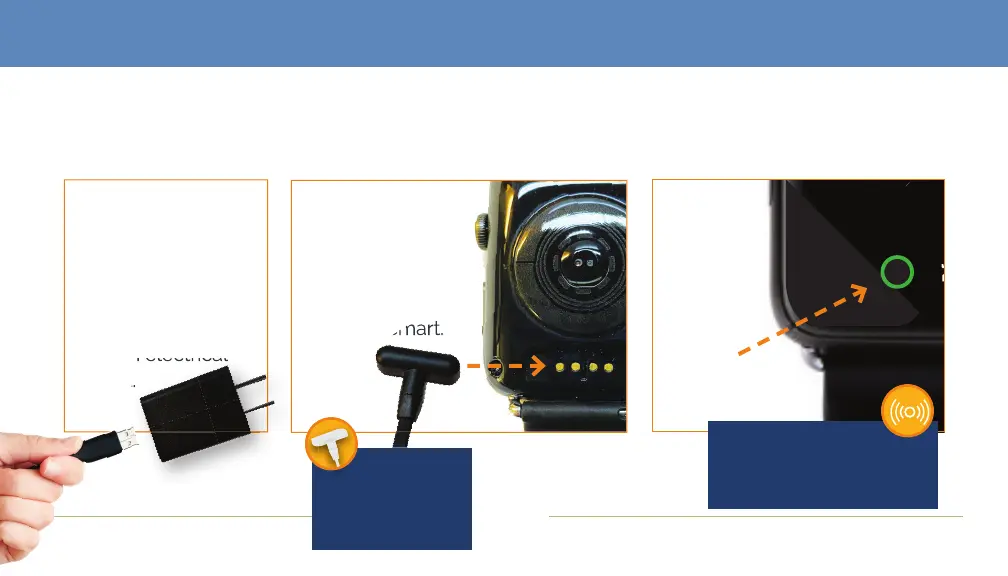
1.
Plug the magnetic
USB charging cable
into the enclosed
adaptor and then
plug the adaptor
into an electrical
outlet.
2.
Attach the
magnetic end
of the cable to
the back of the
SideKick Smart.
3.
When fully
charged,
it will sound
a loud tone
and the
battery
indicator will
show 100%.
May 4, 2021
100%
65%
Listen for the loud tone
your Sidekick Smart
makes when fully charged.
into an electrical
outlet.
CALL (800) 998-2400
SideKick Smart.
SideKick Smart.
Make sure
that the magnetic
charging cable is
rmly in place.