8 9
4.2 Button functions
Enable/Disable light mode
By simultaneous pressing of the PLUS and MINUS buttons
the light mode is activated or deactivated.
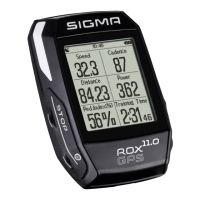
STOP button:
Press this button to exit the
sub-menus or stop a running
data log.
MINUS button:
Use this button to change the training views
during the training. In the menu, navigate
through the separate points or reduce
a value to be set.
ONLY IN TRAINING (with active workout):
Press and hold to move to the next phase
of your defined workout.
PLUS button:
Use this button to change the
training views during training.
In the menu, navigate through
the individual points or increase
a value to be set.
ONLY IN TRAINING
Press and hold to open
the Quick Menu in training
START button:
Press this button to reach the
sub-menus or start the data log.
During a data log you can also
press this button to start
a new lap.
Press and hold the button to
switch the ROX GPS 11.0 on
and off.
EN


 To Next Page