EasyManua.ls Logo

Silicon Valley Peripherals GF-07 - User Manual

Silicon Valley Peripherals GF-07
3 pages
Print Icon
To Next Page IconTo Next Page
Loading...
User Manual for Mini Magnetic GPS
Tracker with Microphone GF-07
Question and Answer IconNeed help?

Do you have a question about the Silicon Valley Peripherals GF-07 and is the answer not in the manual?

Summary

GPS Tracker Specifications

How to Operate the GPS Tracker

Binding Master Number

Set the primary authorized phone number using SMS command "000".

Starting Audio Recording

Initiate audio recording via SMS command "555".

Enabling Sound Monitoring

Activate microphone and monitor ambient sound via SMS command "666".

Requesting Current Location

Get real-time location with Google Maps link via SMS "777".

Real-time Environment Listening

Listen to the tracker's environment by calling its SIM number.

Viewing Historical Tracks

Retrieve login details via SMS "102" to view past paths online.

Clearing Memory Card

Delete all data on the memory card using SMS command "445".

Tracker Management Commands

Checking Device Status

Query status like battery and signal strength via SMS "888".

Restarting and Shutting Down

Commands "999" to restart and "444" to shut down the tracker.

Overview

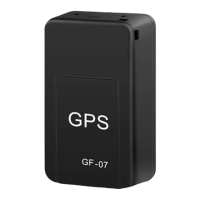
The GF-07 is a mini magnetic GPS tracker equipped with a microphone, designed for discreet tracking and monitoring. Its compact size and magnetic attachment make it suitable for various applications where a small, portable tracking device is needed.

Function Description

The primary function of the GF-07 is to provide real-time location tracking using GPS and GSM/GPRS networks. It also incorporates a microphone, allowing for audio monitoring of its surroundings. The device operates by utilizing a SIM card for communication and a microSD card for recording audio. Users can interact with the tracker by sending SMS commands from a master phone number, which enables features such as starting audio recording, monitoring sound, requesting location, and checking the device's status. Additionally, it offers a feature to track the device's historical path through a dedicated website.

Important Technical Specifications

  • Network: GSM/GPRS
  • GPS Accuracy: 10m
  • GSM Frequency: 850/900/1800/1900MHz (quad-band, ensuring global compatibility)
  • Battery Capacity: 400mAh
  • Charging Input: microUSB
  • Standby Time: Up to 12 days
  • Working Time: 4-6 days
  • Working Temperature: -20°C to +55°C
  • Supported Cards: 2G SIM card, mini TF (microSD) card
  • Dimensions: 35mm x 20mm x 14mm

These specifications highlight the device's portability and endurance, with a decent working time for its size and a wide operating temperature range. The reliance on 2G SIM cards is a crucial detail, as 2G networks are being phased out in some regions.

Usage Features

The GF-07 offers a range of user-friendly features, primarily controlled via SMS commands:

  • Initial Setup: Requires a SIM card and a microSD card. After insertion and power-on, the device enters standby mode.
  • Master Number Binding: Send "000" to the tracker's SIM card number to bind a master phone number. This is essential for secure control of the device.
  • Audio Recording: Send "555" to the tracker to initiate audio recording. The device will reply to confirm recording has started.
  • Sound Monitoring: Send "666" to the tracker to activate the microphone for sound monitoring. The device will reply to confirm the microphone is active.
  • Voice-Activated Call Back: When sound monitoring is active, if the ambient sound exceeds 40dB, the GPS tracker will automatically call the master phone number, allowing for real-time listening.
  • Real-Time Listening: Users can directly call the SIM card number in the GPS tracker to listen to the real-time sound of the tracker's environment.
  • GPS Location Request: Send "777" to the tracker to receive a Google Maps link with the current location of the GPS tracker.
  • Path Tracking: Send "102" to the tracker to receive login credentials for the http://www.gpsui.net/ website. This platform allows users to view the entire historical path the GPS tracker has made.
  • Status Check: Send "888" to the tracker to get information about its battery capacity, signal strength, frequency startup, and memory card capacity.
  • Restart Device: Send "999" to the tracker to restart it. The restart process takes approximately 1 minute.
  • Shutdown Device: Send "444" to the tracker to shut it down.

These features provide comprehensive control over the device's tracking and monitoring capabilities, making it versatile for various surveillance and asset tracking needs.

Maintenance Features

The GF-07 includes a specific maintenance feature related to its memory:

  • Memory Card Cleaning: Send "445" to the tracker to delete the content of the memory card. The device will reply to confirm that the memory card has been successfully cleaned.

This feature is useful for managing storage space on the microSD card and for privacy concerns, ensuring that recorded audio can be remotely cleared. The device's microUSB charging input also simplifies power management, as it uses a common charging standard. Regular monitoring of the battery capacity via the "888" SMS command is recommended to ensure continuous operation.

Silicon Valley Peripherals GF-07 Specifications

General IconGeneral
BrandSilicon Valley Peripherals
ModelGF-07
CategoryGPS
LanguageEnglish