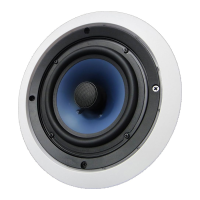
2-Way Ceiling Speaker
! IMPORTANT !
If an icon appears at the end Ofa paragraph, go
to the box on that page with the corresponding
icon for pertinent information.
O - Caution
- Note
NOTE
DOnot paint the speaker element. We
recommerxi you spray the grile so "nt
does not block the holes.
O CAUTION O
Be sure notto cut into anyexistingwiringor
plumbing hidden behind the wall.
NOTE
Avoid routing the speaker wire near
electrical wires.
Do not nai or stQle thrcwgh
INSTALLATION INSTRUCTIONS
Please read before using equipment.
PREPARING THE LOCATION
Required tools (not included):
1.
2.
3.
drywall or keyhole saw
wire stripper
Phillips screwdriver
pencil
14 - 18 gauge speaker wire
Be sure the mounting surface is
between 3/8" (9.5mm) and 1 1/4"
(31mm) thick, with at least a 2 3/4"
(69mm) clearance behind the
mounting surface, so that no wall
studs or other objects block the
back of the speaker.
Remove the inner cardboard disc
from the supplied template/paint
mask and keep it for later. Use
the outer portion as a template to
mark the cutout hole size and
location for mounting the speaker.
Use a drywall or keyhole saw to
cut the hole. o
paint mask and replace the grille.
Paint Mask
CONNECTING THE SPEAKER WIRES
l. Route the speaker wire to the
speaker from the audio equipment.
2. Separate about 4" (101 mm) of speaker
wire at each end.
6m (1/40
101m (4')
3. Using a wire stripper, remove about
1/4" (6mm) of insulation from each wire.
Then twist the ends of each wire.
4. The red (+) terminal on the speaker
should connect to a (+) channel on
your audio equipment and the
black (-) terminal on the speaker should
connect to the same channel (-) terminal
on your audio equipment.
MOUNTING THE SPEAKER
PREPARING THE SPEAKER
If you choose to paint the frame and
grille, we recommend using spray paint.
Make sure to let the paint dry before
connecting the speaker wire or
mounting the speaker.
To remove the grille for painting, use the
grille remover or insert a paper clip into one
of the grille openings and then pull up.
Or, you can carefully twist the plastic frame
back and forth until the grille edge becomes
exposed. Then lift out the grille.
Carefully remove the dust cloth from
behind the grill and replace it after
you are finished painting.
You can also paint the frame to match
your wall or ceiling. To prevent paint from
entering the speaker, remove the grille
and insert the supplied cardboard paint
mask. After the paint is dry, remove the
1.
2.
3.
4.
Remove the grille to expose the
mounting screws.
Be sure the mounting tabs are
tumed in, allowing the speaker to
fit into the hole. Then insert the
speaker into the mounting hole.
Turn the four screws to tighten the
mounting tabs to the wall or
ceiling. Be careful not to
over-tighten the screws.
Replace the grille.
Mounting
Tabs
To remove the speaker from the wall or
ceiling, loosen the screws only far
enough to remove the speaker. This will
prevent the loss of the mounting tabs.


 Need help?
 General