EasyManua.ls Logo

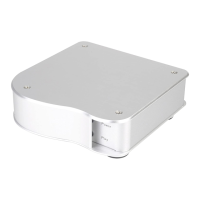
SilverStone EB01-E - User Manual

SilverStone EB01-E
16 pages
Print Icon
To Next Page IconTo Next Page
Loading...
The key to high quality computer audio
ENSEMBLE SERIES
manual
0
1-E
1-E
01-EEB
EB
EB
Question and Answer IconNeed help?

Do you have a question about the SilverStone EB01-E and is the answer not in the manual?

Summary

Product Overview

Key Features of EB01-E

Highlights the key features and capabilities of the EB01-E, such as high-quality DAC and premium decoder.

EB01-E Technical Specifications

Details the technical specifications, including model, material, input/output types, sampling rates, and OS support.

USB Connection Installation Steps

Connecting EB01-E via USB

Guides users on connecting the EB01-E to a computer using a USB cable for audio output.

Driver Installation and System Restart

Instructs on installing the necessary driver and restarting the computer for proper device recognition.

Selecting USB Input on EB01-E

Explains how to select the USB input on the EB01-E using the rear switch, ensuring the indicator is lit.

Optical;Coaxial Connection Installation Steps

Non-PC Device Connection Installation Steps

Product Warranty Information

Warranty Terms and Conditions Details

Outlines the terms and conditions, coverage, and limitations of the product warranty, including contact information.

Summary

Product Overview

Key Features of EB01-E

Highlights the key features and capabilities of the EB01-E, such as high-quality DAC and premium decoder.

EB01-E Technical Specifications

Details the technical specifications, including model, material, input/output types, sampling rates, and OS support.

USB Connection Installation Steps

Connecting EB01-E via USB

Guides users on connecting the EB01-E to a computer using a USB cable for audio output.

Driver Installation and System Restart

Instructs on installing the necessary driver and restarting the computer for proper device recognition.

Selecting USB Input on EB01-E

Explains how to select the USB input on the EB01-E using the rear switch, ensuring the indicator is lit.

Optical;Coaxial Connection Installation Steps

Non-PC Device Connection Installation Steps

Product Warranty Information

Warranty Terms and Conditions Details

Outlines the terms and conditions, coverage, and limitations of the product warranty, including contact information.

SilverStone EB01-E Specifications

General IconGeneral
BrandSilverStone
ModelEB01-E
CategoryMusic Equipment
LanguageEnglish