2
| 2 26
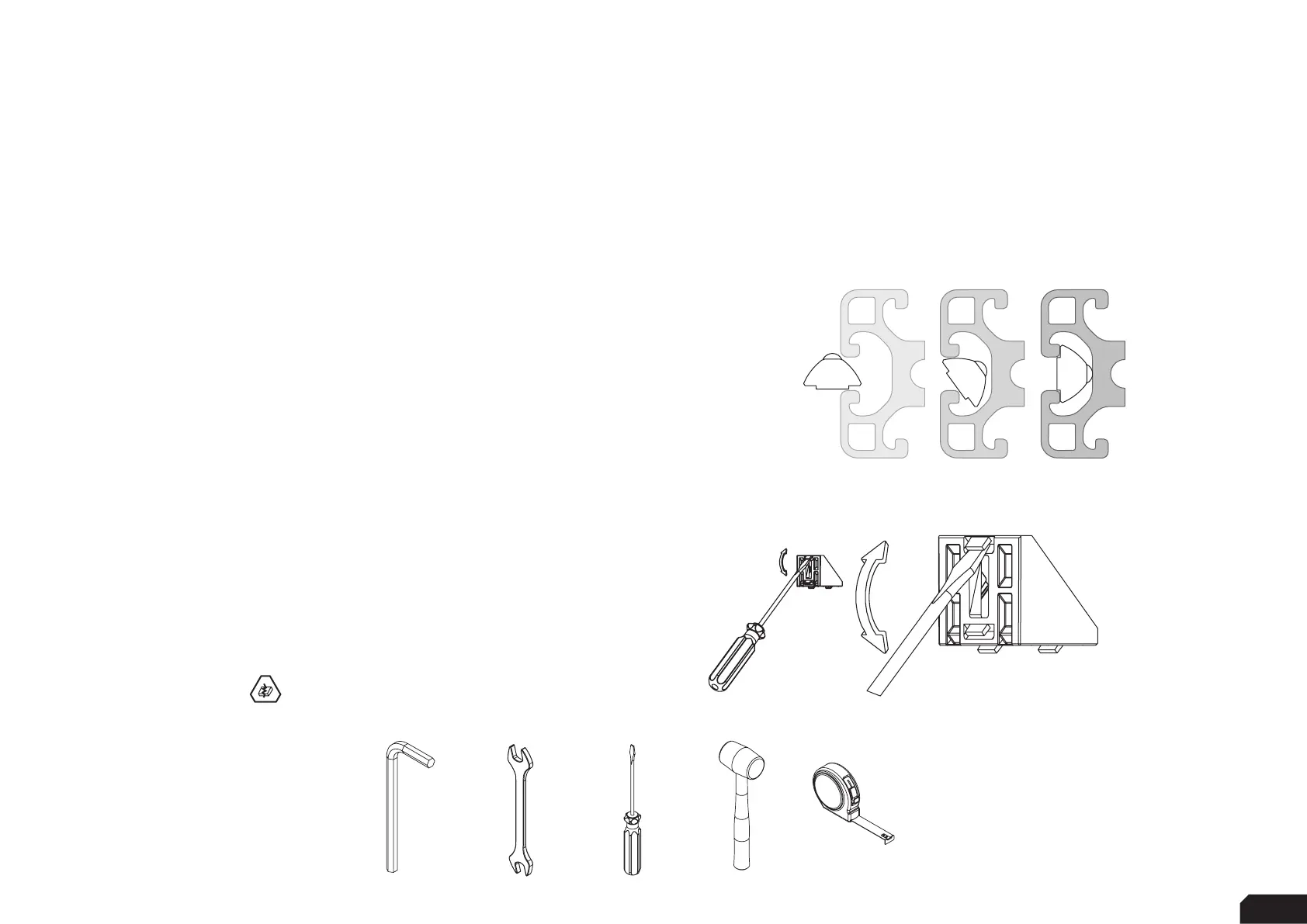
Breaking tabs:
Sometimes tabs from corner brackets need to be broken off in
order to fit as instructed. Place a flathead screwdriver behind
the tab and tilt upwards.
Always make sure to point away from you while doing so.
To know when to do this, we will show the following
symbol next to the brackets.
Inserting Slot-Nuts:
You got excited, finished the build, put the caps on, but forgot to install
one element. Do not worry. It happens to everyone. In this diagram, you
can see how to insert a Slot-Nut directly into the slot from the side.
You can also use one of your smaller Hex wrenches to help wiggle
the Slot-Nut in place.
Tools needed:
Thank you for purchasing this Sim-Lab product! On the following pages, you will find detailed instructions on
assembly. This requires only a set of simple tools and some of your time. Please check the bill of materials before
starting (page 22) and make sure all the parts are delivered.
BEFORE YOU START:
5/6MM 13MM
-


 To Next Page