35
Technical Details
Two independent radios
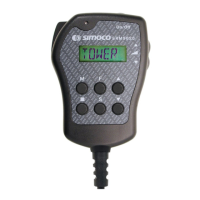
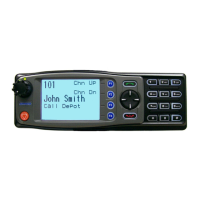
When not in repeater mode you have 2 independent radios that can be used on all the SAR frequencies via the single control head. The head can be
switched from radio to radio by pressing the top button on the radio – it’s labelled on the screen with an arrow pointing to the radio that it is currently con-
trolling (“left” or “right” hand radio).
Why 2 radios?
1) When the radios are turned on (single switch on the control head) the default state is the right hand radio on the TWC and the left hand one on the ECC
channel thus complying with the requirement to monitor this channel (Although I believe this requirement is to be relaxed?).
2) When working with other teams (and coastguard) you can keep general chitchat on your own TWC while still monitoring and operating on the other
team’s (or coastguard) channel.
3) When attending an incident, if expecting a helicopter (or even if you’re not), you can monitor CH53 as well as the TWC.
4) We don’t always man base during an incident because we can’t always get radio contact, even with repeaters, back to base from all areas. So we use
one of the vehicles as a mobile base giving us 2 radios to control an incident.
5) If you get bored during a callout you can put one radio on scan and the other on the TWC.
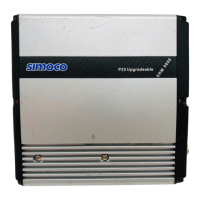
The setup makes best use of the 2 radios that you need to have installed to make a repeater.
How it works – The DMAP board
The main function of the DMAP board is to supply a mechanism to enable a user to supply addition code for installation in the radio. The code is written in
“C” and compiled into a single file that you upload to the DMAP board using the now familiar radio programming software. You go to menu Options, then
Upgrade Software, select the new file and hit download. It does not change the DMAP or radio software, just adds a bit of your own.
When the additional code is installed, it gets called every 2 milliseconds. During each call you then have complete control over both radios and the head for
as long as you need, usually no longer than a few milliseconds is required to send commands and check the status of each radio and the control head. This
is when I am able to intercept selcall control sequences, intercept key presses, change the radio channels, write text to the control head display, switch the
digital output used to switch the RF relays in the diplexer box, set the volume, enable the repeater mode and send out additional “beeps”. Simoco were
very helpful (after I had finished what I wanted to do) and have sent me source code for the repeaters mode.
Further work
1) Add a "This is going through the repeater beep" to all transmissions that go through the repeater.
2) While in repeater mode, monitor another channel (eg Helicopter), and send out a beep on the TWC if any thing is heard on this channel. The base can
then switch to that channel. I could get the repeater to rebroadcast on this channel but I am not sure this is a good idea!
3) Get it to change channel remotely, i.e. use CH53 or indeed any channel in the correct range instead of TWC.
4) There are many other things that can be done, I just have not thought of them yet.
(Continued from page 34)


 To Next Page
 Loading...