quick start
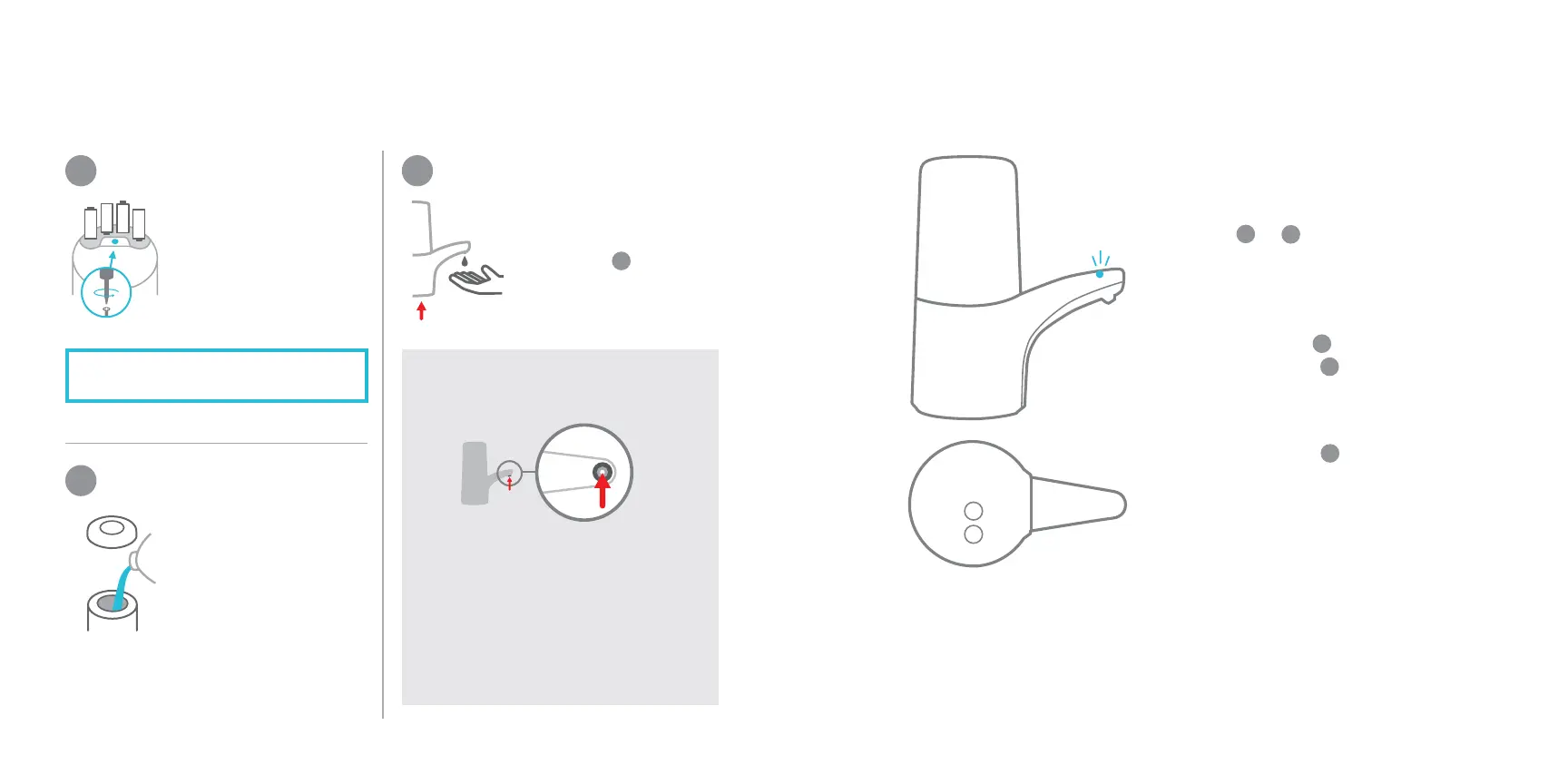
• use a screwdriver to
remove battery cover
• insert 4 AA batteries
as shown
• unscrew top to fill
chamber
Note: Do not use
soap with exfoliants.
• place your hand under
the sensor
• hold down button
until soap comes out
insert batteries
prime the pump
fill the reservoir
1
2
3
Note: Only use alkaline batteries.
+
If the soap isn’t flowing, use a
pin or paperclip to lightly poke
the valve opening.
Be careful not to push too far
or puncture the surrounding
rubber area.
tip: priming problem?
adjust the volume
on/off
continuous dispensing
low battery alert
To change the amount dispensed,
press or buttons on the bottom
of the pump.
Press and hold button to
dispense soap continuously.
LED will turn red during operation
to indicate low battery.
+
-
Press and hold button to turn the
pump off; press button to turn on.
+
+
-
+
-
bottom view


 To Next Page