5/6
EN
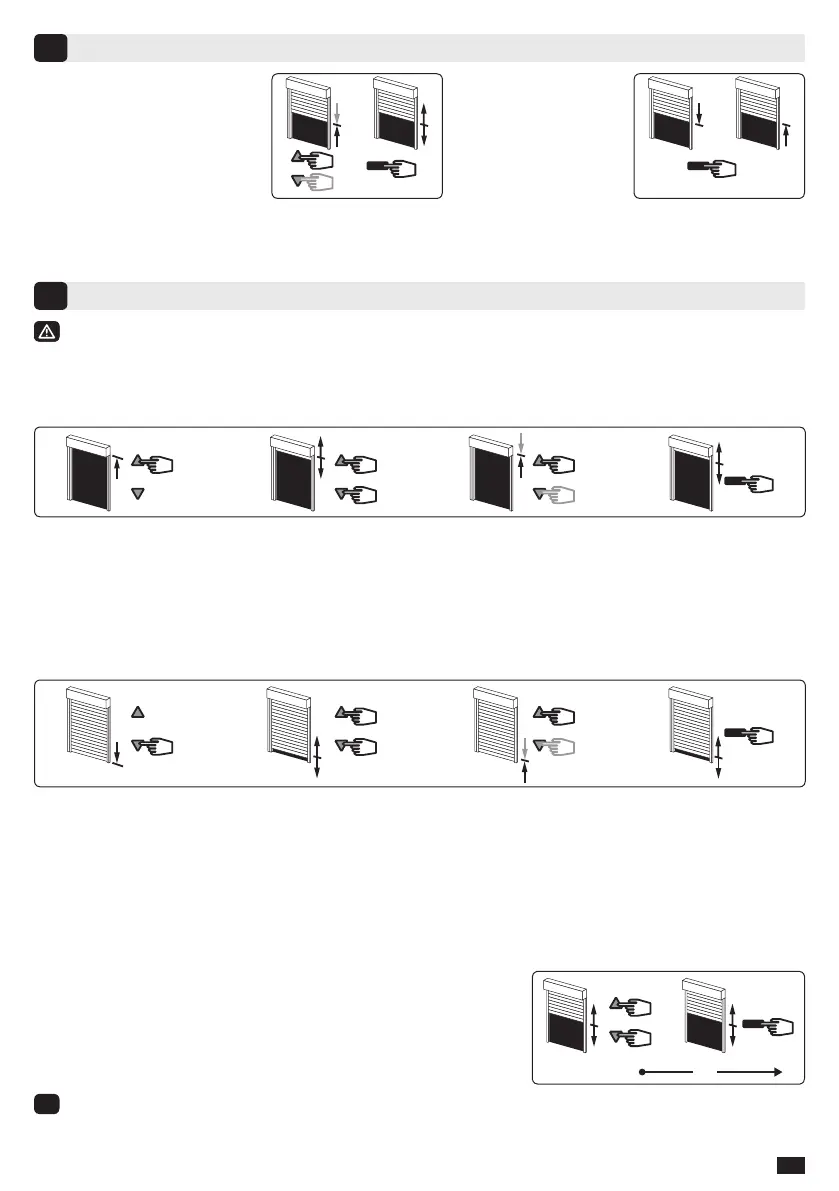
Recording / controlling / deleting intermediate position
7
Recording:
- Move the motor to the wanted
position.
- Press 5 seconds on the
“STOP” button. The motor
will run for 0,5 second in one
direction and then in the other.
Re-adjustment of end limits and modication of the rotation direction (in user mode)
8
The re-adjustment of end limits is automatic every 60 cycles (during 4 cycles) or after a power
supply failure for the following installation UP end limit, mounting A and C, DOWN end limit,
mounting A and B.
8.1- Re-adjustment of UP end limit (mounting B and D only):
1- Move the motor to the up end limit previously adjusted in §4.3 with the “UP” button.
2- Press simultaneously for 5 seconds the “UP” and “DOWN” buttons. The motor will run for 0,5 second in
one direction and then in the other direction.
3- Adjust the new position with the “UP” and “DOWN” buttons.
4- Conrm the new position by pressing 2 seconds the “STOP” button. The motor will run for 0,5 second in
one direction and then in the other direction. The new end limit is memorized.
8.2- Re-adjustment of DOWN end limit (mounting C and D only):
1- Move the motor to the down end limit previously adjusted in §4.3 with the “DOWN” button.
2- Press simultaneously for 5 seconds the “UP” and “DOWN” buttons, The motor will run for 0,5 second
in one direction and then in the other direction.
3- Adjust the new position with the “UP” and “DOWN” buttons.
4- Conrm the new position by pressing 2 seconds the “STOP” button. The motor will run for 0,5 second in
one direction and then in the other direction. The new end limit is memorized.
8.3- Modication of the rotation direction :
Do not move the roller shutter to the up or down end limit position.
1- Press the “UP” and “DOWN” buttons simultaneously for
5 seconds. The motor runs briey in one direction, then in the
other.
2- Within 2 seconds, press the “STOP” button for 2 seconds. The
motor briey runs in one direction, then in the other. The rotation
direction has been changed.
i
After stage 1, if no operation is carried out before 2 seconds, the motor runs again briey in one
direction and then in the other, and the rotation direction is not changed.
Control:
- Press the “STOP”
button for 0,5 second.
The motor runs to the
intermediate position.
Deleting: Position the motor on the intermediate position. Press 5 seconds on the “Stop” button. The
intermediate position is deleted.


 To Next Page
 Loading...