EasyManua.ls Logo

Sinar f2 - Page 7

Default Icon
14 pages
Print Icon
To Next Page IconTo Next Page
To Previous Page IconTo Previous Page
Loading...
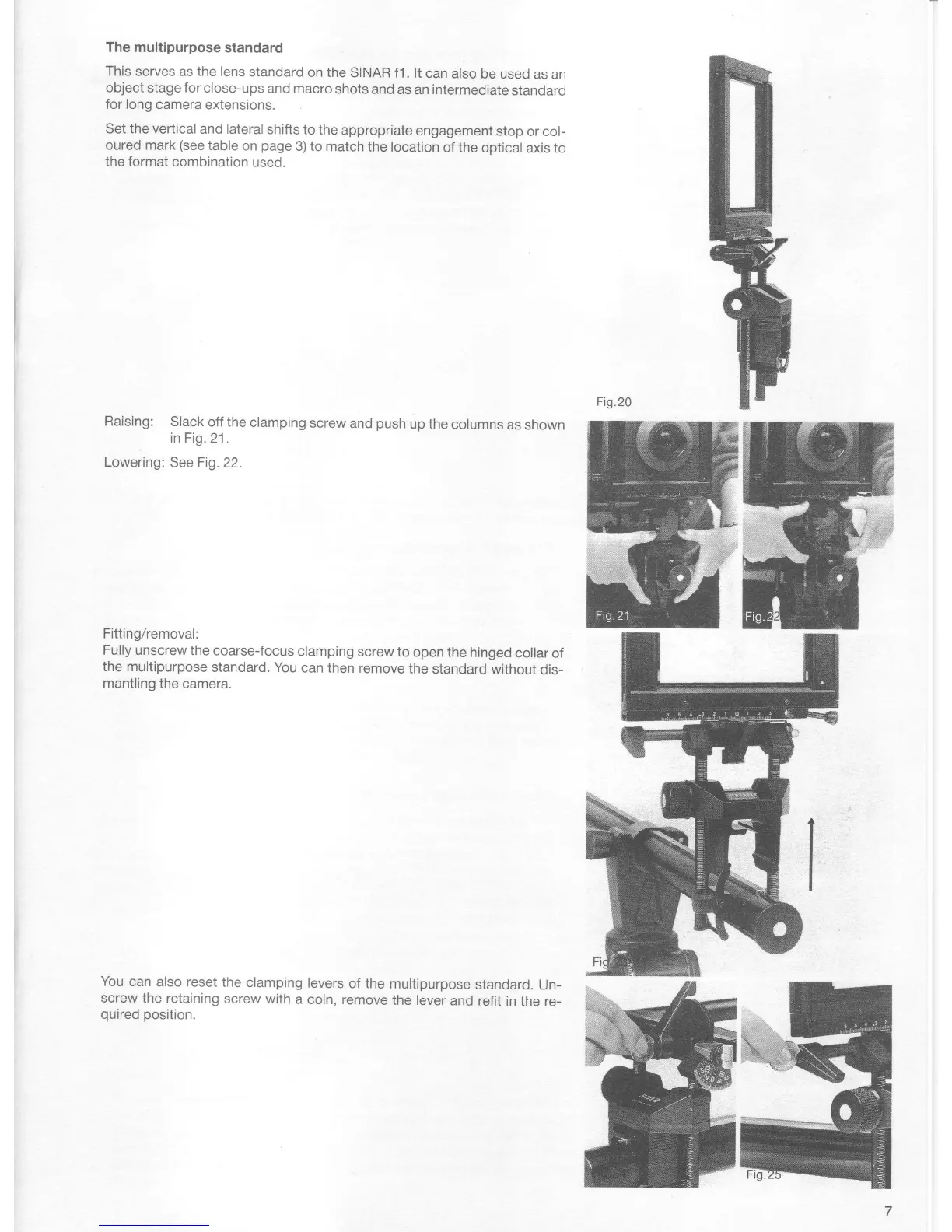
The multipurpose
standard
This serves
as
the
lens
standard
on the
SINAR f1
. lt
can also
be used
as an
object
stage
for
close-ups
and macro
shots
and as
an
intermediate
standard
for long
camera extensions.
Set the vertical
and lateral
shifts
to the
appropriate
engagement
stop
or col-
oured
mark
(see
table
on
page
3) to
match
the location
of the
optical
axis to
the format
combination
used.
Raising:
Slack
off the
clamping
screw
and
push
up the
columns
as shown
in Fig.
21.
Lowering:
See Fig. 22.
Fitting/removal:
Fully
unscrew the
coarse-focus
clamping
screw
to
open the hinged
collar of
the multipurpose
standard. You
can
then remove
the standard
without
dis-
mantling the
camera.
You
can
also reset
the
clamping
levers
of the
multipurpose
standard.
Un-
screw the retaining
screw with
a coin, remove
the lever
and
refit in
the re-
quired position.

Other manuals for Sinar f2

Related product manuals