EasyManua.ls Logo

Sinar p2 - Mounting the Camera; Changing Components

Sinar p2
14 pages
Print Icon
To Next Page IconTo Next Page
To Previous Page IconTo Previous Page
Loading...
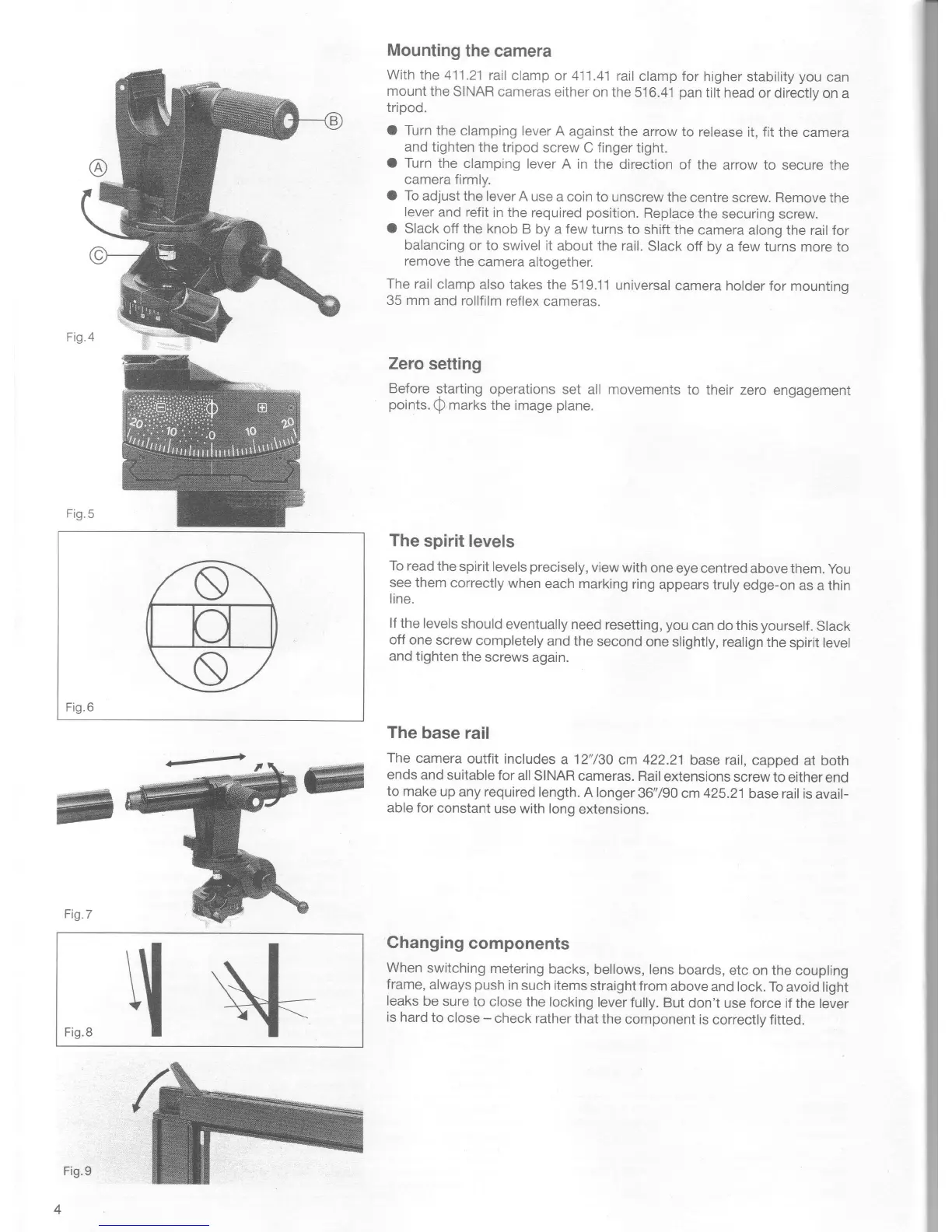
Fig.5
Fig.6
Fig.7
Mounting
the camera
With
the 411.21
rail
clamp or 411 .41
rail clamp for
higher
stability
you
can
mount
the
SINAR cameras
either on the
516.41
pan
tilt head
or directlv on
a
triood.
O Turn the
clamping lever
A against the
arrow to release
it, fit the camera
and tighten
the tripod
screw C finger
tight.
O Turn
the
clamping lever
A in the
direction of the
arrow to
secure tne
camera
firmly.
O To
adjust the
lever A
use a coin to unscrew
the
centre screw. Remove
tne
lever
and
refit in the
required
position.
Replace
the
securing screw.
O
Slack off the
knob B
by a
few
turns to
shift the
camera
along the rail for
balancing
or to
swivel it about the rail.
Slack off
bv a
few
turns more ro
remove
the
camera
altogether.
The rail
clamp
also takes the
51 9.11 universal
camera holder
for mountinq
35 mm
and rollfilm
reflex
cameras.
Zero
setting
Before
starting
operations
set all movements
to their zero
engagement
points.
Q
marks the
image
plane.
The
spirit levels
To read
the
spirit levels
precisely,
view with
one
eye centred
above them.
you
see them
correctly
when
each marking
ring
appears
truly
edge-on as
a thin
line.
lf
the levels
should
eventually need
resetting,
you
can do this
yourself.
Slack
off one
screw
completely
and the
second one
slighfly, realign
the
spirit level
and
tighten
the
screws again.
The
base
rail
The
camera
outfit includes
a 12"/30
cm 422.21
base rail,
capped
at both
ends
and suitable
for
all SINAR
cameras. Rail
extensions
screw
to either
end
to make
up any required
length.
A longer
36'790 cm 425.21
base rail is
avail-
able for
constant
use with long
extensions.
Ghanging
components
When
switching
metering
backs, bellows,
lens
boards,
etc on the
coupling
frame,
always
push
in such items
straight from
above
and lock. To
avoid light
leaks
be
sure to
close the locking
lever
fully.
But
don't use force if
the lever
is
hard to
close
-
check
rather
that the
component
is
correcily fitted.
Fg8q
+
Fig.9

Other manuals for Sinar p2

Related product manuals