EasyManua.ls Logo

Singer 328 - Adjusting the Clearance Between the Touch Lever and Main Drum Piece

Singer 328
97 pages
Print Icon
To Next Page IconTo Next Page
To Previous Page IconTo Previous Page
Loading...
8-4 Adj
usting
Main
Drum
the
Clearance
Between
the
Touch
Lever
and
Piece:
\
,t
fn
case
of imperfect
adjustment
of the
clearance:
Wtren
a Punch
Card is
inserted
into
the
Centre
pane.I,
the
Touch
tevers
read
the patteln
by
pushing
their
Scanning
Fingers
into
the
Card
holes.
Those
Touch
Levers
lemaining
in i iower posit_
ion, push
the
Main
Drum Pieces.
However,
in the
case
that
there
is
too much
cleatance
betra'een
the
roucn
r,eveis-ana-in"
U.irl
Drum Pieces,
the
Touch
Levers
are
unable
to
transrnii
the
pattern
to
the Main
Drum.
Coftecting
Methods:
l. Insert
an Np
Card
into
the
Centre
panel.
Loosen
six +pW
pan
Head
Screws
(3x6).
which
secures
the
pattern
Base
to the
Needle
Bed
Bracer A-
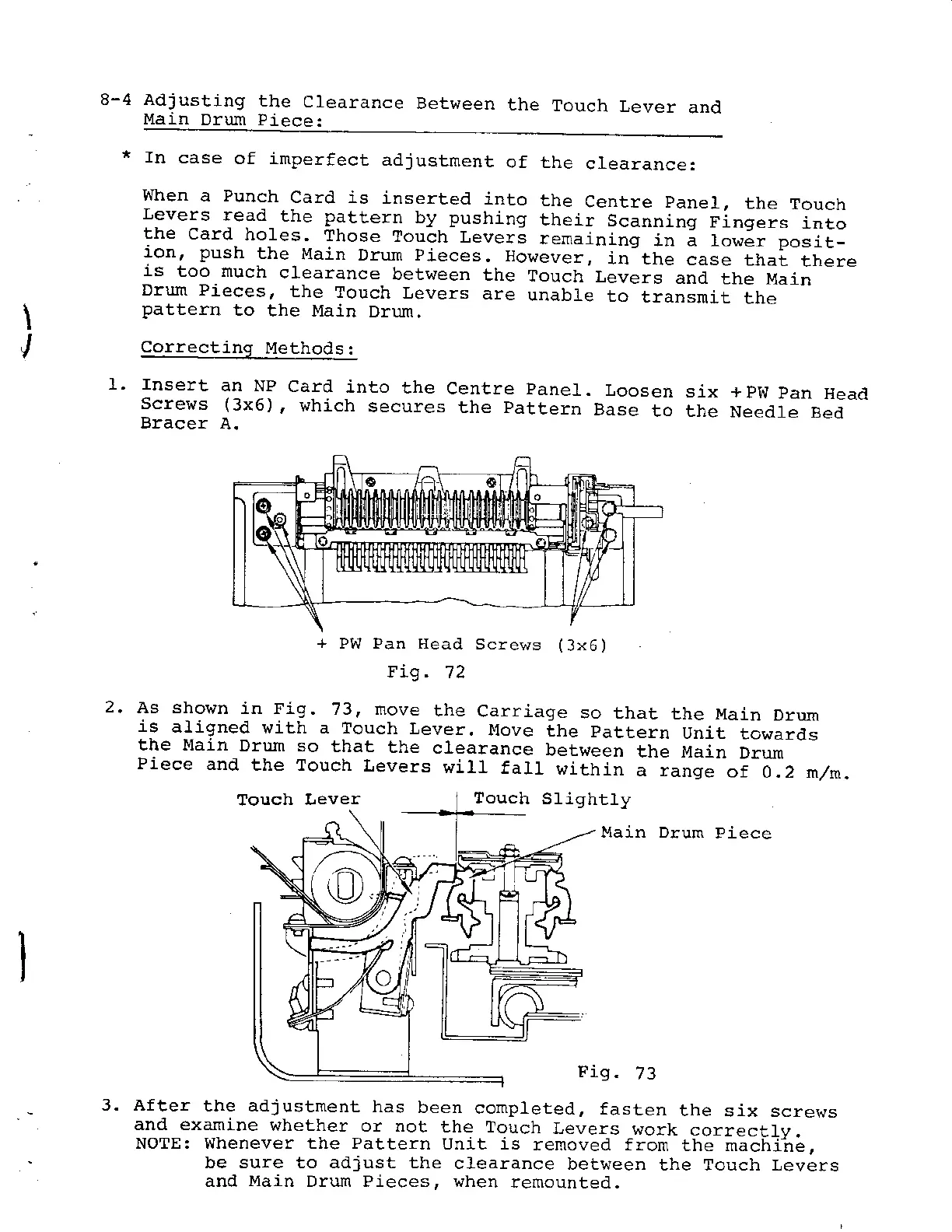
Fig.
't2
2.
As shoJrn
in Fig.
73. move
the
Carriage
so that
the Main
Drum
is
aLigned
with a Touch
Lever.
Move
ihe
pattern
U;it
towards
the Main
Drun so
that
the
clearance
between
the l4ain
Orum
Piece
and
the Touch
Levers
will
fall
i4ithin
a range
of
O.2 n/m.
Touch
Lever
S lightly
!4ain Dlun
Piece
s.
73
3. After
the adjustment
has
been
completeal,
fasten
the
six screws
anil examine
whether
or not
the louch
Levers
q/ork
correctfv-
NOTE: Whenever the Pattern
Unit is
removed from
the machi'ne,
be sure to adjust Lhe
clearance
bet\reen
the Touch Levets
and
Main
Drum Pieces, when
renrounteal.
+
PW Pan Head
Screws
(3x6)
Touch

Related product manuals