11. Defrost Groud meat
Input the figure of the weight of food.
(The input figure of the weight should be within 100--2000g)
12. Defrost Sea food
Example : Cooking vegetable of 350g:
(1) Press "VEGETABLE
(2) Press "VEGETABLE" button again to choose weight, oven will display "350",
(3) Press "START/+30SEC." to start cooking,
13. Auto Menu Cooking
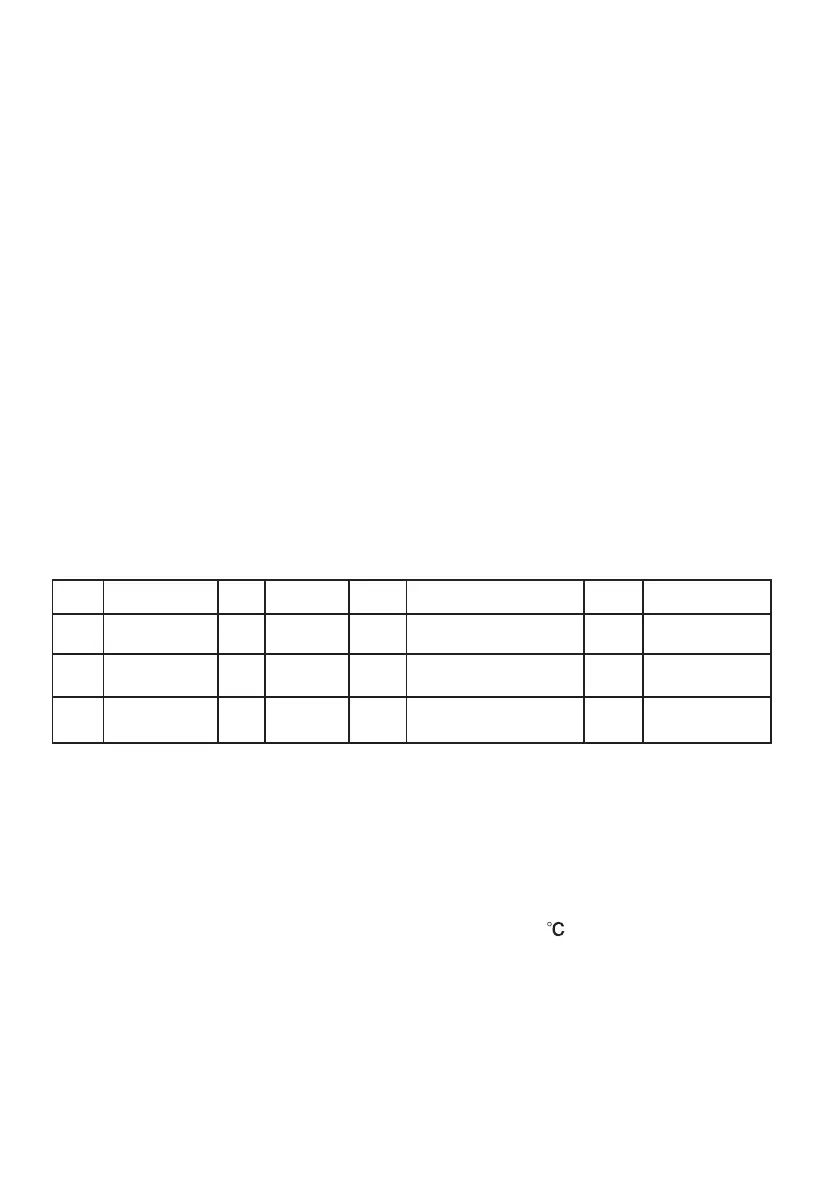
The numeral pads 0—9 are matching with ten different subjects respectively;
Pad
Cook
Pad
Cook
Pad
Cook
1
2
3
4
5
6
7
8
VEGETABLE
FISH
MEAT
PASTA
POTATO
BREAD
SOUP
ROAST
Pad
Cook
9
0
PIZZA
CAKE
Input the figure of the weight of food.
(The input figure of the weight should be within 100--2000g)
(1) Press "DEFROST" pad thrice, the oven will display "d-3".
(2)
(3) Press "START/+30SEC." key to start defrosting.
(1) Press "DEFROST" pad 4 times, the oven will display "d-4".
(2)
(3) Press "START/+30SEC." key to start defrosting.
" button, "Auto " will light.
"g", "AUTO" will light.
"g" will go out, time
counts down, "Auto " will flash.
Note: 1)Cake menu is under convection cooking with 1
-warm-up function,
and you should preheat first following the auto menu operation, when the oven
reaches the temperature, it will stop working and sound to remind opening
the door to put cake in, then press " " to start cooking.
80
START/+30SEC.
2) When roast chicken is selected and 2/3 of the time has passed, it will ring twice to tell you
over the food. You can just leave it continue. For better result,
the door, and then press " "
to continue cooking.
to turn
turn the food over, close
START/+30SEC.


 To Next Page