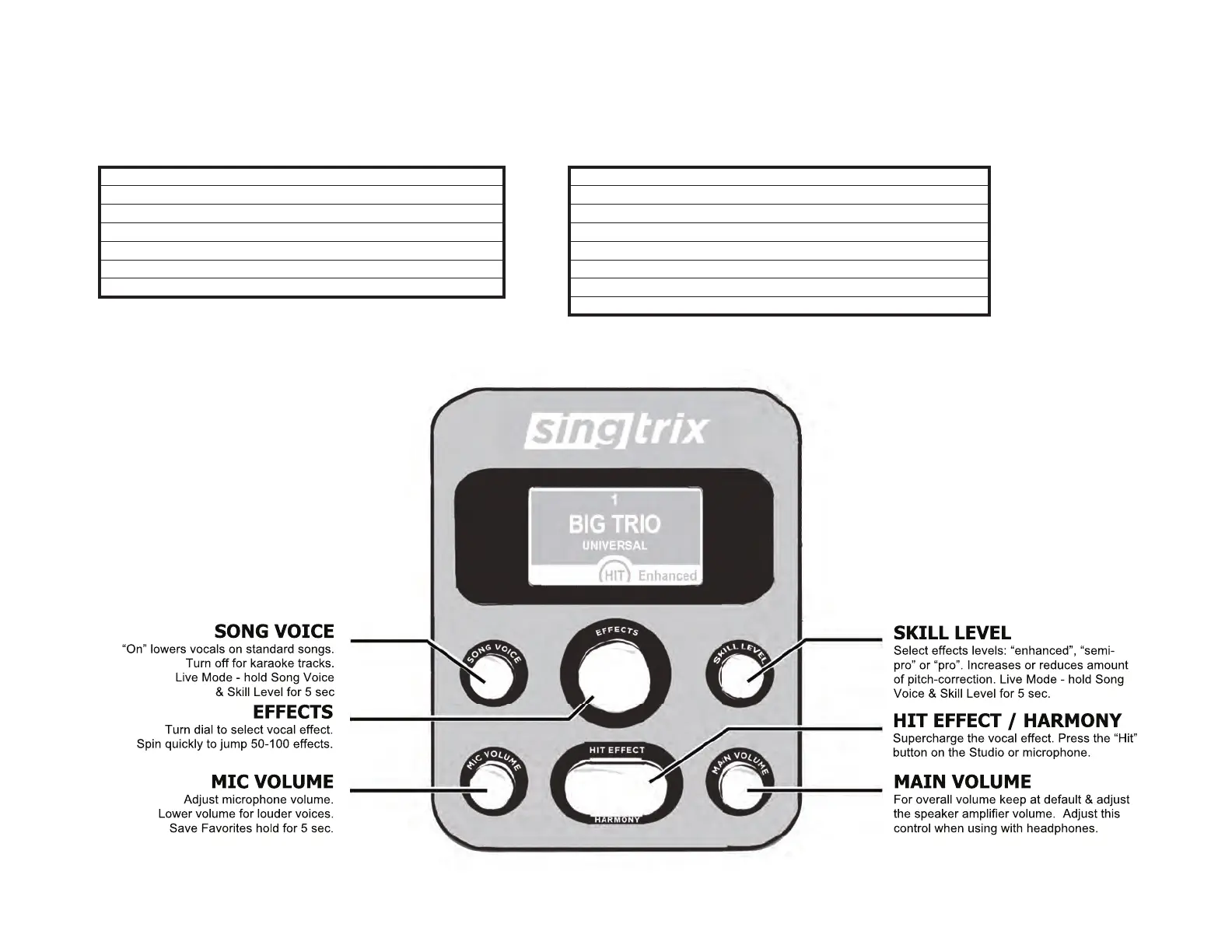
Quick Start: Navigating the Studio Console & Effects Presets
Quick Start: Any Music, Any Device
Singtrix open platform allows you to use a variety of sources for music content & music devices. The music device you use must have a headphone or line
level analog output. Singtrix will tune your voice & live harmonies to the music played. TIP: when using karaoke apps, the 3.5 mm jack may activate on
your device’s onboard microphone. All mics must be disabled on your music device to prevent feedback. Only the Singtrix Mic should be used.
Device Options with line level or headphone outputs
1 Smart Phones
2 Tablets
3 Computers
4 Smart TVs – must have analog output
5 CD Players
6 Karaoke players
Music Content Options standard music & karaoke
1 YouTube® Karaoke Videos or Original Lyric Videos
2 MP3s
3 Music Streaming Apps
4 Karaoke Apps (for music content only)
5 Your own compositions & music recordings
6 Guitar (refer to Live Mode)
7 Keyboard (refer to Live Mode)
Fig-4


 To Next Page