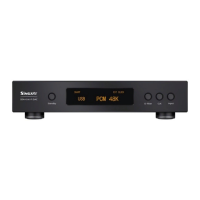
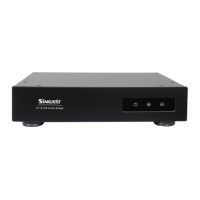
10. Input source selection: By single-pressing INPUT button you can switch different input
source, in order USB, I2S, OPT, COAX,AES and BNC. All input interfaces accept DSD signal,
USB and I2S accept both DSD native and DSD DOP signal, while OPT, COAX ,AES and BNC
only accept DSD DOP signal. For I2S input, please configure the DIP switch at the bottom of
the chassis since there are different I2S line order from different audio source equipment.
11. Sample rate display: PCM is from 44.1Khz up to 768Khz, DSD is from 2.82Mhz up to
24.57Mhz, known as DSD64 up to DSD512
12. The four buttons at front panel are Standby, D-filter,CLK and INPU T. Mutes audio output
or restores audio from mute by single pressing the Standby button, OLED will display
MUTE in mute mode. Hold and press it for 2 seconds will switch the SDA-6 to standby
mode. OLED screen will be off and the standby LED on the left side of OLED screen will
light up, you can press any button to exit standby mode. In the standby mode, only the
audio output is turned off whilst the internal circuit is still working as normal.
13. The function key of our prepared remote control mirrors each function of mentioned
buttons above. POWER label stands for standby, and the white one above is the LED
indicator. The six key functions of V+, V-,PLL, Bri, INV, and PRE are reserve keys, which
have no effect on SDA-6.
SDA-6 解码器快速使用手册
1. 感谢你选择 Singxer 的产品,拿到机器后,请先检查机器外观是否完整,配件是否齐全。
2. 接入电源线,开机前请检查电源电压是否合适,输入电压有 2 种,标签 110V/220V,对
应的电压是 100-120V/200-240VAC;插入电源插头,打开电源开关,电源插座的灯亮起。
3. 插入 USB 线,连接电脑或者数字播放器,USB 需要带 5V 的电源。WINDOWS 系统需要安装
我们提供的驱动程序,WIN10 最新版本可以免驱使用,但是推荐使用我们提供的驱动;
LINUX 和 MAC 自带驱动,不需要另外安装驱动。
4. 电脑或者数字播放器识别到 SDA-6 之后,设置播放器,选择 SDA-6 作为输出设备;点击
播放,SDA-6 显示对应的采样率。
5. 多数播放器设置正确才能播放 DSD;如果 DSD 采样率显示不对,大部分情况是 DSD 播放
设置问题;设置步骤请参考我们的其他文档。
6. SDA-6 的前面板采用 OLED 屏显示各种信息,没有触摸功能;一共 5 个区域显示,分 别 是
数字滤波器(D-filter),PLL 选项,时钟选项,输入源和采样率。
7. 数字滤波器在 PCM 模式下有 6 种,分别是 SHARP/SLOW/SHORT SHARP/SHORT SLOW/NOS/
LOW-DISPERSION ;DSD 模式下只有 NOS 一种。
8. PLL 选项:设置开关在机器底部拔码开关,第八个开关控制。ON 的时候,控制 PLL 打开,
OFF 的时候关闭。PLL 选项仅在光纤,同轴,AES,BNC 输入的时候有效,PLL 锁定正常的
时候显示 PLL LOCK。出厂默认是打开 PLL 的。
9. 时钟选项:选择时钟源是内部时钟还是通过 EXT CLOCK BNC 接口输入。
USB 模式下,支持 10M 时钟,电平为 0.5V-3.3V VPP。输入阻抗可调,调节开关在机箱
底部的第八个开关。ON 的时候为 50 欧,OFF 的时候为 75 欧。
同轴模式下(光纤,同轴,AES,BNC 输入),仅支持 WCK(即采样率,WCLK),电平为
TTL,输入阻抗为标准的 75 欧(此时不受开关 8 的控制)。
当显示 EXT CLOCK LOCK 的时候,即使用外部时钟。


 To Next Page
 Loading...