+
+
O
+
24VDC24VDC
GNDGND
I.RI.R
CLLMCLLM
COMCOM
OPLMOPLM
COMCOM
STPSTP
X5X5
10A10A 250V250V
CLSCLS
OPNOPN
X1X1
W U V PEPE
D2D2 D1D1 C C
SW1SW1
ONON
AN1AN1
LED1LED1
X2X2X3X3
PEPE N L
X8X8
M
LED2LED2
X7X7
LampLamp
1 2 3
CapacitorCapacitor
MotorMotor
EarthEarth
PowerPower
RemoteRemote controlcontrol learninglearning buttonbutton
DIPDIP SwitchSwitch
24VDC24VDC
GNDGND
InfraredInfrared sensorsensor
CloseClose limitlimit switchswitch
StopStop controlcontrol buttonbutton
COMCOM
OpenOpen limitlimit switchswitch
CloseClose controlcontrol buttonbutton
OpenOpen controlcontrol buttonbutton
COMCOM
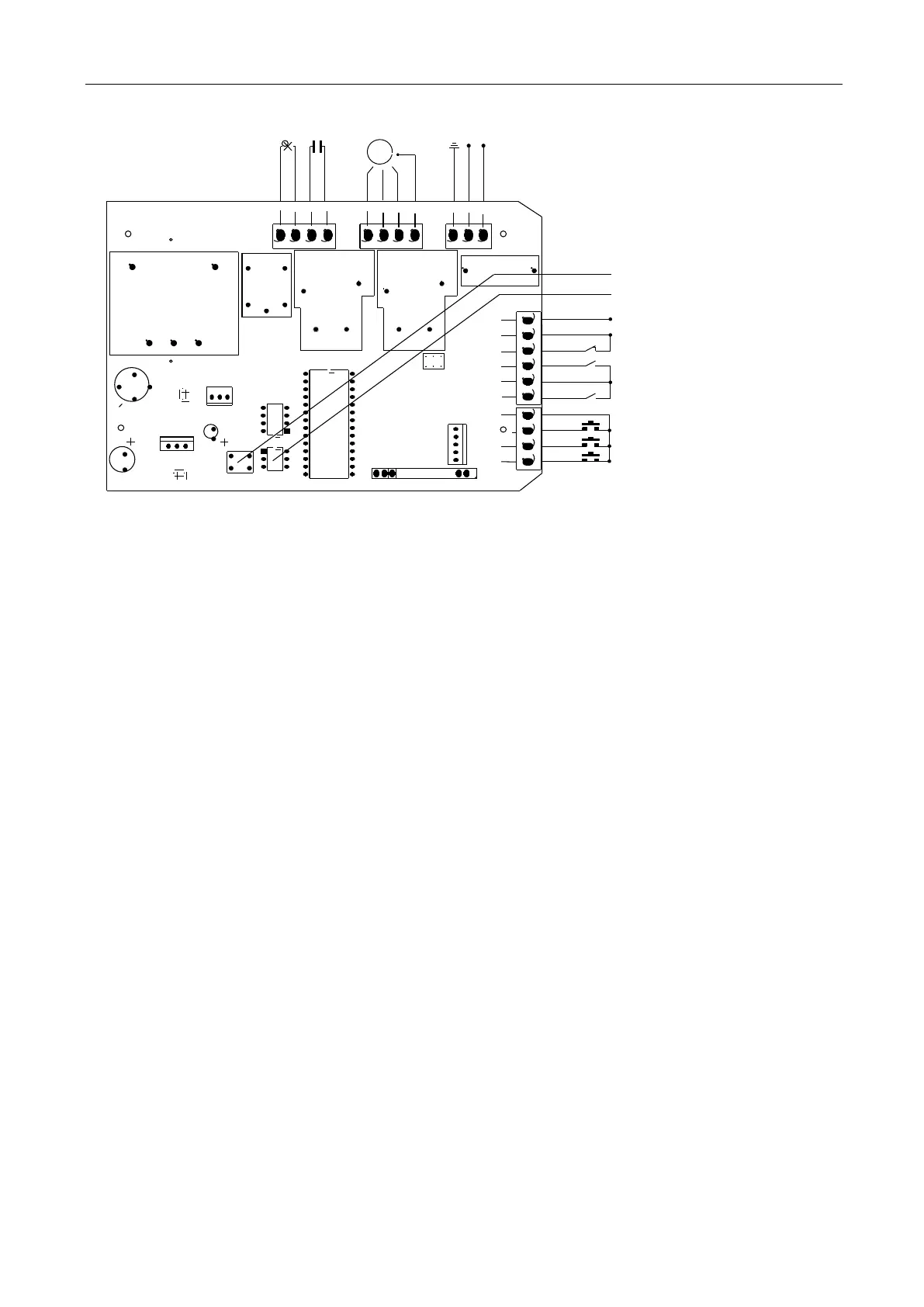
Figure 12
Wiring instruction:
1. Connect L and N to the power supply of AC220V/50HZ; AC110V/60HZ; L is Live wire, N is
Neutral wire, and PE is grounding wire.
2. Connect LAMP to D1, D2; voltage: AC220V/50HZ; AC110V/60HZ.
3. Connect the motor wire U to the REV motor wire, connect W to the FWD motor wire, and
connect V to the motor common wire.
4. Connect C, C to the capacitor wire.
X5 Terminal
24VDC Power supply for fittings +24VDC(Electric current ≤50mA);
GND Power ground;
I.R Photocell input (N.C.);
CLLM Close limit switch;
COM Limit switch common terminal;
OPLM Open limit switch.
X7 Terminal
COM Control button common terminal;
STP Stop control button (N.O.);
CLS Gate close control button (N.O.);
OPN Gate open control button (N.O.).
DIP Switch
1. External button switch. ON - Three button switch; OFF - Single button switch (X7 terminal
CLS button can be used to circularly control OPEN/STOP/CLOSE/STOP of the main engine).
2. Automatic close time.
3. Automatic close time.
Setting for automatic close time:
2 ON 3 OFF: automatic close time is 15s,


 To Next Page
 Loading...