4
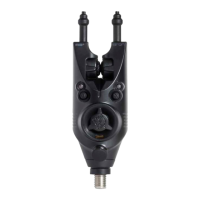
R4 Alarm
INSERT BATTERY:
Open battery compartment using crosshead screwdriver
and insert 2 x AAA Alkaline batteries
(not supplied). We recommend purchasing top quality
alkaline batteries for enhanced performance and
lifespan.
TO TURN R4 HEAD ON/OFF:
Press & hold the Power button for 3 seconds. When
turning on the alarm LEDs will light green and the alarm
will sound a series of fast beeps rising in tone. When
turning the alarm off the LEDs will light red and the
alarm will sound a series of fast beeps decreasing in
tone.
NOTE
: If sound on the alarm head has previously
been muted the LEDs will be seen but start up/power
down tone sequences will not be heard.
MUTING:
Short press of the Power button.
1. LED and sound on (Factory setting)
2. LEDs on/no sound – left LED flashes green,
no alarm tone.
3. LEDs off/sound on – left LED flashes red plus
alarm tone.
4. (Covert Mode) LEDs off/sound off – left LED flashes
red, no alarm tone.
The programmes are cycled though in turn.
VOLUME:
Short press of the
X
Function button. Eight volume
settings are available. Each consecutive short press of
the
X
Function button changes volume output by one
level. The rst bleep you hear represents current volume,
each consecutive bleep the volume being set.
TONE:
Hold down Power button
and short press the
Function
X
button. Eight tone settings are available.
Each consecutive short press of the
X
button changes
the tone. The rst tone you hear represents current tone,
R4 Instruction Manual.indd 4R4 Instruction Manual.indd 4 25/01/2022 12:3725/01/2022 12:37



 To Next Page
 Loading...