This document describes the GS811-A Carbon Monoxide (CO) Alarm, a single-station device designed to protect homes and families from the dangers of carbon monoxide.
Function Description
The GS811-A CO alarm is designed to detect carbon monoxide gas from any source of combustion. It provides both audible and visual signals to alert users to the presence of CO. It is not designed to detect smoke, fire, or any other gas. The device is intended for use in ordinary indoor locations of family living units and is not designed to measure compliance with Occupational Safety and Health Administration (OSHA) commercial or industrial standards.
Important Technical Specifications
- Model Number: GS811-A
- Power Supply: DC 4.5V (3 x AA 1.5V batteries)
- Recommended Battery Type: Energizer E91
- Sensitivity Setting (Conforms to UL2034 standard):
- 70 PPM: Alarm within 60 to 240 minutes
- 150 PPM: Alarm within 10 to 50 minutes
- 400 PPM: Alarm within 4 to 15 minutes
- Standby Current: <40μA (Average)
- Alarm Current: <10mA (Average)
- Operation Ambient Condition: 40°F (4.4°C) to 100°F (37.8°C), 10-95% R.H. non-condensing
- Storage/Transport Ambient Condition: -20°C to +50°C, 10-95% R.H. non-condensing
- Sensor Type: Electrochemical
- Product Life: 7 years after initial power up
- Sensor Range: 0 – 10000 PPM
- Alarm Sound: ≥85dB at 10 feet @3.2±0.4KHz pulsing alarm
- CO Alarm Silence: Approximately 5 minutes
- End of Life Warning Silence: Approximately 48 hours
- Mounting: Wall-mounted, at least 1.8 meters (about 6 feet) above floor level.
Usage Features
The CO alarm features a TEST/RESET button to test the unit's electronics and reset it during an alarm. Pressing and holding the button for 0.5 seconds will enable the test function, producing the alarm sound pattern and a red LED flash. This test should be performed weekly.
Indicators:
- STATUS indicator (green LED): Flashes every 30 seconds during normal operation, indicating the unit is functioning properly. During start-up (preheated state), it flashes every 3 seconds for 30 seconds.
- ALARM indicator (red LED): Indicates alarm or warning status.
Warning Signals:
- Low battery voltage warning: The red LED flashes and the horn chirps twice every 35 seconds. This indicates the battery is low and needs replacement. The detector will not protect against CO poisoning if the battery is drained.
- Malfunction warning: The red LED flashes and the horn chirps once every 30 seconds. This indicates a malfunction. If replacing the battery does not resolve the issue, the unit has malfunctioned and must be replaced immediately. A malfunctioning alarm will not respond to CO.
- End of life warning: After 7 years from initial power-up, the red LED flashes and the horn chirps 3 times every 35 seconds. This indicates the end of the CO alarm's life, and it must be replaced immediately as it will not detect CO in this condition.
- End of life warning silence: When the alarm is in end-of-life warning mode, pressing the TEST/RESET button will silence the horn for approximately 48 hours, though the red LED will continue flashing. This silence feature is not available if the alarm has been in end-of-life warning for 30 days.
- CO alarm warning: When dangerous levels of CO are detected, the unit emits a loud alarm pattern: 4 quick beeps followed by 5 seconds of silence. This cycle repeats as long as CO is present. The red LED flashes with the same pattern. After the initial 4 minutes of the alarm, the silence period changes to 60 seconds. This signal continues until CO dissipates or the alarm is manually silenced.
- CO alarm warning silence: During a CO alarm, pressing the TEST/RESET button will silence the alarm for 5 minutes. The red LED will continue flashing. The alarm will reactivate within 6 minutes if CO concentration remains at 70 PPM or greater.
Installation Recommendations:
- Install near bedrooms to ensure the alarm can be heard in sleeping areas.
- Avoid basements or furnace rooms for primary installation.
- Mount at least 1.8 meters (6 feet) above the floor.
- Place out of reach of children.
- Install in a bedroom or hallway close to sleeping areas.
- For multi-level homes, a CO alarm is recommended on each level.
- Locate at least 8 feet away from all fuel-burning appliances.
- Place at eye level for optimum monitoring of LED indicators.
- Ensure all vents are unobstructed.
Locations to Avoid:
- Kitchens, garages, or furnace rooms where the sensor might be exposed to damaging or contaminating substances.
- Within 1.5m of heating or cooking appliances.
- Dead air spaces (e.g., peaks of vaulted ceilings, gabled roofs).
- Turbulent air from ceiling fans.
- Near fresh air vents or close to doors/windows opening to the outside.
- Excessively dusty, dirty, or greasy areas.
- Damp and humid areas (e.g., bathrooms).
- Areas where aerosols are sprayed.
- Areas with temperatures colder than 0°C or hotter than 40°C.
- Behind curtains or furniture, as this can obstruct CO detection.
Battery Installation/Replacement:
- Remove the unit from the wall.
- Remove old batteries and connect new alkaline batteries to the power input connector.
- Place new batteries into the battery box.
- Hook the alarm body onto the wall screws via the keyholes.
- Test the alarm using the TEST/RESET button.
- WARNING: Use only specified batteries. Different batteries may have a detrimental effect. Replace batteries at least once a year.
- NOTE: The unit may sound for several minutes after battery installation before entering normal operation. If it continues to sound, contact the agent.
Important Labels: Two labels are provided with crucial information on what to do during an alarm. One should be placed next to the alarm, and the other near a fresh air source where occupants plan to gather. These labels include space to write emergency service and appliance technician phone numbers.
Maintenance Features
- Cleaning:
- Remove the unit from the wall and clean the alarm cover and vents with a soft brush attachment monthly to remove dust and dirt.
- NEVER use detergents or other solvents to clean the unit.
- AVOID spraying air fresheners, hair spray, or other aerosols near the CO alarm.
- DO NOT paint the unit, as paint will seal the vents and interfere with the sensor's ability to detect CO.
- NEVER attempt to disassemble or clean inside the unit, as this will void the warranty.
- Testing: Test the unit weekly using the TEST/RESET button. If the unit does not perform as described, replace it immediately.
- Ventilation: When household cleaning supplies or similar contaminants are used, the area should be ventilated.
- Substance Avoidance: Certain substances can affect the sensor and cause false alarms, including methane, propane, isobutene, isopropanol, ethylene, benzene, toluene, ethyl acetate, hydrogen sulfide, sulfur dioxides, alcohol-based products, paints, thinner, solvents, adhesives, hair sprays, aftershaves, perfumes, and some cleaning agents.
General Warnings:
- The CO alarm GS811-A is for indoor use only. Do not expose to rain or moisture.
- Do not knock or drop the detector.
- Do not open or tamper with the alarm, as this could cause malfunction.
- The CO alarm will not be operational and will not monitor for CO levels without a battery.
- If the alarm sounds, it should be treated as a potentially serious condition. Immediately move to fresh air, call emergency services (Fire Department or 911), and do not re-enter the premises until responders have arrived and the alarm is in normal condition.
- If the alarm reactivates within 24 hours after initial steps, call a qualified appliance technician to investigate CO sources.
- Never restart a CO problem source until it has been corrected.
- Never ignore the sound of the alarm. If the alarm reactivates within six minutes after being silenced, it indicates high and dangerous levels of CO.

 Need help?
 General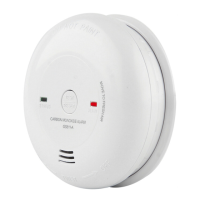

 To Next Page