11
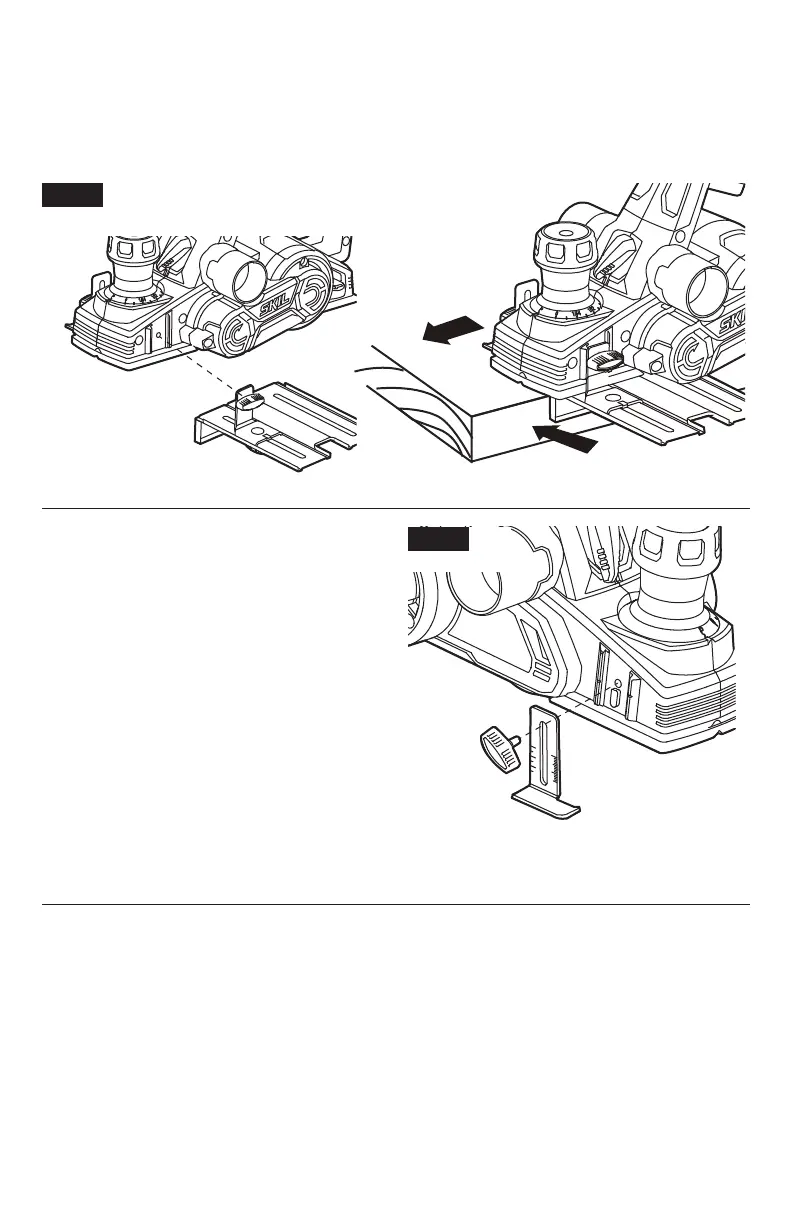
Edge Guide (Fig.6)
a. Remove the locking knob and slide the edge guide into the planer.
b. Replace the locking knob and rmly tighten it.
c. Loosen the locking nut and slide the edge guide to the desired position. Securely tighten the
locking nut.
Fig. 6
Rabbeting-Depth Stop (Fig.7)
The rabbeting-depth stop allows the user to
set any rabbeting depth from 0 to 5/16 inch (8
mm).
For best results, it is important that the blade
be properly aligned with the front base of the
tool. The width of the rabbet is controlled by
the edge guide. The final depth is achieved
by repeating the planning procedure until the
rabbeting-depth stop contacts the workpiece.
To setting the rabbeting depth:
a. Loosen the locking knob and set the desired
rabbet depth by aligning the depth scale on
the rabbeting-depth stop with the indicator
line.
b. Securely tighten locking nut.
Fig. 7


 To Next Page