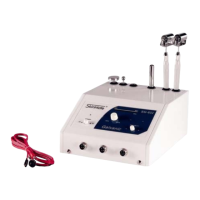
SM-601 / J8801 High-Frequency User’s Guide
Intensity
Control
Power
On / Off
Included Accessories:
1- Insulated High Frequency Handle W/Wire
1- Glass Spoon Electrode
1- Glass Mushroom Electrode
1- Glass Straight Electrode
(no coil wire inside)
1- Glass angled Spot Electrode
Assembly and Basic Operation:
High Frequency Function:
1. Connect the handle’s wire to the machine (it only fits one way) making sure to fasten it into place the
securing ring.
2. Simply insert the desired glass electrode (metal end first) into the hole at the end of the handle.
3. Using the power switch, turn the machine to the “on” position and the glass electrode should light up.
4. To control the intensity of the electrode, use the knob located at the center of the face place labeled
“Min/Max”. Turning this knob allows the user to adjust the current to match the desired need.
5. When the machine is not in use, make sure the power switch is in the “Off” position.

 Need help?

 To Next Page
 General