Skybox Appliance 8050 Quick Start Guide
Skybox version 11.4.100 4
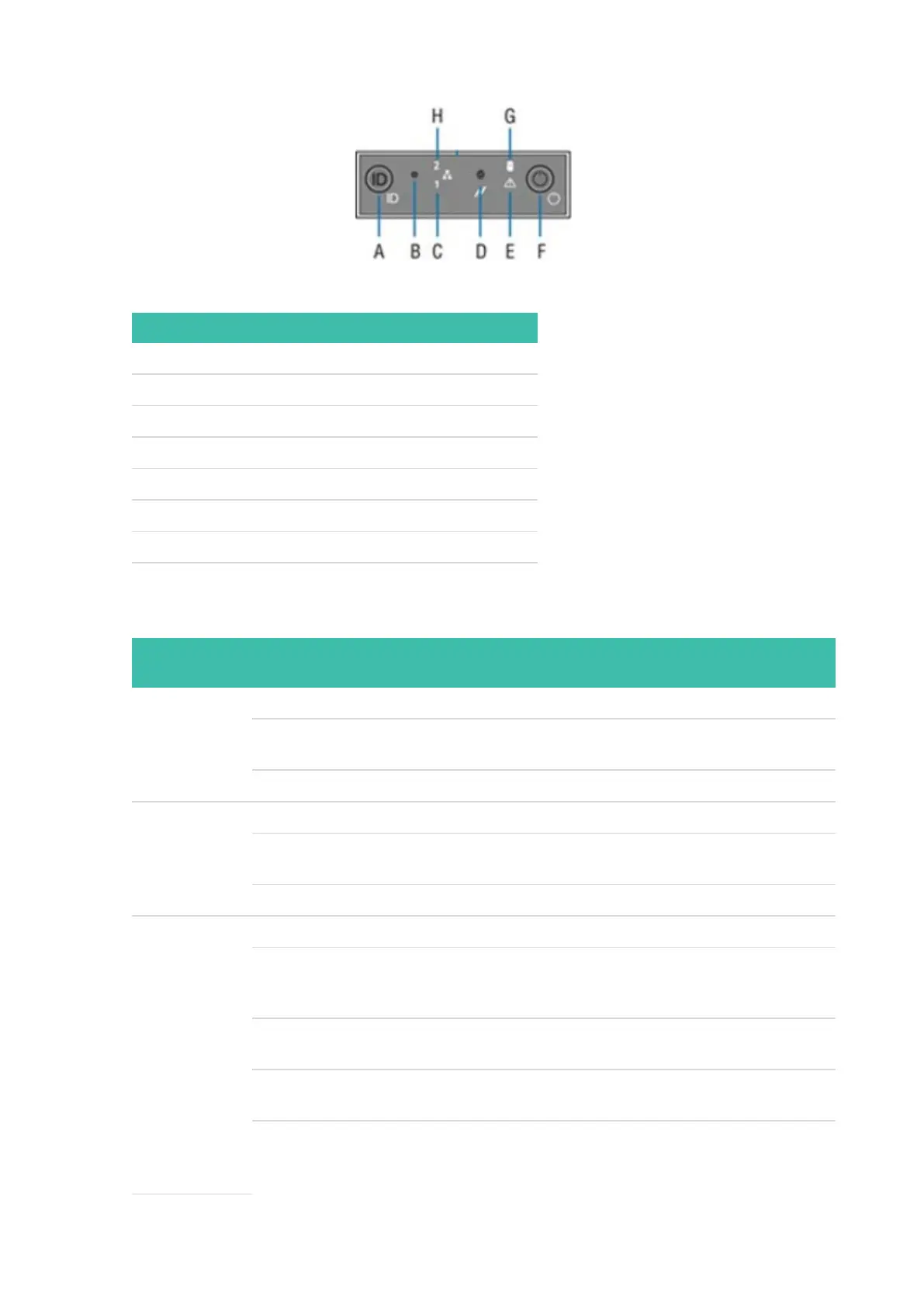
Power button and LEDs
LETTER FEATURE
A System ID button with integrated LED
B NMI button (recessed; tool required for use)
C NIC1 activity LED
D System cold reset button
E System status LED
F Power button with integrated LED
G Hard drive activity LED
H NIC2 activity LED
Front panel LED functions
LED COLOR /
STATE
DESCRIPTION
Power/Sleep Green / on Power on
Green /
blinking
Sleep
Off Power off
NIC LEDs Green / on Network link but no network activity
Green /
blinking
Network activity
Off No link
System Status Green / on System ready/no alarm
Green /
blinking
System ready but degraded: Redundancy lost (for example, a power
supply or fan failure); non-critical temperature or voltage threshold
reached; battery failure; or predictive power supply failure.
Amber /
on
Critical Alarm: Critical power modules failure, critical fans failure,
voltage (power supply), critical temperature and voltage
Amber /
blinking
Non-Critical Alarm: Redundant fan failure, redundant power module
failure, non-critical temperature, and voltage
Off Power off: System unplugged
Power on: System powered off and in standby, no prior degraded/non-
critical/critical state


 To Next Page