EasyManua.ls Logo

SKYDANCE D4-WPS - User Manual

SKYDANCE D4-WPS
2 pages
Print Icon
To Next Page IconTo Next Page
Loading...
Features
Technical Parameters
Mechanical Structures and Installations
1
User Manual Ver 1.0.0
Model No.: D4-WPS
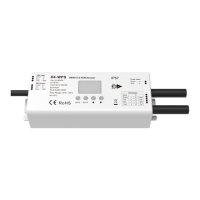
4 Channel Constant Voltage Waterproof DMX512 & RDM Decoder
IP67 waterproof/RDM/Stand-alone function/Seven PWM frequency/Linear or logarithmic dimming/Numeric display
Waterproof DMX512 decoder with IP67 rating, suitable for outdoor and damp environment.
Comply with the DMX512/RDM standard protocols.
Digital numeric display, set DMX decode start address by buttons.
1/2/4 DMX channel output selectable.
16bit (65536 levels) /8bit (256 levels) grey level selectable.
PWM frequency 250/500/1000/2000/4000/8000/16000Hz selectable.
Logarithmic or linear dimming curve selectable.
Stand-alone RGB/RGBW mode and 4 channel dimmer mode selectable,
which be controlled by buttons with built-in programs, instead of DMX signal.
Over-heat / Over-load / Short circuit protection, recover automatically.
LVD
Wiring Diagram
Output power
4 x (60-180V)
Output voltage
4 x (12-36)VDC
Output current
4CH,5A/CH
Input and Output
Input voltage
12-36VDC
Input current
20.5A
Output type
Constant voltage
Gross weight
Size
Package
Safety and EMC
EMC standard (EMC)
ETSI EN 301 489-1 V2.2.3
ETSI EN 301 489-17 V3.2.4
Certication
CE,EMC,LVD
EN 62368-1:2020+A11:2020
Safety standard(LVD)
Warranty and Protection
5 years
Protection
Reverse Polarity
Over-heat
Over-load
Short circuit
Warranty
Operation temperature
Case temperature (Max.)
Environment
IP67
IP rating
Ta: -30
O
C ~ +55
O
C
T c:
+75
O
C
Operation
Long press SETUP key for 2s, prepare for setup system parameter: decode mode, grey level, output PWM frequence, output brightness curve, default output level,
automatic blank screen. then short press SETUP key to switch six item.
Decode mode: short press or key to switch 1/2/4 channel decode mode("d-1","d-2" or "d-4"). When set as 1 channel decode,
the decoder occupy only 1 DMX address, and four channel output the same brightness of this DMX address.
Grey level: short press or key to switch 8bit("b08") or 16 bit("b16"). choose 16 bit if the DMX master support 16 bit.
Output PWM frequency: short press or key to switch 250Hz("F02"), 500Hz("F05"), 1000Hz("F10"), 2000Hz("F20"), 4000Hz("F40"), 8000Hz("F80")
or 16000Hz("F16"). Higher PWM frequency, will cause lower output current, higher power noise, but more suitable for camera(No ickers for video).
Output brightness curve: short press or key to switch linear curve("C-L") or logarithmic curve("C-E").
Default output level: press or key to change default 0-100% level ("d00" to "dFF" ) when no DMX input signal.
Automatic blank screen: short press or key to switch enable ("bon") or disable("boF") automatic blank screen.
Long press SETUP key for 2s or timeout 10s, quit system parameter setting.
System parameter setting
Note:
1. An DMX signal amplifier is needed if more than 32 decoders are connected, or use overlong signal line,
signal amplification should not be more than 5 times continuously.
2. If the recoil effect occurs because of longer signal line or bad line quality, please try to connect
0.25W 90-120Ω terminal resistor at the end of each DMX signal line.
3. When display 1OL,2OL,3OL,4OL, correspond to 1,2,3,4, channel overload alarm.
When display OHA, overheat alarm.
0.492kg
L165 x W98 x H72mm
153.00 mm
57.00 mm
143.50 mm
34.00 mm
AC100-240V
Power Supply
12-36VDC
Constant Voltage
RGBW LED strip
W
DMX
Master
Question and Answer IconNeed help?

Do you have a question about the SKYDANCE D4-WPS and is the answer not in the manual?

Overview

Channel Constant Voltage Waterproof DMX512 & RDM Decoder (Model No.: D4-WPS)

The D4-WPS is a robust 4-channel constant voltage DMX512 & RDM decoder designed for outdoor and damp environments, boasting an IP67 waterproof rating. It supports both DMX512 and RDM standard protocols, offering versatile control over LED lighting installations. Beyond DMX control, the device features stand-alone RGB/RGBW and dimmer modes, allowing for operation via built-in programs without an external DMX signal.

Function Description

The D4-WPS decoder translates DMX512 signals into constant voltage PWM outputs to control LED strips. It supports various decode modes, including 1, 2, or 4 channel output, with the option for 8-bit (256 levels) or 16-bit (65536 levels) grey level dimming for smooth transitions. Users can set the DMX decode start address via a digital numeric display and buttons.

The device offers seven selectable PWM frequencies (250Hz, 500Hz, 1000Hz, 2000Hz, 4000Hz, 8000Hz, 16000Hz), allowing optimization for different applications, such as reducing flicker for video recording at higher frequencies. Dimming curves can be set to either linear or logarithmic, providing flexibility in brightness perception.

In stand-alone mode, when no DMX signal is present, the decoder can operate as an RGB/RGBW controller or a 4-channel dimmer. The RGB/RGBW mode offers 30 pre-programmed dynamic modes (P01-P30), each with adjustable speed and brightness. The dimmer mode (L-1 to L-8) allows independent brightness control for each of the four output channels.

The device also includes essential protection features such as reverse polarity, over-heat, over-load, and short circuit protection, ensuring reliable and safe operation. These protections allow the device to recover automatically from fault conditions.

Important Technical Specifications

Input and Output:

  • Input voltage: 12-36VDC
  • Input current: 20.5A
  • Output voltage: 4 x (12-36)VDC
  • Output current: 4CH, 5A/CH (20A total)
  • Output power: 4 x (60-180W) (240W-720W total, depending on input voltage)
  • Output type: Constant voltage

Safety and EMC:

  • EMC standard: ETSI EN 301 489-1 V2.2.3, ETSI EN 301 489-17 V3.2.4
  • Safety standard: EN 62368-1:2020+A11:2020
  • Certification: CE, EMC, LVD

Environment:

  • Operation temperature (Ta): -30°C ~ +55°C
  • Case temperature (Max. Tc): +75°C
  • IP rating: IP67

Physical:

  • Size: L165 x W98 x H72mm
  • Gross weight: 0.492kg

Warranty:

  • 5 years

Usage Features

System Parameter Setting:

  • Accessing Settings: Long press the SETUP key for 2 seconds to enter system parameter setting mode.
  • Navigation: Short press the SETUP key to cycle through six parameters: decode mode, grey level, output PWM frequency, output brightness curve, default output level, and automatic blank screen.
  • Adjusting Values: Use the or keys to change values for each parameter.
  • Decode Mode: Select 1, 2, or 4 channel decode mode ("d-1", "d-2", "d-4"). In 1-channel mode, the decoder occupies only one DMX address, and all four output channels display the same brightness.
  • Grey Level: Choose between 8-bit ("b08") or 16-bit ("b16") grey levels. 16-bit is recommended if the DMX master supports it.
  • PWM Frequency: Select from 250Hz ("F02"), 500Hz ("F05"), 1000Hz ("F10"), 2000Hz ("F20"), 4000Hz ("F40"), 8000Hz ("F80"), or 16000Hz ("F16"). Higher frequencies reduce flicker, making it suitable for video recording, but may result in lower output current and higher power noise.
  • Output Brightness Curve: Choose between linear ("C-L") or logarithmic ("C-E") curves.
  • Default Output Level: Set the default brightness level (0-100%, "d00" to "dFF") when no DMX input signal is present.
  • Automatic Blank Screen: Enable ("bOn") or disable ("bOF") the automatic blank screen feature.
  • Exiting Settings: Long press SETUP key for 2 seconds or wait 10 seconds for timeout.

DMX Mode:

  • Entering DMX Mode: Short press the MODE key when the display shows "001~512".
  • Setting DMX Address: Use the or keys to change the DMX decode start address (001~512). Long press for fast adjustment.
  • Automatic DMX Entry: The device automatically enters DMX mode if a DMX signal is detected.
  • DMX Address Mapping: Each D4-WPS decoder occupies 4 DMX addresses. For example, if the start address is 1, CH1 controls LED R, CH2 controls LED G, CH3 controls LED B, and CH4 controls LED W.

Stand-alone RGB/RGBW Mode:

  • Entering Stand-alone RGB/RGBW Mode: This mode is active only when the DMX signal is disconnected or lost.
  • Mode Selection: Short press the MODE key when the display shows "P01~P30". Use the or keys to change the dynamic mode number.
  • Adjusting Parameters: Short press the SETUP key to switch between mode speed ("S-1" to "S-F"), brightness ("b-1" to "b-F"), and W channel brightness ("400" to "4FF"). Use the or keys to adjust values.
  • Exiting Settings: Long press SETUP key for 2 seconds or wait 10 seconds for timeout.

Stand-alone Dimmer Mode:

  • Entering Stand-alone Dimmer Mode: This mode is active only when the DMX signal is disconnected or lost.
  • Mode Selection: Short press the MODE key when the display shows "L-1~L-8". Use the or keys to change the dimmer mode number.
  • Adjusting Channel Brightness: Short press the SETUP key to switch between the four channels (100~1FF, 200~2FF, 300~3FF, 400~4FF). Use the or keys to adjust the brightness value of each channel independently.
  • Exiting Settings: Long press SETUP key for 2 seconds or wait 10 seconds for timeout.

Maintenance Features

Malfunctions Analysis & Troubleshooting:

  • No Light:
    • Cause: No power, wrong connection, or insecure connection.
    • Troubleshooting: Check the power supply and connections.
  • Wrong Color:
    • Cause: Wrong connection of R/G/B/W wires, DMX decode address error.
    • Troubleshooting: Reconnect R/G/B/W wires, set the correct decode address.
  • Uneven Intensity (voltage drop):
    • Cause: Output cable too long, wire diameter too small, overload beyond power supply capability, overload beyond controller capability.
    • Troubleshooting: Reduce cable length or loop supply, change to wider wire, replace with a higher power supply, add power repeater.

Restore Factory Default Parameters:

  • Procedure: Long press both and keys for 2 seconds. The display will show "RES" to confirm restoration.
  • Default Settings: DMX decode mode, DMX decode start address 1, four channel decode, 8-bit grey level, 2000Hz PWM frequency output, logarithmic brightness curve, 100% output level when no DMX input, RGB mode number 1, dimmer mode number 1, and automatic blank screen disabled.

Wiring Diagram Notes:

  • DMX Signal Amplification: An DMX signal amplifier is required if more than 32 decoders are connected or if using an overlong signal line. Amplification should not exceed 5 times continuously.
  • Terminal Resistor: If recoil effects occur due to long or poor quality signal lines, connect a 0.25W 90-120Ω terminal resistor at the end of each DMX signal line.
  • Alarm Indications:
    • "1OL", "2OL", "3OL", "4OL" indicate overload alarms for channels 1, 2, 3, and 4 respectively.
    • "OHA" indicates an overheat alarm.

SKYDANCE D4-WPS Specifications

General IconGeneral
BrandSKYDANCE
ModelD4-WPS
CategoryMedia Converter
LanguageEnglish