Connect to the App:
Scan the QR code to install the RC Gears app.
After the balancer is powered on and the start-up screen is displayed, enable Bluetooth on the smartphone;
the app will search and find the balancer and tap the device in the list to connect.(All pages of the App and
the displays of the device are fully synchronized and interact with each other seamlessly.)
Voltage: DC12V~18V
Standby Current: ≤70mA
Working Current: 12V/≤750mA 18V/≤550mA
DC Input Interface: Ø5.5mm DC Jack with I.D 2.5mm pin,
inner Positive(+), outer Negative(-).
Compatiable Tires: 1/10 & 1/8 on-road
Display: 2.8-inch TFT
Size: 178(L)*99(W)*106(H)mm
Communication: Bluetooth 5.0
Transmission distance: ≤15m
Working temperature: 0℃~40℃
Working humidity: 10%~80% (Non-condensing)
Storage temperature: -10℃~60℃
Storage humidity: 20%~70% (Non-condensing)
Weight: about 800g
Tech. Specs.
RC Tire Blanacer*1 1/10 tire adapter*1 Fixture*1 DC power cable*1
Balancing Putty*10g Carrying Case*1Manual*1
What is included:
WARRANTY AND SERVICE
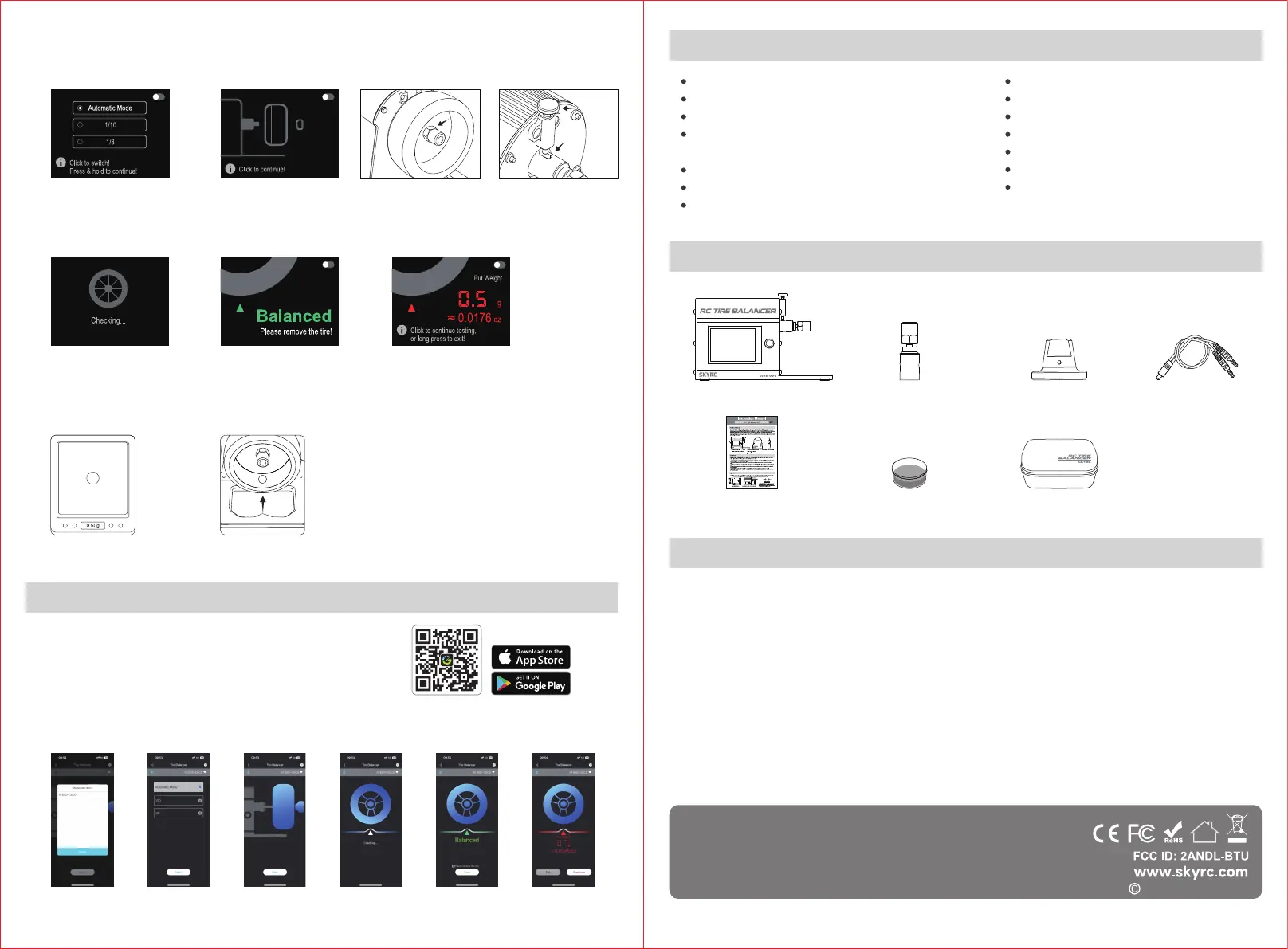
① Choose Tire Type. The startup screen will
be displayed upon powering on, followed
by the tire model selection page.
Automatic Mode: The tire type will be
detected automatically.
1/10: 1/10 on-road tire
1 / 8: 1/8 on-road tire
The default mode is "Automatic Mode".
The motor will perform 25 clockwise
rotations while ensuring the table
remains level, vibration-free, and
with minimal airflow.DO NOT TOUCH
the tires or forcefully brake the motor
throughout this process.
Weigh the putty to match as
indicated on display.
Select the device
to connect
Choose the tire
ype, tap Next
Install the tire,
tap Next
Checking... Balanced!
Tap DONE to return
to Tire Type page.
Imbalanced!
Tap Exit to return to Tire
Type page, or Tap Start
Over to check again!
Position to counterweigh: inside the rim
of the tire, as the notch arrow indicates at the bottom plate.
Balanced:
Press the locker to twist the nut
counterclockwise to remove.
Short-press to return, or you can
turn off the power.
Imbalanced:
Weigh the balancing putty to match as indicated on display
and shape the putty into a ball if needed. Affix the weight
on the tire as the notch arrow indicates at the bottom plate.
Hold and press the button to return to the Tire Type page.
Twist off the nut on the tire adaptor. Ensure that the hexagon of the nut matches the hexagon of the tire.
Press the lock on the balancer to secure the adaptor. Twist the nut clockwise to attach the tire to the
adaptor.Wait 3-5 seconds and then short press the button to enter the next step.
② Tire Installing
③ Checking
⑤ Countweighing
⑥ After putting the counterweight as prompted, users
probably need to conduct it repeatedly to get balanced.
This process may require iteration when certain tires have
multiple counterweight points. After adding weight, press
the button again to perform the test.
④ Result
2. Tire Checking:
RC Gears app
We guarantee this product to be free of manufacturing and assembly defectsfor a period of one year from
the time of purchase. The warranty only applies to material or operational defects, which are present at the
time of purchase. During that period, we will repair or replace free of service charge for products deemed
defective due to those causes. This warranty is not valid for any damage or subsequent damage arising as a
result of misuse, modification or as a result of failure to observe the procedures outlined in this manual.
Note:
The warranty service is valid in China only.
If you need warranty service overseas, please contact your dealer in the first instance, who is responsible
for processing guarantee claims overseas. Due to high shipping cost, complicated custom clearance
procedures to send back to China. Please understand SkyRC can't provide warranty service to overseas
end user directly. If you have any questions which are not mentioned in the manual, please feel free to
send email to support@skyrc.com
The manual is subject to change without notice;
please refer to our website for the latest version!
Manufactured by SkyRC TECHNOLOGY CO., LTD.
2023.09 7504-1774-02



 To Previous Page
 Loading...