Codes: Set Top Boxes
Codes : décodeurs
C1
x2
La télécommande est dotée d’une programmation QuickSwap (permutation rapide) pour les marques suivantes. Si votre marque ne
Action Keys
Brand
A
B
C
D
Arris, Motorola, Pace
Comcast, Arris, Motorola, Pace
DirecTV
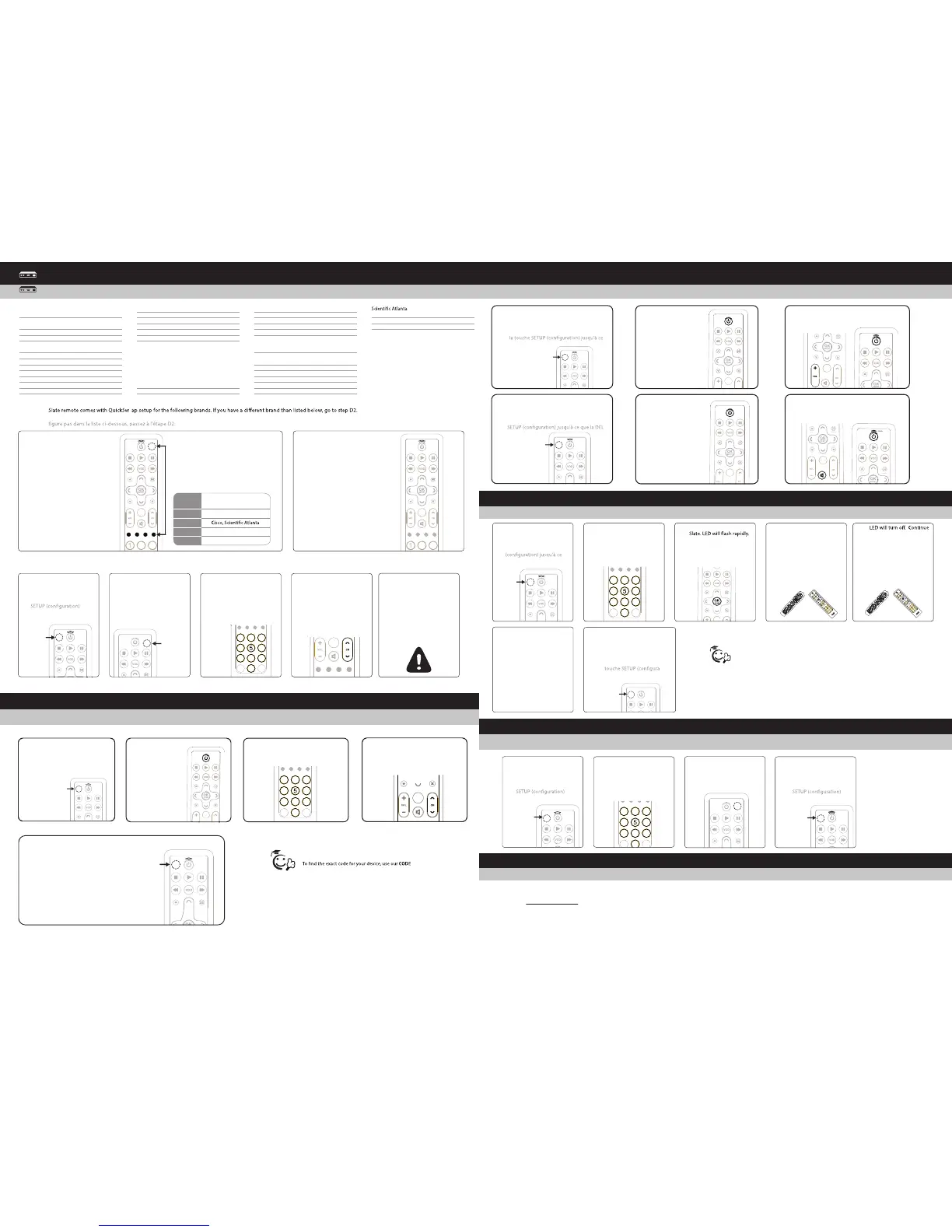
Press and HOLD the Cable Power
SETUP key simultaneously with
corresponding STB brands colored
letter key for three seconds..
Appuyez simultanément pendant
trois secondes sur la touche SETUP
et sur la touche alphabétique en
couleur de la marque de décodeur
correspondante.
1
Press the CH+ button to see
if STB changes. If it does,
setup is complete.
Appuyez sur la touche CH+
pour voir si le décodeur
change. Si c'est le cas,
l'installation est terminée.
2
Setting Volume Controls
Configuración de los parámetros de volumen:
Learning Other Remote Key Functions:
Programmation d’autres fonctions de la télécommande :
6
Repeat steps 2 through 5 as
often as desired for learning
of all additional key.
Répétez les étapes 2 à 5
aussi souvent que l’on
souhaite pour la program-
mation de toutes les autres
touches.
To e xit learning, press and
HOLD the SETUP key until
the LED blinks twice.
Pour quitter le mode de
programmation, appuyez
de façon prolongée sur la
-
tion) jusqu'à ce que la DEL
clignote deux fois.
7
Press and Hold
A B
C D
Press 9, 7, 5. LED will blink
twice.
Appuyez sur 9, 7, 5. La DEL
clignote deux fois.
2
Press KEY to be learned on
Appuyez sur la touche à
programmer de la
télécommande. La DEL
clignote rapidement.
3
GUIDEPG
P
G
E
X
IT
M
ENU
L
AST
7
1
2
3
4
6
8 9
0
INF
O
A
B
C
D
HOLD teaching remote
close to learning remote IR
LED and press key to be
taught.
TENEZ la télécommande
programmatrice près de la
DEL IR de la télécom-
mande programmable et
appuyez sur la touche à
programmer.
4
D
A
Y
O
N/
O
FF
S
W
A
P
P
IP
LIVE
O
N/
O
FF
S
W
A
P
P
IP
PA
GE
g
hi
tu
v
FA
V
p
q
r
s
d
ef
j
k
l
m
n
o
a
bc
S
ET
TI
N
GS
LIVE
D
A
Y
D
VD
AU
DIO
TV
w
x
yz
LAST
S
E
T
U
P
CH
C
AB
L
E
3
0
GUIDE
I
N
FO
EXIT
VOL
1
2
4
5
6
7
8
9
0
M
E
N
U
B C
D
OK
S
E
LEC
T
LIST
ON
D
E
M
A
N
D
WA
TCH
CABL
E
3
CH
G
UI
D
E
P
G
P
G
EXIT
M
ENU
LAST
7
1
2
3
4
6
8
9
0
I
N
FO
A
B
C
D
pressing teaching key until
LED blinks twice.
La DEL s’éteint. Continuez
à appuyer sur la touche à
programmer jusqu'à ce
que la DEL clignote deux
fois.
5
D
A
Y
O
N
/
O
F
F
S
W
AP
PI
P
L
I
V
E
O
N
/
O
F
F
S
W
AP
PI
P
P
A
G
E
g
hi
tu
v
F
A
V
pqr
s
d
ef
j
k
l
m
no
a
bc
S
E
T
T
IN
G
S
L
I
V
E
D
A
Y
D
VD
A
UD
I
O
T
V
w
x
y
z
L
A
ST
S
E
T
U
P
CH
C
AB
L
E
3
0
G
U
IDE
IN
FO
EXI
T
VOL
1
2
4
5
6
7
8
9
0
M
EN
U
B
C
D
OK
S
E
L
E
C
T
LIST
O
N
D
E
M
A
N
D
W
AT
C
H C
AB
L
E
3
CH
Press and HOLD the SETUP
key until LED blinks twice.
appuyez de façon prolongée
sur la touche SETUP
que la DEL clignote deux
fois.
1
Press and Hold
Appuyez de façon
prolongée
x2
WWW.URCSUPPORT.COM
© Copyright Universal Electronics 2014
Troubleshooting
Dépannage :
Problem: I tried all codes for my brand of device and none work.
Solution: Try CODE SEARCH (SETUP METHOD C) method or go
to www.urcsupport.com for model-based search.
Problem: LED does not blink when a key is pressed.
Solution: Replace batteries.
It will save time and cause less confusion programming LEARNING on Slate by
programming keys in order from the top to bottom of remote.
La programmation des touches dans l’ordre, du haut vers le bas de la télécommande,
se fera plus rapidement sans donner lieu à confusion.
Tip/Astuce :
Press VOLUME + key. LED will blink twice.
Appuyez sur la touche VOLUME +. La DEL
clignote deux fois.
3
x2
Press the TV POWER
key.
Appuyez de façon
prolongée.
2
x2
Press MUTE key. LED will blink four times.
Appuyez sur la touche MUTE (mise en
sourdine). La DEL clignote quatre fois.
Setting Volume Controls
Réglage des commandes de volume :
Setup Method D: Code Search
Méthode D de programmation : Recherche de code
Press and hold SETUP until
the mode key blinks twice.
Appuyez et maintenez SETUP
jusqu'à ce que la touche clignote
en mode deux fois.
1
Press and Hold
x2
Press the TV POWER
key once.
Appuyez sur la
touche TV Power
fois.
2
A B
C D
Enter keys 9-9-1.
Entrez les touches 9-9-1.
3
A B
C D
C2
Press STB power key
(unlabeled upper right
corner key) once.
Appuyez deux fois sur la
touche d'alimentation de
décodeur (touche non
marquée au coin supérieur
droit).
2
Enter 1st code for your STB
brand from the code list.
LED blinks twice.
Appuyez sur la touche CH+
pour voir si le canal du
décodeur change. Si c'est le
cas, l'installation est
terminée.
3
Press the CH+ button to
see if the STB channel
changes. If it does, setup is
complete.
Appuyez sur la touche
CH+ pour voir si le canal
du décodeur change. Si
c'est le cas, l'installation
est terminée.
4
If the STB channel does NOT
change, repeat process
using the next code for your
STB brand.
Si le canal du décodeur ne
change pas, répétez la
procédure en utilisant le
code suivant de la marque
de votre décodeur.
5
A B
C D
Press and HOLD the SETUP
key until LED blinks twice.
Appuyez de façon
prolongée sur la touche
jusqu'à ce que la DEL
clignote deux fois.
1
x2x2
Press and Hold
Appuyez de
façon
prolongée
Press and Hold
Presione y
mantenga
apretado
FINDER feature at WWW.URCSUPPORT.COM
Pour trouver le code exact de votre appareil, utiliser notre
fonction CODE FINDER qui cherchera votre code à
l’adresse : WWW.URCSUPPORT.COM
Tip/Astuce:
Locking Volume to TV Press and HOLD the
SETUP key until the LED blinks twice.
Pour bloquer la touche volume sur le
téléviseur, appuyez de façon prolongée sur
que la DEL clignote deux fois.
1
Press and Hold
Appuyez de façon
prolongée
que la DEL clignote deux fois.
que la DEL clignote deux fois.
x2
Unlocking Volume (sets volume to control
STB) Press and HOLD the SETUP key until
the LED blinks twice.
Appuyez de façon prolongée sur la touche
clignote deux fois.
1
Press and Hold
Appuyez de façon
prolongée
x2
2
Press the TV POWER
key.
Appuyez sur la
touche marche/arrêt
du téléviseur.
Problème : J’ai essayé tous les codes de la marque de mon appareil et aucun ne fonctionne.
Solution : Essayez la méthode CODE SEARCH (méthode C de programmation) ou visitez
www.urcsupport.com pour une recherche par modèle.
Problème : La DEL ne clignote pas lorsqu’une touche est pressée.
Solution : Remplacez les piles.
Programming a MACRO:
Primary MACRO Setup
Programmation d’une MACRO : Configuration de la principale macro
1
2
3
4
x2
x2
Press and Hold
Appuyez de façon
prolongée
Press and Hold
Appuyez de façon
prolongée
Press and HOLD the SETUP
key until the LED blinks
twice.
Appuyez de façon
prolongée sur la touche
jusqu'à ce que la DEL
clignote deux fois.
Enter macro key sequence.
Saisissez la séquence des
touches macro.
Enter 9-9-5 and then press
the key that will be used
for the MACRO.
Saisissez 9-9-5, puis
appuyez sur la touche qui
sera utilisée pour la
MACRO.
Press and HOLD the SETUP
key until the LED blinks
twice.
Appuyez de façon
prolongée sur la touche
jusqu'à ce que la DEL
clignote deux fois.
ADB 11998, 13028, 12302,
11481
Amino 11998, 13028, 12302,
11602, 11481, 11615,
11898, 12482
Arris 11998
Cisco 11877, 11982, 12345,
13028
Deuromedia 13744
DirecTV 11377
Dish 10775, 12262
Echostar 10775, 12262
Enseo 13661, 12530, 13066
Entone 12302, 13048
Exterity 12677
GetWell TV 11828
Guest-Tek 10654, 12227, 13646
Huawei 11982
Hughes Network Systems 11377
Humax 11377
JVC 10775
LodgeNet 11174, 12654, 11059,
11203, 12804, 12805,
12806, 12807, 12808,
12809, 13151, 13152,
11867, 11868, 11869,
11878, 13056, 13057,
13058, 13059, 13411,
13412, 13413
Motorola 11376, 11998, 11982
MovieBeam 13678
Myrio 11602
Nighthawk 12689
nSTREAMS 13976
NXTV 11478, 11978
OnCommand 13226, 12815, 12816,
12817, 12818, 12819,
12822, 12823
Pace 11376, 11877, 11998,
11982
Pace 11377
Pioneer 11877
Roomlinx 13357
Samsung 11377
Samsung 11877
11877, 11982, 12345,
13028
Sejin 11602
Thomson 11982
Appuyez de façon
prolongée
Appuyez de façon
prolongée
Press Ch+ repeatedly until your
device turns ON or OFF.
Appuyez plusieurs fois sur Ch+ jusqu’a
ce que votre appareil soit allumé
ou éteint.
4
5
To save the working code,
press and hold SETUP until
the LED blinks twice.
Appuyez sur la touche SETUP
et maintenez-la enfoncée pour
enregistrer le code de
fonctionnement.
Press and Hold
Presione y mantenga
apretado


 To Previous Page
 Loading...