Codes: Set Top Boxes
Códigos: Decodificadores
C1
x2
Action Keys
Brand
A
B
C
D
Arris, Motorola, Pace
Comcast, Arris, Motorola, Pace
DirecTV
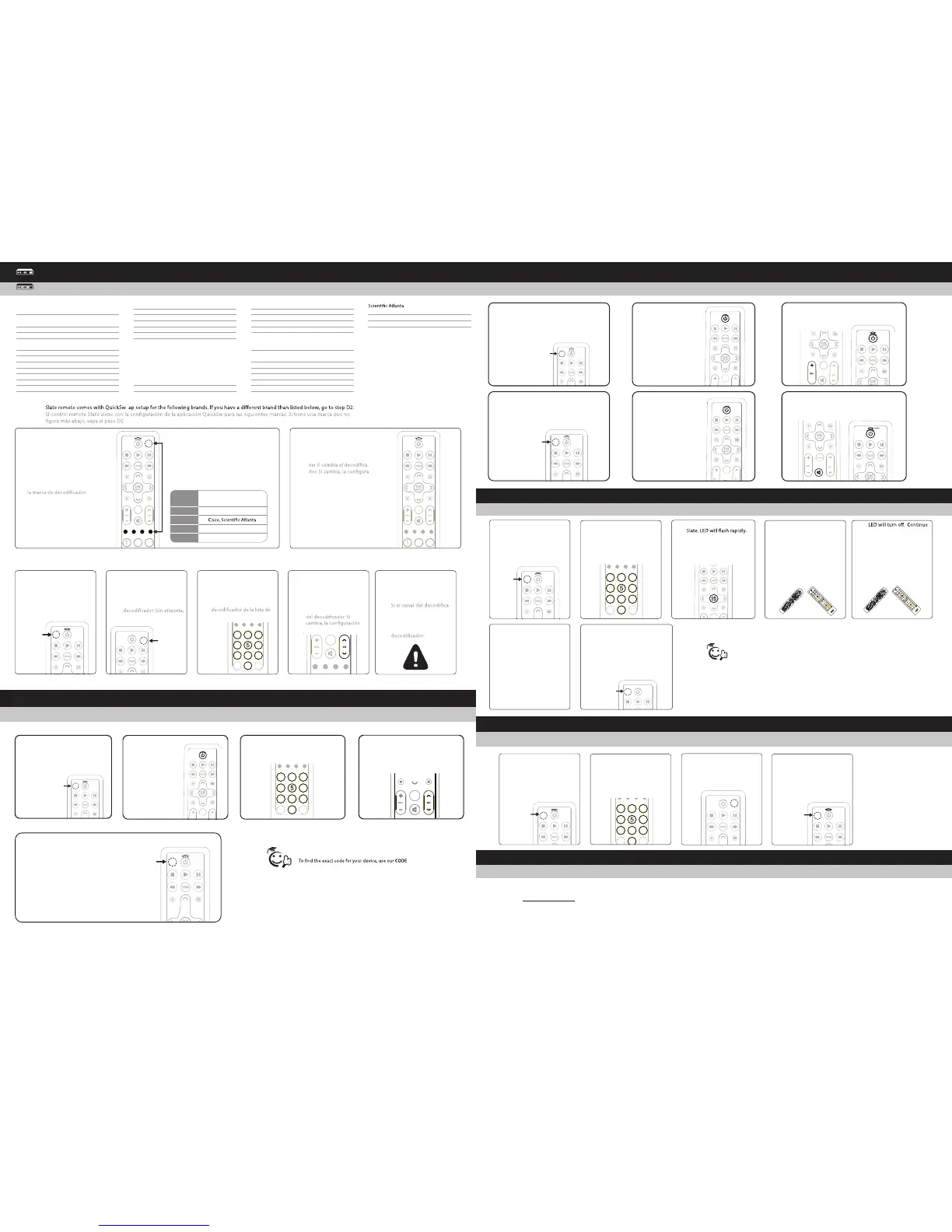
Press and HOLD the Cable Power
SETUP key simultaneously with
corresponding STB brands colored
letter key for three seconds.
.
Presione y MANTENGA APRETADA
durante tres segundos la tecla
CONFIGURACIÓN simultáneamente
con la tecla alfabética de color para
1
Press the CH+ button to see
if STB changes. If it does,
setup is complete.
Presione el botón CAN+ para
-
-
ción está completa.
2
Setting Volume Controls
Configuración de los parámetros de volumen:
Learning Other Remote Key Functions:
Aprender las funciones de las teclas de otro control remoto:
6
Repeat steps 2 through 5 as
often as desired for learning
of all additional key.
Repita los pasos 2 a 5 tan
seguido como lo desee para
aprender todas las teclas
adicionales.
To e xit learning, press and
HOLD the SETUP key until
the LED blinks twice.
Para salir del aprendizaje,
presione y MANTENGA
APRETADA la tecla
CONFIGURACIÓN hasta
que el LED titile dos veces.
7
Press and Hold
Presione y mantenga
apretado
A B
C D
Press 9, 7, 5. LED will blink
twice.
Presione 9, 7, 5. El LED
titilará dos veces
2
Press KEY to be learned on
Presione la TECLA que desea
aprender en Slate. El LED
brillará rápidamente de
manera intermitente.
3
GUIDEPG
P
G
E
X
IT
M
ENU
L
AST
7
1
2
3
4
6
8 9
0
INF
O
A
B
C
D
HOLD teaching remote
close to learning remote IR
LED and press key to be
taught.
SOSTENGA el control
remoto del que aprende
cerca del LED IR del control
remoto en el que aprendey
presione la tecla que desea
enseñar.
4
D
A
Y
O
N/
O
FF
S
W
A
P
P
IP
LIV
E
O
N/
O
FF
S
W
A
P
P
IP
PA
GE
g
hi
tu
v
FA
V
p
q
r
s
d
ef
j
k
l
m
n
o
a
bc
S
ET
TI
N
GS
LIV
E
D
A
Y
D
VD
AU
DIO
TV
w
x
yz
LAST
S
E
T
U
P
CH
C
A
BL
E
3
0
GUIDE
I
NFO
EXIT
VOL
1
2
4
5
6
7
8
9
0
M
E
N
U
B C
D
OK
S
E
LE
C
T
LIST
ON
DE
M
A
N
D
WA
TCH
CABL
E
3
CH
G
UI
D
E
P
G
P
G
EXIT
M
ENU
LAST
7
1
2
3
4
6
8
9
0
I
NFO
A
B
C
D
pressing teaching key until
LED blinks twice.
El LED se apagará. Siga
presionando la tecla para
aprender hasta que el LED
titile dos veces.
5
D
A
Y
O
N
/
O
F
F
S
W
A
P
P
I
P
L
I
V
E
O
N
/
O
F
F
S
W
A
P
P
I
P
P
A
G
E
g
hi
tu
v
F
A
V
pqr
s
d
ef
j
k
l
m
no
a
bc
S
E
T
T
IN
G
S
L
I
V
E
D
A
Y
D
V
D
A
UD
I
O
T
V
w
x
y
z
L
A
ST
S
E
T
U
P
CH
C
AB
LE
3
0
G
U
IDE
INFO
EXI
T
VOL
1
2
4
5
6
7
8
9
0
M
EN
U
B
C
D
OK
S
E
L
E
C
T
LIST
O
N
D
E
M
A
N
D
W
AT
C
H C
AB
L
E
3
CH
Press and HOLD the SETUP
key until LED blinks twice.
Presione y MANTENGA
APRETADA la tecla
CONFIGURACIÓN hasta que
el LED titile dos veces.
1
Press and Hold
Presione y
mantenga
apretado
x2
WWW.URCSUPPORT.COM
© Copyright Universal Electronics 2014
FINDER feature at WWW.URCSUPPORT.COM
Para encontrar el código exacto para su equipo, utilice
nuestra función de LOCALIZADOR DE CÓDIGOS en
WWW.URCSUPPORT.COM
Tip/Consejo:
Troubleshooting
Resolución de problemas:
Problema: Intenté todos los códigos para la marca de mi dispositivo y ninguno funciona.
Solución: Pruebe el método de BÚSQUEDA DE CÓDIGO (MÉTODO DE CONFIGURACIÓN C)
o visite www.urcsupport.com para obtener una búsqueda por modelo.
Problema: El LED no titila cuando se presiona una tecla.
Solución: Reemplace las pilas.
Problem: I tried all codes for my brand of device and none work.
Solution: Try CODE SEARCH (SETUP METHOD C) method or go
to www.urcsupport.com for model-based search.
Problem: LED does not blink when a key is pressed.
Solution: Replace batteries.
It will save time and cause less confusion programming LEARNING on Slate by
programming keys in order from the top to bottom of remote.
Ahorre tiempo y no se confunda al programar APRENDIZAJE en Slate programando
las teclas en orden desde la parte superior a la inferior del control remoto.
Tip/Consejo:
Press VOLUME + key. LED will blink twice.
Presione la tecla VOLUMEN +. El LED titilará dos
veces
3
x2
Locking Volume to TV Press and HOLD the
SETUP key until the LED blinks twice.
Para bloquear el volumen al televisor,
presione y MANTENGA APRETADA la tecla
CONFIGURACIÓN hasta que el LED titile dos
veces.
1
Press and Hold
Presione y mantenga
apretado
x2
Press the TV POWER
key.
Presione la tecla de
ENCENDIDO de TV.
2
2
Press the TV POWER
key.
Presione la tecla de
ENCENDIDO de TV.
x2
Press MUTE key. LED will blink four times.
Presione la tecla SILENCIO. El LED titilará
cuatro veces.
Unlocking Volume (sets volume to control
STB) Press and HOLD the SETUP key until
the LED blinks twice.
Presione y MANTENGA APRETADA la tecla
CONFIGURACIÓN hasta que el LED titile dos
veces
1
Press and Hold
Presione y mantenga
apretado
x2
Setting Volume Controls
Configuración de los parámetros de volumen:
Setup Method D: Code Search
Méthode D de programmation : Recherche de code
Press and hold SETUP until
the mode key blinks twice.
Mantenga pulsado SETUP hasta
que el modo parpadee dos veces.
1
Press and Hold
Presione y mantenga
apretado
x2
Press the TV POWER
key once.
Presione la tecla de
encendido TV una
vez.
2
Press Ch+ repeatedly until your
device turns ON or OFF.
Pulse Ch+ de manera repetida hasta
que su aparato se encienda (ON)
o se apague (OFF).
4
A B
C D
Enter keys 9-9-1.
Introduzca teclas 9-9-1.
3
5
To save the working code,
press and hold SETUP until
the LED blinks twice.
Pulse y mantenga pulsado
el botón SETUP (CONFIURAR)
para guardar el código
de funcionamiento.
A B
C D
C2
Press STB power key
(unlabeled upper right
corner key) once.
Presione dos veces la tecla
de encendido del
en la esquina superior
derecha).
2
Enter 1st code for your STB
brand from the code list.
LED blinks twice.
Ingrese el primer código
para la marca de su
códigos. El LED titila dos
veces.
3
Press the CH+ button to
see if the STB channel
changes. If it does, setup is
complete.
Presione el botón CAN+
para ver si cambia el canal
está completa.
4
If the STB channel does NOT
change, repeat process
using the next code for your
STB brand.
-
dor NO cambia, repita el
proceso utilizando el
siguiente código para la
marca de su
5
A B
C D
Press and HOLD the SETUP
key until LED blinks twice.
Presione y MANTENGA
APRETADA la tecla
CONFIGURACIÓN hasta que
el LED titile dos veces.
1
x2x2
Press and Hold
Presione y
mantenga
apretado
Press and Hold
Presione y
mantenga
apretado
Programming a MACRO:
Primary MACRO Setup
Programar una MACRO: Configuración de MACRO primaria
Press and HOLD the SETUP
key until the LED blinks
twice.
Presione y MANTENGA
APRETADA la tecla
CONFIGURACIÓN hasta que
el LED titile dos veces.
1
Enter 9-9-5 and then press
the key that will be used
for the MACRO.
Ingrese 9-9-5 y luego
presione la tecla que se
usará para la MACRO.
2
Enter macro key sequence.
Ingrese la secuencia de
teclas de la macro.
3
Press and HOLD the SETUP
key until the LED blinks
twice.
Presione y MANTENGA
APRETADA la tecla
CONFIGURACIÓN hasta
que el LED titile dos veces.
4
x2
x2
Press and Hold
Presione y mantenga
apretado
Press and Hold
Presione y mantenga
apretado
ADB 11998, 13028, 12302,
11481
Amino 11998, 13028, 12302,
11602, 11481, 11615,
11898, 12482
Arris 11998
Cisco 11877, 11982, 12345,
13028
Deuromedia 13744
DirecTV 11377
Dish 10775, 12262
Echostar 10775, 12262
Enseo 13661, 12530, 13066
Entone 12302, 13048
Exterity 12677
GetWell TV 11828
Guest-Tek 10654, 12227, 13646
Huawei 11982
Hughes Network Systems 11377
Humax 11377
JVC 10775
LodgeNet 11174, 12654, 11059,
11203, 12804, 12805,
12806, 12807, 12808,
12809, 13151, 13152,
11867, 11868, 11869,
11878, 13056, 13057,
13058, 13059, 13411,
13412, 13413
Motorola 11376, 11998, 11982
MovieBeam 13678
Myrio 11602
Nighthawk 12689
nSTREAMS 13976
NXTV 11478, 11978
OnCommand 13226, 12815, 12816,
12817, 12818, 12819,
12822, 12823
Pace 11376, 11877, 11998,
11982
Pace 11377
Pioneer 11877
Roomlinx 13357
Samsung 11377
Samsung 11877
11877, 11982, 12345,
13028
Sejin 11602
Thomson 11982
Press and Hold
Presione y mantenga
apretado


 To Previous Page
 Loading...