3
SAVE THESE INSTRUCTIONS- FOR HOUSEHOLD USE ONLY
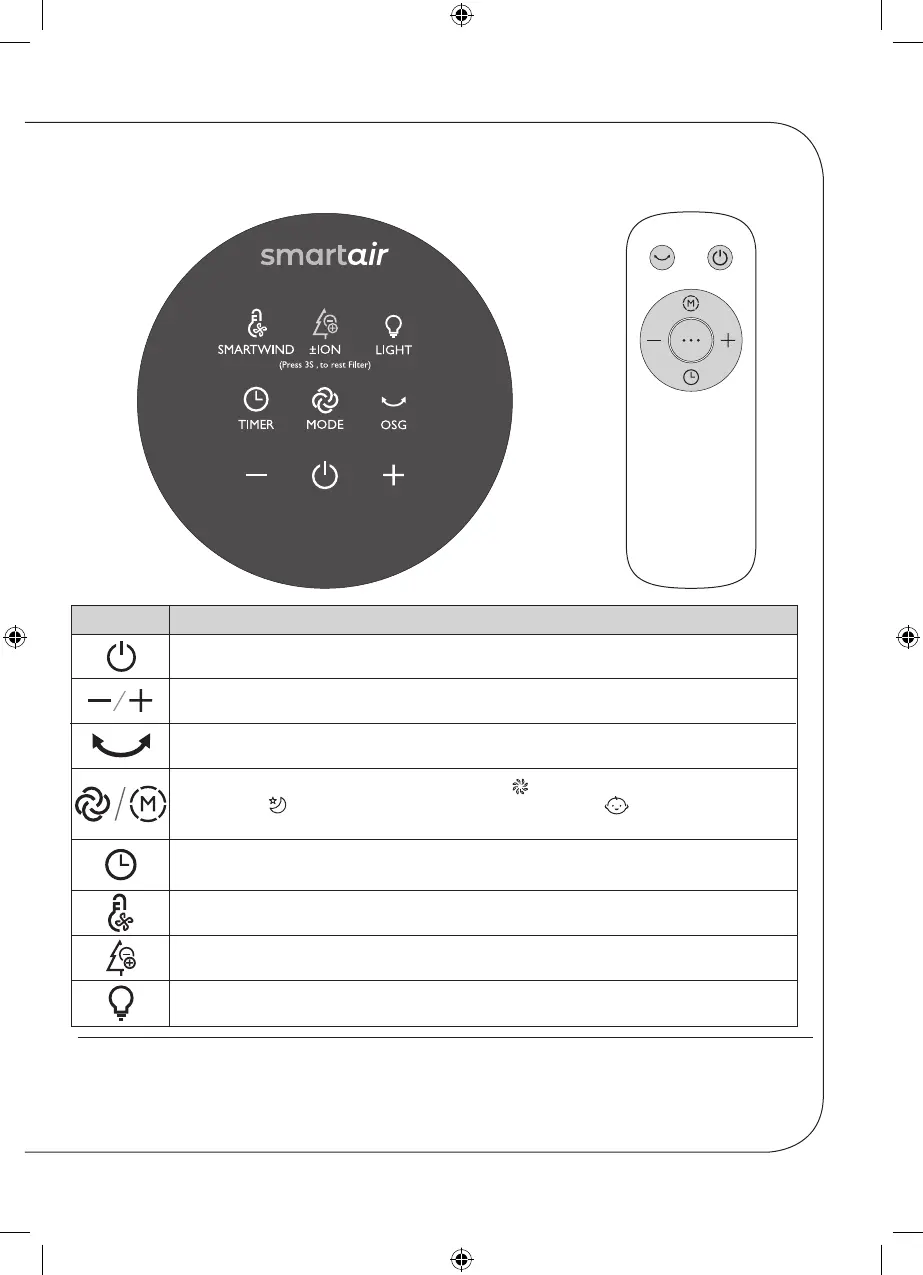
Controls
Thermal safety cutout
Your fan is fitted with an internal thermal safety switch. This will stop the fan from operating if
the internal temperature exceeds the normal operating temperature. If this happens refer to the
‘Thermal Safety Cutout’ on page 9.
Plug the fan into a mains socket and turn the power on if required and fit the batteries into the
remote control.
BUTTON
FUNCTION
POWER: Turn the fan ON / Turn OFF.
ADJUSTMENT BUTTONS: Set wind speed / Adjust timing.
OSC: Use to change the angle of rotation of the top of the fan.
MODE: Use to select the desired wind speed, day wind (12 speeds, indicator
light is on) / sleep wind (3 speeds, indicator light is on) / baby wind (2 speeds,
indicator light is on).
TIMER: Use to set the running time of the fan when it will automatically turn on or
off.
SMARTWIND: Use to set the temperature of the air coming out of the fan.
± ION: Use to ionised the air coming out of the fan.
LIGHT: Use to turn the ambient light on or off.
CONTROL
PANEL
REMOTE
CONTROL
Smartair Bladeless Fan Manual.indd 3 13/10/2020 17:29


 To Next Page