Need help?
Do you have a question about the SMART Board 480 and is the answer not in the manual?
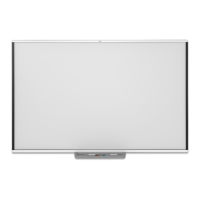
The SMART Board™ 480 Interactive Whiteboard is a versatile and user-friendly device designed to enhance collaborative learning and presentation experiences. It functions as a large interactive display, allowing users to write, draw, and manipulate digital content directly on its surface using a pen or their finger. This interactive capability transforms traditional whiteboards into dynamic tools for engaging audiences and facilitating interactive discussions.
At its core, the SMART Board 480 serves as an interactive display that connects to a computer and a projector. The projector displays the computer's desktop onto the whiteboard surface, and the board's touch-sensitive technology allows users to control the computer directly from the board. This means you can open applications, browse the internet, annotate documents, and interact with multimedia content simply by touching the board.
The primary function is to provide an intuitive interface for digital interaction. Users can write or draw with the included pens, which are recognized by the board as digital ink. This digital ink can be saved, edited, and shared, making it easy to capture ideas and distribute meeting notes or lesson content. The board also supports touch gestures, allowing for actions like dragging, dropping, and resizing objects, similar to interacting with a tablet or smartphone.
Beyond basic writing and drawing, the SMART Board 480 integrates seamlessly with SMART Notebook™ software, a powerful application designed for creating and delivering interactive lessons and presentations. This software allows users to prepare engaging content with various tools, templates, and multimedia elements, which can then be presented and interacted with on the whiteboard. The combination of the hardware and software creates a comprehensive solution for interactive teaching, training, and brainstorming.
The interactive whiteboard also facilitates real-time collaboration. Multiple users can interact with the board simultaneously, fostering a more dynamic and inclusive environment for group activities. This feature is particularly beneficial in educational settings where students can work together on projects, or in business environments for collaborative brainstorming sessions.
The SMART Board 480 is designed with ease of use in mind, offering several features that enhance its practical application.
Simple Installation: The manual provides clear instructions for mounting the whiteboard to a wall. This involves securing the mounting brackets, attaching the board, and then connecting the necessary cables. The process is straightforward, ensuring that the board can be set up efficiently in various environments, from classrooms to conference rooms. The mounting system is robust, designed to hold the board securely in place for long-term use.
Intuitive Interaction: The board's surface is touch-sensitive, allowing for direct manipulation of digital content. Users can write with the provided pens or use their finger as a mouse. This direct interaction eliminates the need to constantly switch between the board and a computer mouse or keyboard, streamlining the workflow during presentations or lessons. The pens are designed for comfortable grip and accurate writing, mimicking the feel of traditional writing tools.
Pen Tray Functionality: The integrated pen tray is a key usage feature. It holds the interactive pens and often includes buttons for quick access to common functions, such as changing ink color, accessing the on-screen keyboard, or launching the SMART Notebook software. The pen tray is designed to be easily accessible, ensuring that tools are always within reach. The board automatically detects when a pen is removed from the tray, preparing it for writing.
Durable Surface: The whiteboard surface is engineered for durability, capable of withstanding frequent use in busy environments. It is designed to be easy to clean, ensuring that the display remains clear and responsive over time. This robust construction contributes to the longevity of the device, making it a reliable tool for daily use.
Connectivity: The SMART Board 480 connects to a computer via a USB cable, which transmits touch data. The computer then sends video output to a projector, which displays the image onto the board. This standard connectivity ensures compatibility with a wide range of computers and projectors, making it adaptable to existing technology setups. The cable management features, as shown in the manual, help maintain a tidy installation.
Software Integration: The board's full potential is unlocked when used with SMART Notebook software. This software provides a rich set of tools for creating interactive lessons, presentations, and activities. Features include digital ink tools, shape recognition, multimedia embedding, and a vast gallery of ready-to-use content. The software allows users to save their work, enabling them to revisit and modify content, or share it with others. This integration transforms the whiteboard from a simple display into a powerful content creation and delivery platform.
Multi-Touch Capabilities (if applicable to specific model): While the manual focuses on basic setup, many SMART Boards offer multi-touch capabilities, allowing two or more users to interact with the board simultaneously using gestures. This feature promotes collaborative learning and problem-solving, as students or colleagues can work together on the same digital canvas.
Maintaining the SMART Board 480 is relatively straightforward, focusing on ensuring optimal performance and longevity.
Regular Cleaning: The whiteboard surface is designed to be easily cleaned. Regular cleaning with appropriate, non-abrasive cleaners is recommended to remove dust, smudges, and any residue from the pens. This ensures that the surface remains clear for projection and responsive to touch input. The durable material resists damage from typical cleaning agents.
Cable Management: The installation instructions emphasize proper cable routing and management. Ensuring that cables are securely connected and neatly organized prevents accidental disconnections and reduces wear and tear on the cables themselves. This also contributes to a safer and more aesthetically pleasing installation.
Software Updates: While not explicitly detailed in the hardware manual, maintaining the associated SMART Notebook software and drivers is crucial for optimal performance. Regular software updates, typically provided by SMART Technologies, ensure compatibility with new operating systems, introduce new features, and address any performance issues. Users are encouraged to check for and install these updates to keep their system running smoothly.
Troubleshooting Guidance: The manual includes basic troubleshooting steps, such as checking cable connections and ensuring proper calibration. These initial checks can resolve common issues and help users maintain the board's functionality without requiring professional assistance. The calibration process, which aligns the touch input with the projected image, is a key maintenance step to ensure accurate interaction.
Environmental Compliance: The manual highlights SMART Technologies' commitment to environmental responsibility, including compliance with WEEE and RoHS directives. This indicates that the device is designed with consideration for its environmental impact, from manufacturing to end-of-life disposal. While not a direct maintenance feature, it assures users of the product's adherence to sustainability standards.
In summary, the SMART Board 480 Interactive Whiteboard is a robust and intuitive tool designed to facilitate dynamic and collaborative digital interaction. Its ease of installation, user-friendly features, and straightforward maintenance requirements make it an effective solution for enhancing engagement in educational, business, and training environments.
 General
| Resolution | 1280 x 960 |
|---|---|
| Touch Technology | DViT (Digital Vision Touch) technology |
| Connectivity | USB |
| Weight | 44 lb. (20 kg) |
| Aspect Ratio | 4:3 |
| Writing surface | Hard-coated steel |
| Pen Input | Yes |
| Ports | USB |
| Operating System Compatibility | Windows, macOS, Linux |
| Mounting Options | Wall mount |
| Display Size | 77 inches |
| Diagonal Size | 77 inches |


 To Next Page